A travel agency in Sylhet asked why their Facebook ads brought many clicks but very few enquiries. We opened their site on a mid-range phone using mobile data. We waited. And waited. Eleven seconds later, a giant slider image appeared. Most visitors had already gone back to Facebook.
Website speed optimization is not a technical luxury. In Bangladesh, where most visitors browse on phones and mobile data, it decides whether people see your offer at all. This guide shows how to test your speed and fix what matters most.
Why speed matters so much
- People leave slow pages. Every extra second loses visitors, especially from ads.
- Ads cost more. You pay for clicks from people who never see the page.
- SEO suffers. Google uses page experience signals, including Core Web Vitals.
- Trust drops. A slow site feels unprofessional.
Core Web Vitals in plain words
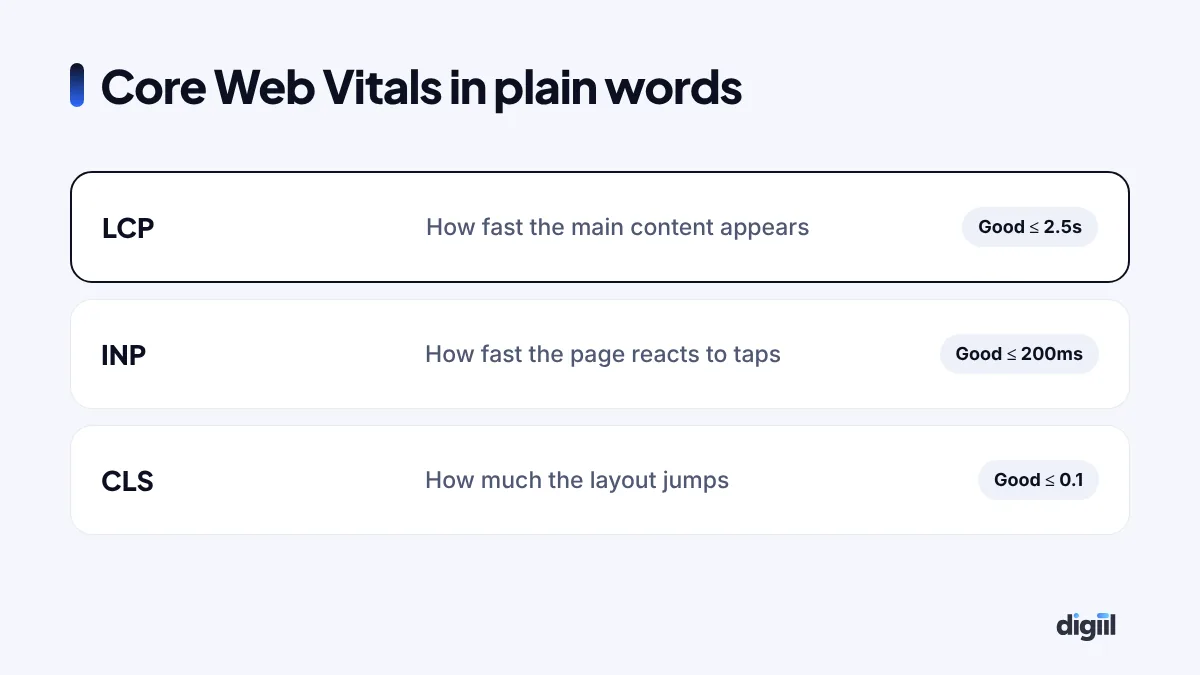
Google measures three main things. You do not need to be perfect, but aim for “good” on mobile.
How to test your speed
- PageSpeed Insights: enter your URL. Look at the mobile tab and real-user data if available.
- Search Console → Core Web Vitals: shows which groups of pages are slow for real users.
- Your own phone: open the site on mobile data, not Wi-Fi. This is the real experience.
Test your homepage, a key service or product page, and your landing pages.
The biggest wins, in order
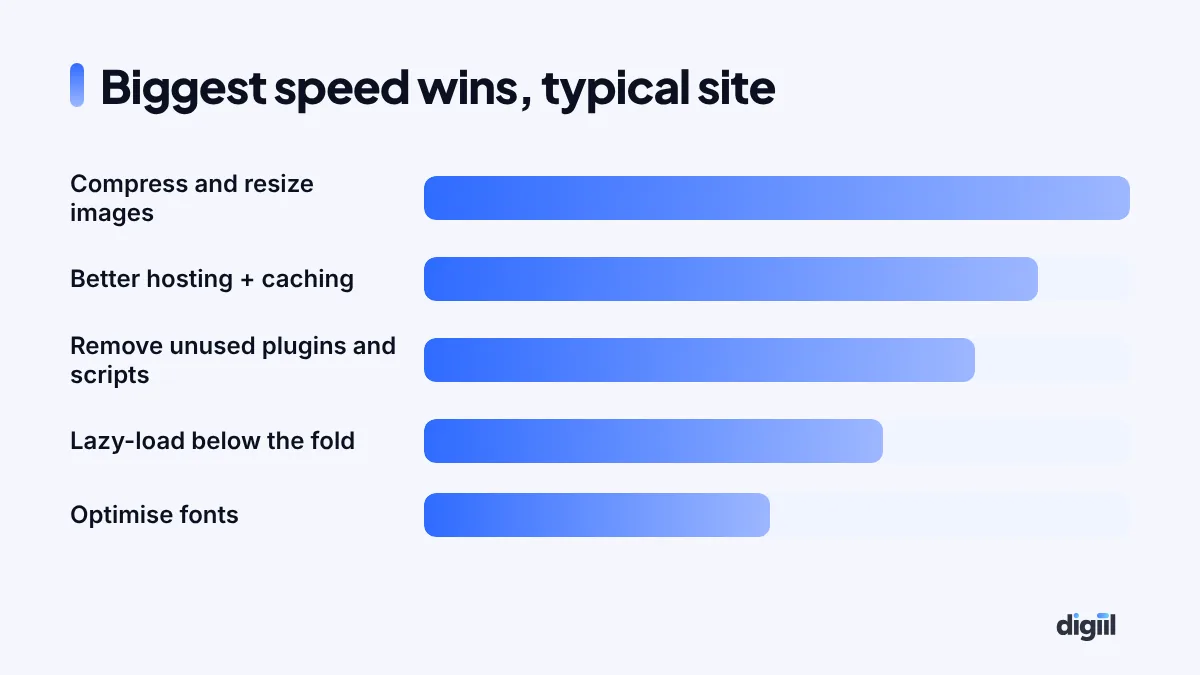
1. Fix your images
Images are the most common problem. A phone photo can be 4 MB. On a website, it should usually be under 200 KB.
- Resize images to the size they are shown.
- Convert to WebP (or AVIF).
- Lazy-load images below the first screen.
- Set width and height so the layout does not jump.
2. Use good hosting and caching
Cheap shared hosting with overloaded servers is slow no matter what you do. Choose hosting with fast storage, server-level caching such as LiteSpeed, and a server near your visitors. Add a CDN like Cloudflare. See our web hosting guide.
3. Remove what you do not need
Every plugin, chat widget, slider, pop-up and tracking script adds weight. Remove unused plugins. Load chat and heavy widgets only after the page is ready. Keep only the tracking you actually use.
4. Choose a lightweight theme
Some multipurpose themes load huge amounts of code on every page. A lightweight theme, or a well-built custom theme, makes a big difference.
5. Optimise fonts
Use only the font weights you need, preload the main font and use font-display: swap so text shows immediately.
6. Handle videos carefully
Do not autoplay large videos at the top of mobile pages. Use a poster image and load the video only when someone taps play.
WordPress-specific tips
- Use a caching plugin that matches your server, such as LiteSpeed Cache on LiteSpeed hosting.
- Keep WordPress, themes and plugins updated.
- Clean the database: old revisions, spam comments, expired transients.
- Avoid page builders loading assets you do not use; disable unused widgets and fonts.
- Limit heavy WooCommerce features on pages that do not need them.
A simple speed budget
| Item | Target for key pages |
|---|---|
| Total page weight | Ideally under 1–2 MB |
| Hero image | Under 150–200 KB, WebP |
| Fonts | 2–4 files maximum |
| Third-party scripts | Only what you use |
| LCP on mobile | 2.5 seconds or less |
Common mistakes
- Uploading photos straight from the camera.
- Installing three caching plugins at once.
- Autoplay video and big sliders at the top of mobile pages.
- Chasing a perfect 100 score instead of real-user speed.
- Never re-testing after adding new plugins.
Speed on Bangladeshi networks
Network quality varies across the country. A page that loads in two seconds in Gulshan on fibre might take eight seconds on mobile data in a district town. Design for the slower case:
- Keep the first screen light: text, one optimised image, a button.
- Avoid loading big videos, maps or chat widgets before the visitor interacts.
- Use a CDN with nearby locations so files travel a shorter distance.
- Test with Chrome’s network throttling set to slow 4G.
A step-by-step speed fix for a WordPress site
- Take a backup.
- Run PageSpeed Insights on your top 3 pages and note the main issues.
- Install an image optimisation plugin and convert existing images to WebP.
- Set up caching that matches your server and turn on a CDN.
- Deactivate plugins you do not use, then test again.
- Replace heavy sliders and animations on mobile with a single image.
- Limit fonts to the weights you actually use.
- Delay chat, pop-ups and non-essential scripts.
- Re-test, and compare real-user data in Search Console after a few weeks.
How speed affects your ads
When someone clicks your ad, you pay for that click whether the page loads or not. If a slow page loses a third of visitors before they see anything, you are effectively paying a third more for every real visitor. Faster pages also tend to get better quality and engagement signals, which can improve ad performance over time.
Speed checklist for new pages
| Before publishing | Done? |
|---|---|
| Images resized, compressed, WebP | ☐ |
| Width and height set on images | ☐ |
| No autoplay video above the fold on mobile | ☐ |
| Only needed scripts loaded | ☐ |
| Tested on a phone with mobile data | ☐ |
Core Web Vitals targets at a glance
Google publishes clear “good” thresholds for each Core Web Vital. Aim for these on mobile, because most Bangladeshi visitors use phones.
| Metric | What it measures | Good | Needs work | Poor |
|---|---|---|---|---|
| LCP (Largest Contentful Paint) | How fast the main content appears | ≤ 2.5 s | 2.5–4 s | > 4 s |
| INP (Interaction to Next Paint) | How fast the page reacts to taps | ≤ 200 ms | 200–500 ms | > 500 ms |
| CLS (Cumulative Layout Shift) | How much the page jumps while loading | ≤ 0.1 | 0.1–0.25 | > 0.25 |
Google judges these with real-user data, at the 75th percentile. That means three out of four visits should be “good”.
Want to check your own site now? Try our free SEO audit tool. It runs Google Lighthouse on mobile and desktop and lists the biggest speed fixes.
One product page, before and after
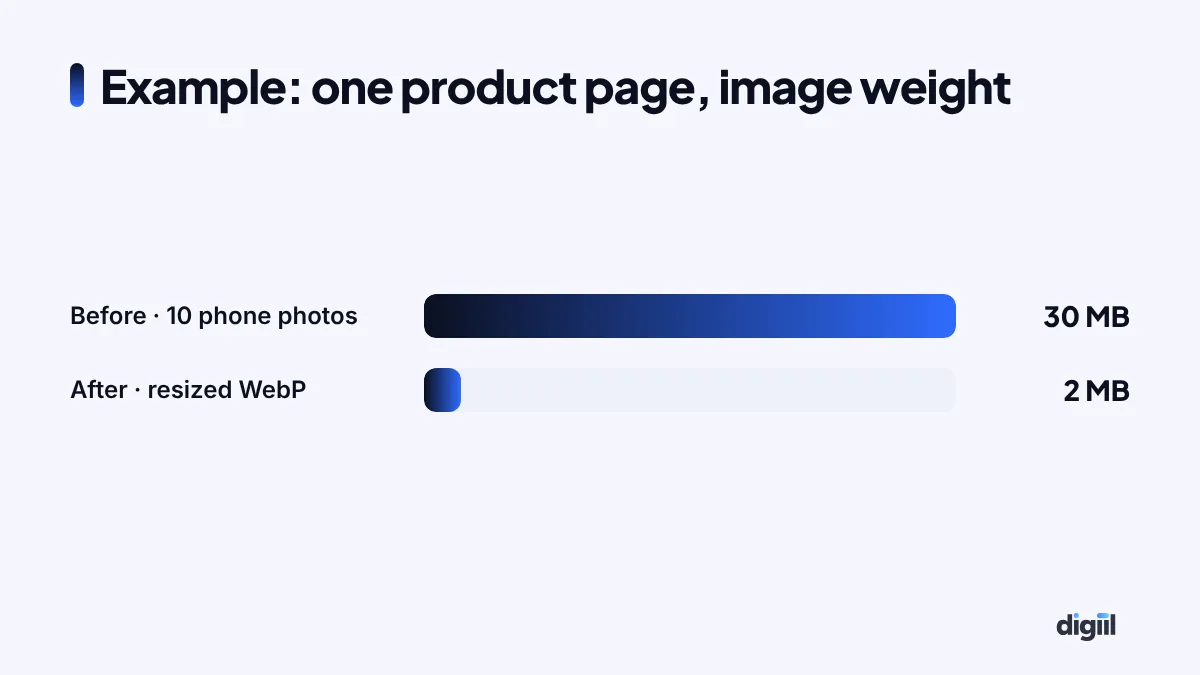
Here is what the image fixes above look like on a single page. A fashion product page had ten photos straight from a phone, about 3 MB each. That is around 30 MB for one page, which can take a very long time on a busy mobile network. After resizing to 1600 pixels and converting to WebP, the same ten photos weighed about 2 MB in total. Nothing else changed, and the page felt instant.
Hosting: when to upgrade
No amount of plugin tuning fixes a slow server. Watch your server response time (TTFB). If it is regularly above about 600 ms, consider better hosting.
- Choose hosting with LiteSpeed or NGINX, PHP 8.x and SSD or NVMe storage.
- Pick a data centre near your visitors. For Bangladesh, Singapore is often a good choice.
- Use a CDN for images and static files.
Managed hosts like Hostinger (budget-friendly, LiteSpeed) or Cloudways (more control, cloud servers) are common choices for small and growing sites. Our hosting guide compares the options.
Disclosure: some links on this page are partner links. If you buy through them, we may earn a small commission at no extra cost to you.
Put a number on a faster site
Speed is easy to ignore because the cost is invisible. Visitors who leave a slow page never show up in your reports. Google and Deloitte’s “Milliseconds Make Millions” study found that a 0.1-second improvement in mobile load time was linked to higher conversion rates for retail sites. Use the calculator to estimate what a modest improvement could mean for you.
Be modest with the “after” rate. Speed alone rarely doubles conversion, but on a site that takes 6 to 8 seconds on mobile data, getting under 3 seconds often lifts it noticeably, and it lowers your ad costs at the same time.
What happened to the travel agency
We replaced the slider with one compressed hero image, converted all images to WebP, moved the site to better hosting with caching and a CDN, and removed five unused plugins and two chat widgets. The page loaded in about two seconds on mobile data. Enquiries from the same ad budget rose noticeably in the following month.
Website speed optimization pays for itself in better ad results, rankings and sales. Start with images and hosting, then remove what you do not need. If you want an expert speed fix, see our WordPress development service.
- Test on a real phone using mobile data.
- Images are usually the biggest problem: resize, compress, WebP, lazy-load.
- Good hosting, caching and a CDN matter.
- Remove unused plugins, widgets and scripts.
- Aim for “good” Core Web Vitals, not a perfect score.
Questions people also ask
What is a good website loading time?
Aim for the main content to appear within about 2.5 seconds on mobile, which is Google's "good" threshold for Largest Contentful Paint.
Does website speed affect SEO?
Yes. Page experience, including Core Web Vitals, is part of how Google evaluates pages. Speed also affects bounce rate and conversions directly.
Why is my site fast on Wi-Fi but slow on phones?
Phones on mobile data have slower connections and less processing power. Heavy images and scripts hurt much more there.
Will a caching plugin fix everything?
No. Caching helps, but large images, slow hosting and heavy scripts still need fixing.

Amanat has managed $4M+ in Google and Meta ad spend for brands in the UK, USA, Australia and Bangladesh since 2020. He holds 20+ certifications, including Digital Marketing Strategy from Harvard Business School Online. More about Amanat