Most small businesses post when someone remembers. The result is a burst of posts before Eid, two weeks of silence, then a rushed offer. A social media content calendar fixes that by turning “what do we post today?” into a decision you make once a month.
Here is a method to build one in a single afternoon. Block four hours, bring your phone and a cup of tea, and finish with a month planned and a week ready to go.
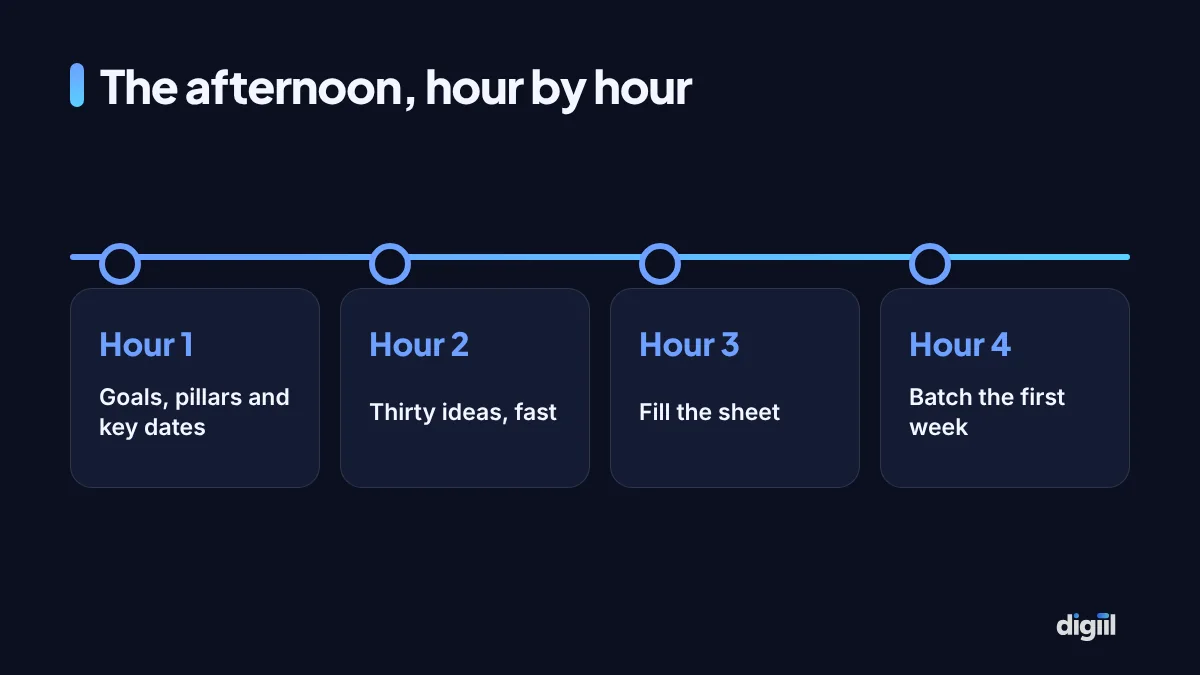
Hour 1: Goals, pillars and dates
Pick one goal for the month
More messages, more website orders, more bookings, or more followers in a new city. One main goal keeps the calendar focused. Every post should either serve it directly or build the trust that makes it possible.
Choose three to five content pillars
Pillars are the recurring themes you post about. They stop you posting the same thing every day and make ideas easier to find.
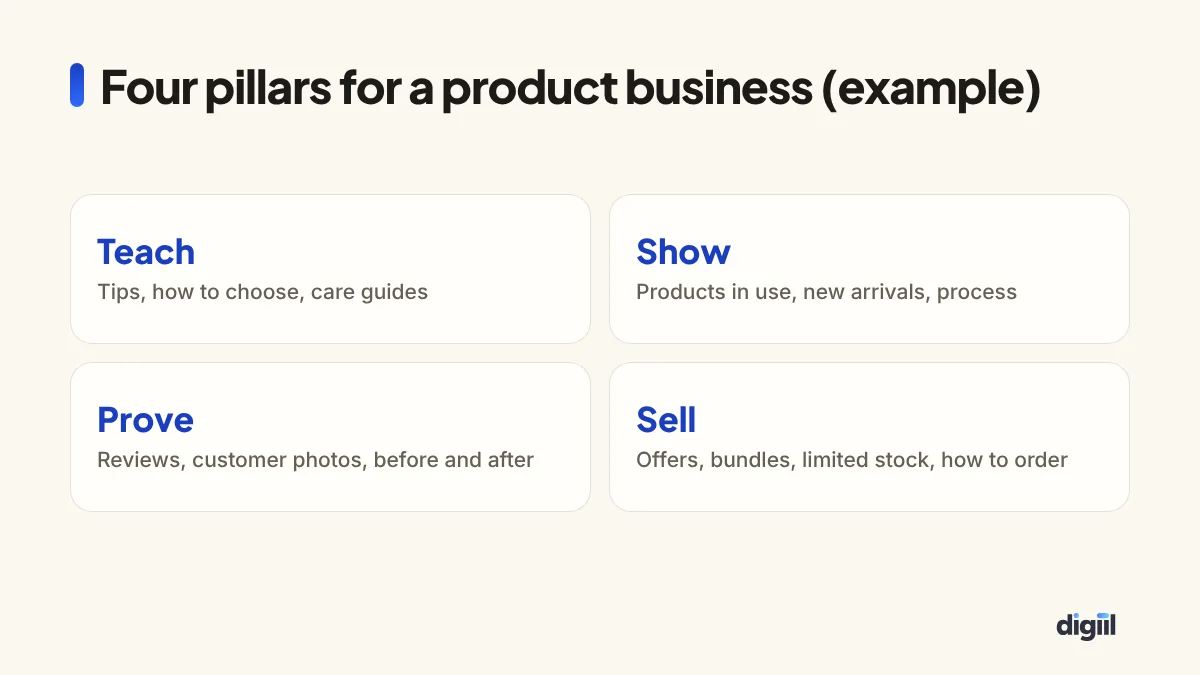
A service business might use different pillars: explain (answers to common questions), show the work (projects, results), the people (team, behind the scenes) and offer (packages, booking). Decide a rough mix. Many businesses do well with most posts helping or showing and a smaller share directly selling. If every post is an offer, people learn to scroll past.
Mark the dates that matter
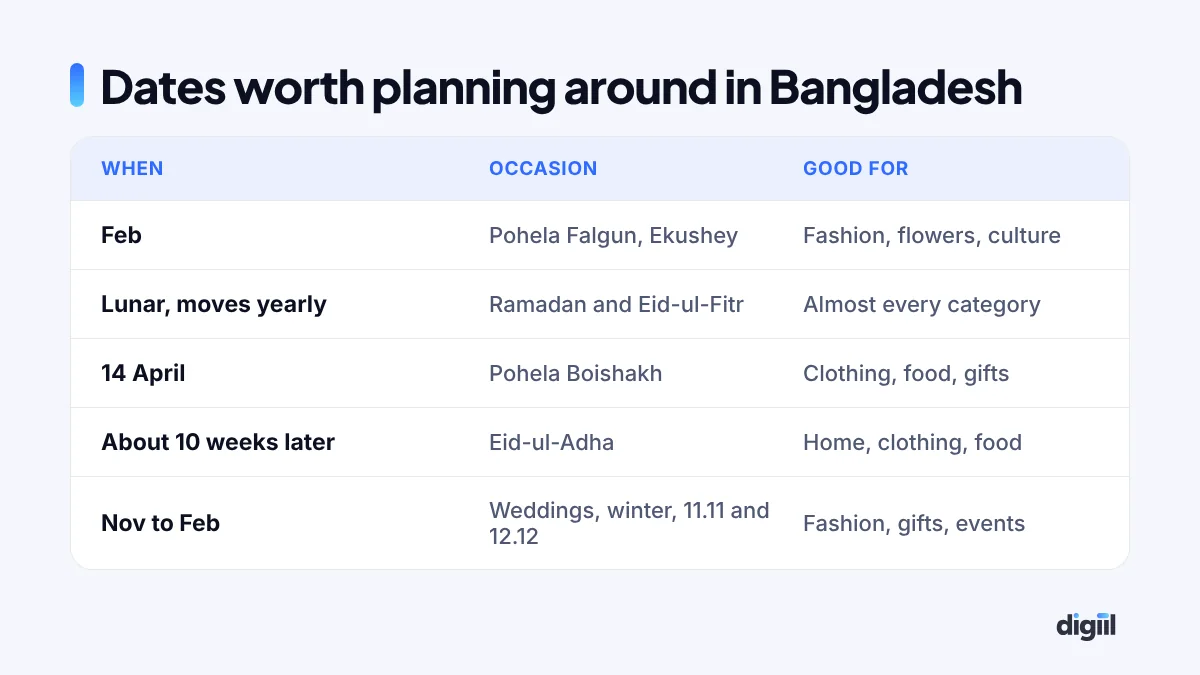
Eid dates move every year with the lunar calendar and depend on moon sighting, so check the expected dates each year and plan the run-up rather than the day itself. Add your own dates too: shop anniversary, new collection launches, salary days, school admission periods and local events in your area. For festive campaigns, our Eid marketing campaign ideas are a good starting list.
Hour 2: Thirty ideas, fast
Do not judge ideas yet. Write quickly from these sources:
- Your inbox and comments: every question customers ask is a post.
- Your best posts from the last three months: make new versions of what worked. Insights will show you which ones.
- New stock and services: each deserves more than one post.
- What happens in your business: packing, making, delivering, training staff, receiving stock.
- Customer stories: reviews, photos, before and after, with permission.
- Mistakes buyers make in your category, and how to avoid them.
- Comparisons: this fabric versus that, this package versus that.
An AI tool can help widen the list. Give it your business, your buyers and your pillars, and ask for twenty ideas per pillar. Keep the specific ones and throw away the generic. Our guide to ChatGPT for business has prompts for this.
Hour 3: Fill the sheet
A simple sheet beats an expensive tool you never open. Create one row per post with these columns:
| Column | What goes in it |
|---|---|
| Date and time | When it goes out |
| Platform | Facebook, Instagram, TikTok, LinkedIn |
| Pillar | Teach, show, prove or sell |
| Format | Reel, photo, carousel, Story, Live |
| Topic and hook | The idea and its first line |
| Caption and call to action | Draft text and what to do next |
| Assets | Photo or video needed, and who makes it |
| Status | Idea, ready, scheduled, posted |
| Result | Reach, shares, messages, after a few days |
Place festive and launch posts first, then fill the gaps with your pillars so the mix stays balanced. Spread formats too, with at least two short videos a week. The reasons are in Reels marketing.
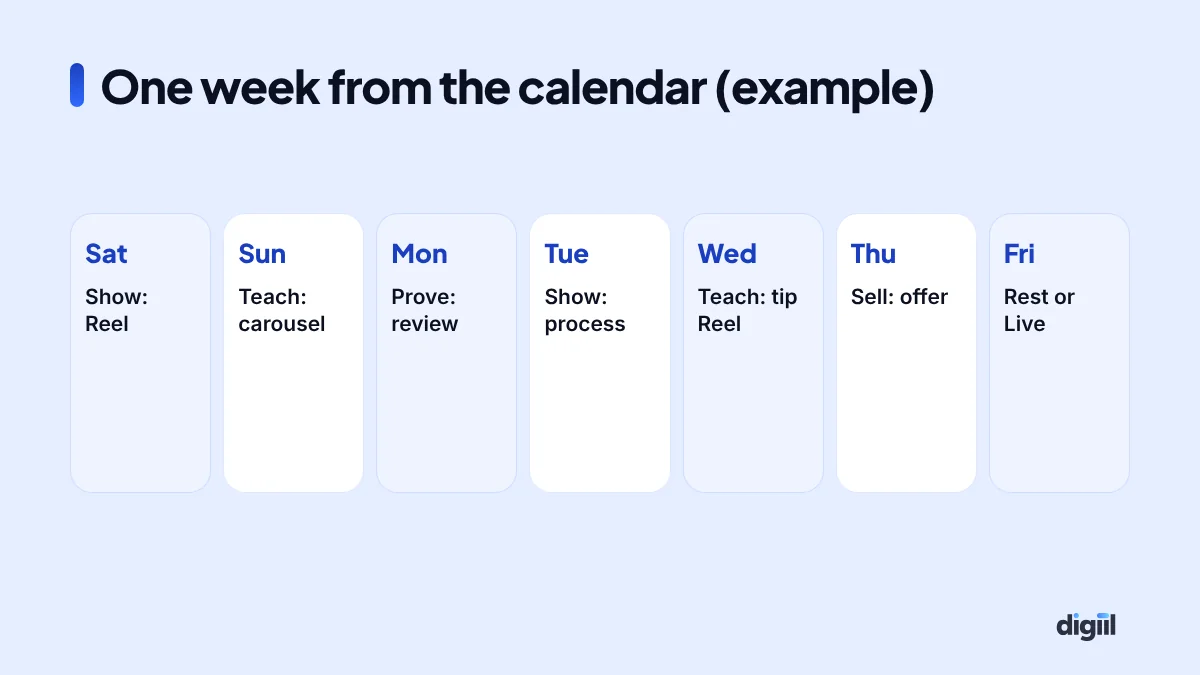
Leave one or two empty slots each week. Something will happen that deserves a post: a big order, a funny customer message, a timely moment. A calendar with no room for that feels stiff.
Hour 4: Batch the first week
Batching means doing similar tasks together. It is the reason a calendar survives past the second week.
- Shoot all photos and clips for the week in one session, in good light.
- Write all captions in one sitting, using the hooks from the sheet.
- Design graphics and carousels together, using a few consistent templates.
- Schedule everything in Meta Business Suite or your scheduling tool.
Then repeat the batch once a week, or film for two weeks at a time when you find your rhythm.
One idea, five posts
A calendar gets easier when every good idea is used more than once. Take a single topic, such as “how to choose the right size kurti”, and spread it:
- Reel: a 30-second try-on showing two sizes on the same person.
- Carousel: the size chart explained in five slides.
- Story: a poll asking which size people usually wear.
- Facebook post: a customer’s photo and their comment about the fit.
- Quick reply: the same explanation saved for the inbox.
Five pieces from one idea, each suited to its format, and none of them repetitive to the follower who sees two of them.
Three example calendars
A restaurant
Pillars: food close-ups, kitchen and team, customer moments, offers. Rhythm: a dish Reel on weekdays before lunch, a family or group offer before the weekend, a behind-the-kitchen video once a week, and a customer photo repost every few days. Key dates: Ramadan iftar menus, Eid, Valentine’s and family occasions, and cricket match days if your audience follows them.
A dental or skin clinic
Pillars: explain common problems, show the clinic and the doctors, patient experiences with consent, and booking information. Rhythm: two short explainer videos a week, one clinic or team post, one booking reminder. Avoid before-and-after claims that break platform health rules, and never post patient details without written consent.
A B2B service company
Platforms: LinkedIn first, Facebook second. Pillars: insights from the founder, case studies, team expertise, and events or announcements. Rhythm: two or three posts a week during working days, mostly text and carousel, with a short video once a week.
Scheduling in Meta Business Suite
- Open Meta Business Suite and choose Planner.
- Create a post or Reel, choose Facebook, Instagram or both, and add media and caption.
- Pick Schedule instead of Publish, and set the date and time from your sheet.
- Check the preview for each platform, since captions and crops can differ.
- Mark it “scheduled” in your sheet so the team knows it is done.
Scheduling saves time, but someone still has to be around to reply when the post goes live.
When more than one person is involved
Add an approval step to the sheet: the person who writes marks a post “ready”, the owner or manager marks it “approved”, then it is scheduled. Agree a deadline, such as everything for next week approved by Thursday. Without a deadline, approvals become the bottleneck that breaks the calendar.
Posting times
There is no universal best time. Check your page insights for when your followers are online, and test. Many Bangladeshi consumer audiences are active in the evening and late at night, while B2B audiences respond better during working hours. Consistency matters more than finding the perfect minute.
Review at the end of the month
Spend thirty minutes looking at the “Result” column. Which pillar and format brought messages or orders, not just likes? Which posts were shared? Do more of those next month and drop what did not move anything. Our guide to increasing Facebook page reach explains which signals to watch.
The calendars that survive, in the businesses we work with, share one habit: someone blocks the same two hours every week for batching, usually on the quietest weekday morning. Calendars that rely on finding a spare moment each day rarely make it past the second month.
Mistakes that sink calendars
- Planning more than you can make. A realistic three posts a week beats an abandoned daily plan.
- Every post selling. Followers tune out.
- Planning without the person who makes the content. If the designer or videographer only sees the plan on the day, it will slip.
- No owner. One person must be responsible for keeping it moving.
- Posting and leaving. Replying to comments and messages is part of the calendar, not an extra.
For the bigger strategy around your calendar, read social media marketing in Bangladesh. If you would rather hand over planning and production, see our social media services or book a free 15-minute strategy call.
Planning questions
How far ahead should I plan social media content?
A month ahead for the overall plan and a week ahead for finished posts works for most small businesses. Plan festive campaigns six to eight weeks ahead, since stock, photos and ads all need preparation.
What is the best free tool for a content calendar?
A Google Sheet is enough for most small teams. Meta Business Suite lets you schedule Facebook and Instagram posts for free. Trello, Notion or Canva's planner suit teams who prefer boards.
How many posts per week should I plan?
Plan a number you can sustain with good quality. Three to five a week is realistic for most small businesses, with at least two short videos among them.
Should I follow the calendar strictly?
Use it as a base, not a cage. Leave room each week for something timely, such as a customer story, a news moment or a question from the inbox.

Amanat has 7+ years in digital marketing and has managed $8M+ in Google and Meta ad spend for 235+ brands in the UK, USA, Australia and Bangladesh. He holds 20+ certifications, including Digital Marketing Strategy from Harvard Business School Online. More about Amanat