Two advertisers bid on the same keyword, “ac servicing dhaka”. One pays for searches from people who want AC servicing in Dhaka. The other pays for those, plus “ac technician job”, “how to clean ac at home” and “air conditioner price”. The difference is a single setting: the Google Ads keyword match type.
This guide uses that one keyword throughout, so you can see exactly what each match type does to your budget.
The three match types
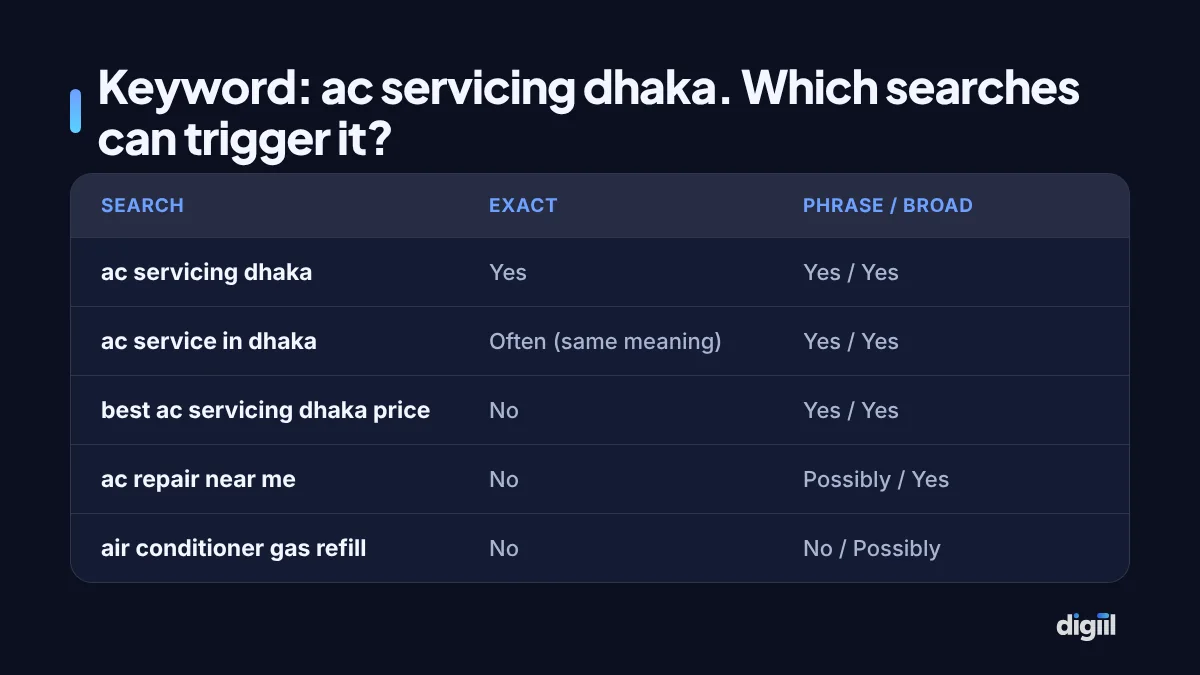
The table is illustrative. Google’s matching changes over time and depends on context, so the only way to see what you actually pay for is the search terms report, covered below.
Exact match: [ac servicing dhaka]
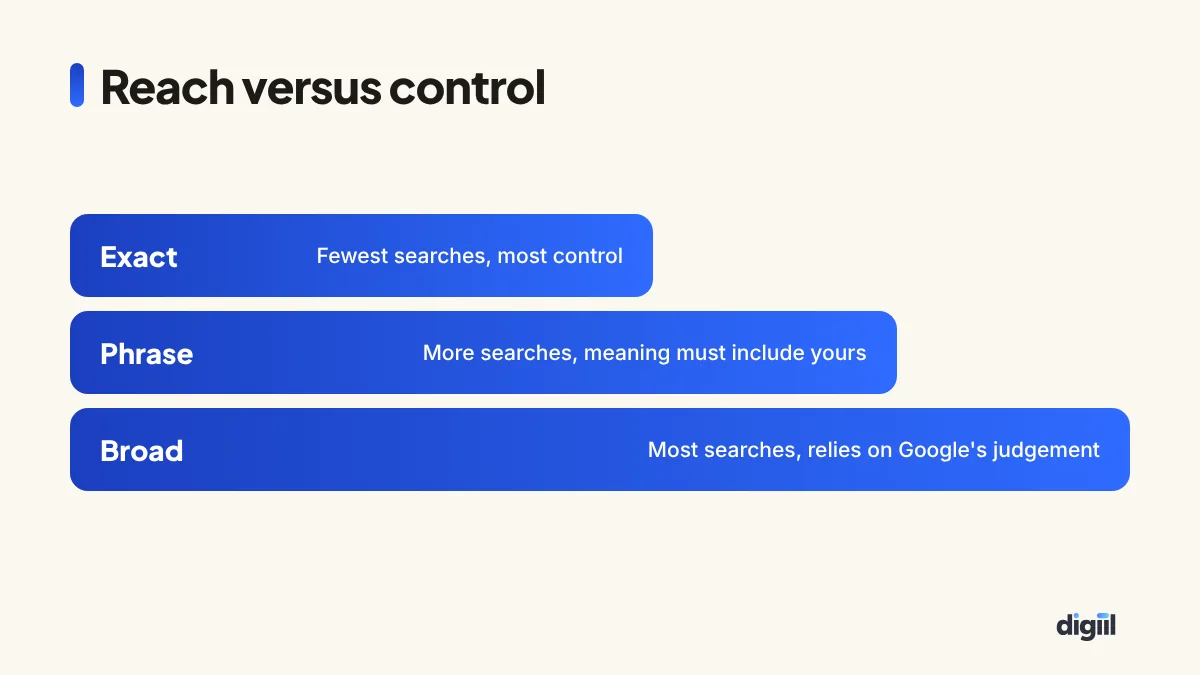
Written in square brackets. Your ad can show for searches with the same meaning as the keyword, including close variants such as plurals, misspellings, reordered words and some synonyms. It gives the most control and the least volume. Use it for your most valuable, proven keywords.
Phrase match: “ac servicing dhaka”
Written in quotation marks. Your ad can show for searches that include the meaning of your keyword, with extra words before or after. “Best ac servicing dhaka price” qualifies. It is a sensible default for most small accounts: wider than exact, still anchored to your meaning.
Broad match: ac servicing dhaka
No symbols. Your ad can show for searches Google considers related, even without your words. Google uses signals such as the user’s recent searches, your landing page and other keywords in the ad group. It brings the most volume and the most surprises.
When to use each
| Situation | Suggested approach |
|---|---|
| New account, small budget, no conversion data | Phrase and exact on 10 to 30 buying keywords |
| Expensive keywords, tight margins | Exact on the best terms, phrase on a few more |
| Steady conversions and smart bidding in place | Test broad in a separate ad group or campaign |
| Finding new keyword ideas | Broad with close monitoring, or Performance Max search themes |
| Brand name | Exact and phrase in its own campaign |
Broad match works best when Google knows what a good result is. That means conversion tracking you trust and a conversion-based bid strategy. See Google Ads conversion tracking. Without that, broad match optimises towards clicks and spends on loose matches.
Negative keywords: the budget saver
Negative keywords stop your ad showing for searches you do not want. They are the most underused tool in small accounts, and the cheapest way to cut wasted spend.
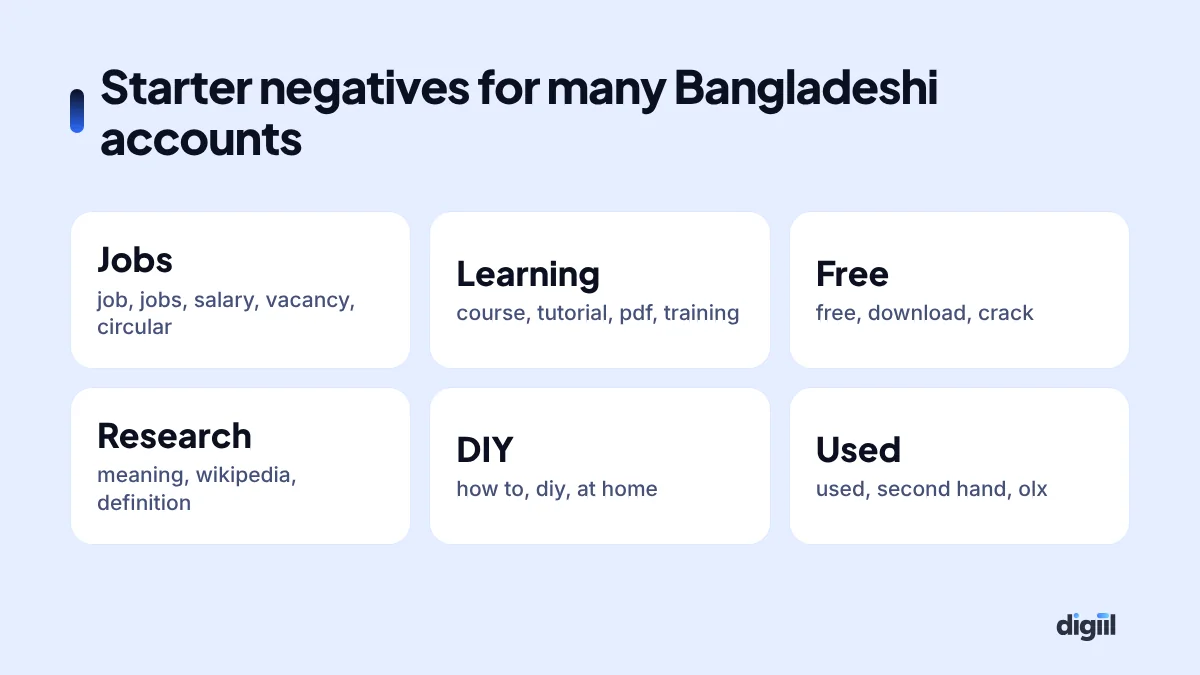
Not every theme suits every business. A training institute wants “course”; a pest control company does not mind “how to” if it sells products. Build your list from your own search terms report, using the starter themes as prompts.
Negative match types
- Negative broad (job): blocks searches containing all the words, in any order.
- Negative phrase (“ac price”): blocks searches containing that exact phrase.
- Negative exact ([ac servicing]): blocks only that exact search.
Negatives do not cover close variants. If you block “job”, also add “jobs”. Keep shared negative lists at account level so every campaign benefits.
A negative that is too broad can stop your best searches. Adding “price” as a negative to an e-commerce account, for example, blocks buyers comparing prices, who are often ready to purchase. Check the search terms report before and after adding big negatives.
The search terms report
This report shows the actual searches that triggered your ads, what they cost and whether they converted. Open it under Insights and reports in Google Ads, or from the Keywords section of each campaign. It is the only honest view of what your match types are doing.
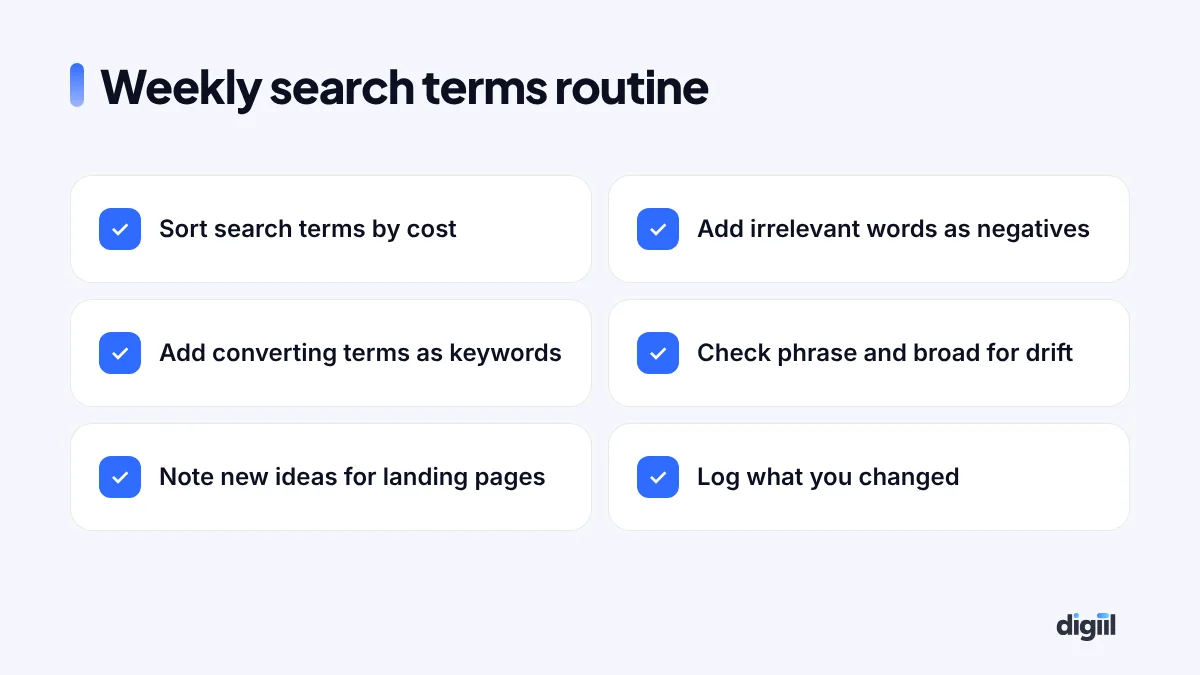
An AC service company looks at a week of search terms. “ac servicing dhaka” and “ac service uttara” converted. “ac technician job circular” spent Tk 1,200 with no conversions, so “job”, “technician job” and “circular” become negatives. “inverter ac gas refill price” converted twice, so it becomes a new phrase match keyword with a landing section about gas refills.
Some search terms are grouped as “other” for privacy, so you will not see every search. You will see enough to steer.
A driving school in Mohammadpur opened its first search terms report and found that a large share of clicks came from “driving licence fee”, “BRTA exam questions” and “car driving game”. None of those people wanted lessons. Twenty negative keywords later, the same budget bought far more calls.
Organising keywords
- Group by theme: one ad group per service or product type, so ads and landing pages can match closely.
- Keep ad groups small: a handful to a few dozen closely related keywords.
- Do not repeat the same keyword in several ad groups. They compete with each other.
- Write ads that mirror the keywords, which helps relevance and Quality Score.
To find the keywords in the first place, use our keyword research guide. Banglish and Bangla searches are worth testing, since many people search that way, but check volumes in Keyword Planner first.
Bangla, Banglish and English keywords
People in Bangladesh search in three ways for the same thing: English (“ac servicing dhaka”), Banglish (“ac service koto taka”) and Bangla script. Close variants do not reliably connect these, so treat each as its own keyword set.
- Check each version in Keyword Planner for volume and bid ranges.
- Put each language in its own ad group, with ads written in the same style as the searches.
- Set the campaign’s language targeting to include the languages your audience uses on their devices. Many Bangladeshi users have phones set to English even when they search in Banglish.
- Expect Banglish searches to be shorter and less precise, so watch their search terms closely.
Brand and competitor keywords
Bid on your own brand name in its own campaign with exact and phrase match. It is usually cheap, protects you from competitors appearing above you, and gives you clean data on people who already know you. Keep brand terms out of your other campaigns with negatives, or your non-brand results will look better than they really are.
Bidding on competitors’ names is allowed in many cases, but you cannot use their trademark in your ad text without permission, the clicks are often expensive, and conversion rates are usually lower. Test cautiously.
Three expensive mistakes
- Single-word broad keywords such as “ac” or “furniture”, which match almost anything.
- No negatives at launch, which pays for job seekers and students in the first week.
- Never opening the search terms report, which means never knowing what you are paying for.
Match types and automated campaigns
Performance Max and AI-powered search features use search themes and your landing pages rather than keyword match types alone. If a search exactly matches an exact or phrase keyword in a Search campaign, Google generally gives the Search campaign priority. Keep your most important keywords in Search for control. More in Performance Max campaigns.
A simple starting setup
- Choose 10 to 30 keywords with clear buying intent.
- Add each as phrase match, and the top five also as exact match.
- Add a starter negative list at account level.
- Run for one week and review search terms.
- Add negatives and new keywords, then repeat weekly.
- Test broad match only after you have steady, tracked conversions.
For what each click is likely to cost, see Google Ads cost in Bangladesh. If you would like your account reviewed or managed, see our Google Ads service or book a free 15-minute strategy call.
Match type questions
Which match type should a beginner use?
Start with phrase and exact match on a small set of high-intent keywords, with a solid negative keyword list. Add broad match later, once conversion tracking is reliable and you use a conversion-based bid strategy.
Is broad match bad?
Not by itself. Broad match combined with smart bidding and good conversion data can find valuable searches you would not have thought of. Without conversion data, it often spends on loosely related searches.
Do negative keywords match close variants?
No. Negative keywords do not automatically include misspellings, plurals or synonyms. Add the variations you want to block yourself.
What happened to broad match modifier?
Google retired broad match modifier in 2021 and folded its behaviour into phrase match. Old keywords with plus signs now behave as phrase match.
How often should I check search terms?
Weekly for new campaigns and accounts with meaningful spend, then every two weeks once things are stable.

Amanat has 7+ years in digital marketing and has managed $8M+ in Google and Meta ad spend for 235+ brands in the UK, USA, Australia and Bangladesh. He holds 20+ certifications, including Digital Marketing Strategy from Harvard Business School Online. More about Amanat