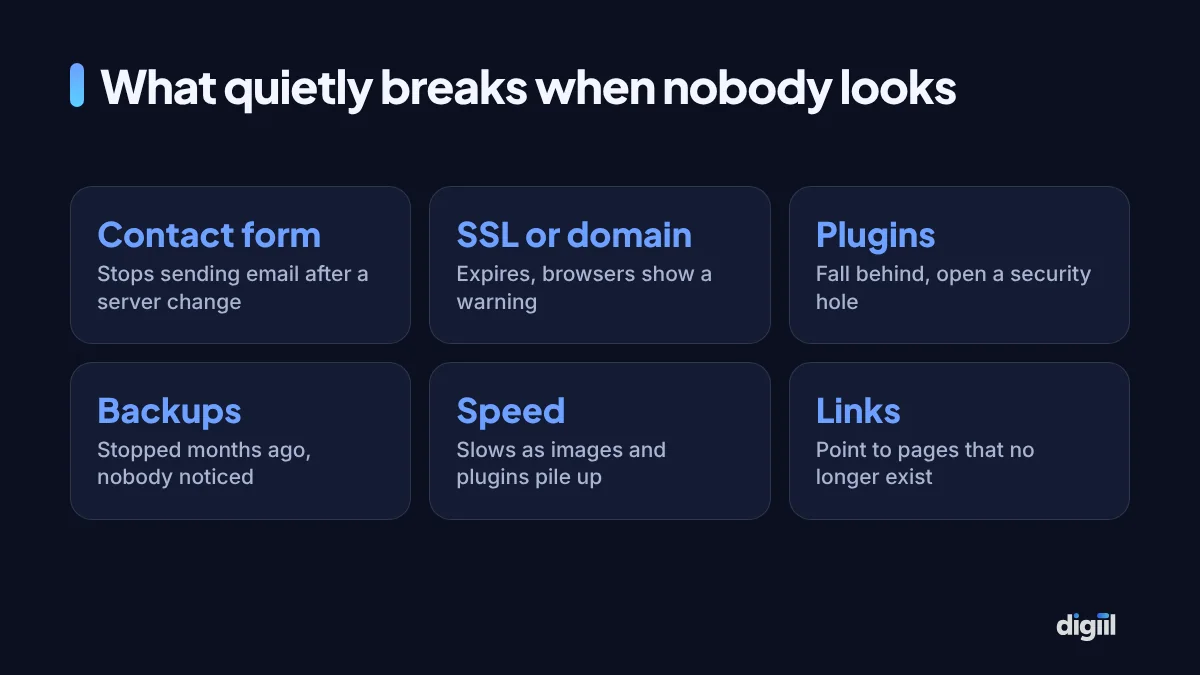
A dental clinic in Uttara found out its website was broken from a patient. The booking form had stopped sending messages after an automatic plugin update eleven weeks earlier. Nobody at the clinic had noticed, because nobody had tested it. Every online enquiry in those weeks had gone nowhere.
Website maintenance is the work nobody notices until it stops. A website is not a printed brochure. It runs on software that changes every month, on a server that changes every year, inside browsers and search engines that change constantly. Leave it alone long enough and something breaks, usually at the worst moment.
Below is the checklist we use, split by how often each task needs doing. Copy it into your calendar. Each item has a one-line reason, so you know what you are protecting.
Weekly (about 15 minutes)
- Open the site on your phone. Home page, a service or product page, and the contact page. You will catch most visible problems here first.
- Send a test enquiry through every form and confirm the email arrives. Forms fail silently and cost leads for weeks before anyone notices.
- Check that the latest backup ran. Look at the date of the most recent copy, not just that backups are “on”.
- Scan for update notices in the dashboard. Security updates should not wait a month.
- For online stores, place a test order or check that real orders came through normally, including payment confirmations.
Monthly (one to two hours)
- Update plugins, theme and core, one batch at a time, after a fresh backup. Check the site after each batch.
- Remove what you do not use: deactivated plugins, old themes, test pages. Unused code is still attackable.
- Review user accounts. Delete accounts for staff, freelancers and agencies who no longer work with you. Make sure every admin uses two-factor login.
- Run a security scan with your security plugin or hosting tool.
- Test speed on mobile with PageSpeed Insights for your three most important pages. Note the scores so you see trends.
- Look at Google Search Console for new errors in indexing, pages, and Core Web Vitals.
- Check for broken links with a plugin or crawler, and fix or redirect them.
- Read through comments and spam if your site accepts them.
Quarterly (half a day)
- Restore a backup to a test copy. A backup you have never restored is a hope, not a backup.
- Review content: prices, team members, opening hours, phone numbers, offers that ended. Outdated details cost trust and calls.
- Check page titles and descriptions on key pages and refresh any that underperform in Search Console.
- Compress new images uploaded since the last review. Staff often upload full-size phone photos.
- Review analytics: top pages, top exit pages, conversion rate. Decide one improvement for next quarter.
- Check the server’s PHP version and other software against what your hosting supports. Old versions stop receiving security fixes.
Yearly
- Renew the domain well before expiry, ideally on auto-renew with a card that will not expire. See domain names in Bangladesh.
- Review hosting: is it still fast enough, is the plan right for your traffic, what is the renewal price? Compare in web hosting in Bangladesh.
- Renew premium licences for themes and plugins. Expired licences usually mean no more updates.
- Update legal pages: privacy policy, terms, refund and delivery policy.
- Do a full audit of design, content and SEO, and decide whether a refresh is due.
- Confirm who has access to the domain registrar, hosting, analytics and the website itself. Write it down somewhere safe.
Backups deserve their own rules
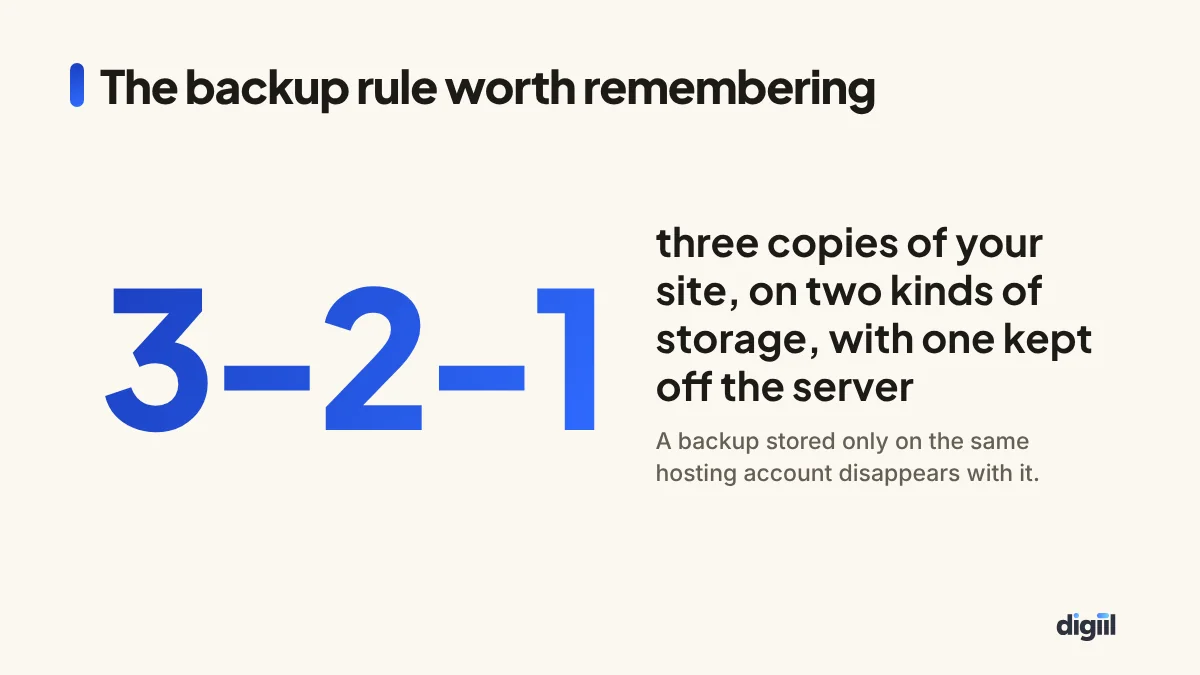
Hosting companies take backups, but they are not your backup plan. They may keep them for only a few days, charge to restore them, or lose them along with the account. Keep your own.
- Frequency: daily for stores and busy sites, weekly for sites that rarely change.
- Location: at least one copy off the server, such as Google Drive, Dropbox or cloud storage.
- Contents: both the files and the database. A copy of only one is not a working site.
- Retention: keep several weeks of copies. Malware is often found days after it arrived, and the latest backup may be infected too.
Updating safely
Updates are the most important maintenance task and the most likely to break something. A careful routine removes most of the risk.
- Take a fresh backup immediately before updating.
- Read the changelog for major version jumps of your theme, page builder or e-commerce plugin.
- Use a staging copy for big updates if your hosting offers one. Update there first, then on the live site.
- Update in small batches rather than everything at once, so you know which update caused a problem.
- Check the site after each batch: home page, a key page, a form, and checkout if you have one.
- If something breaks, roll that single plugin back or restore the backup, and investigate calmly.
Avoid updating just before a big sale, a campaign launch or a holiday when nobody can fix problems.
Security basics that prevent most problems
Most hacked small business sites fall to the same few causes: outdated plugins, weak or shared passwords, and pirated (“nulled”) themes or plugins that carry malware. The fixes are not complicated.
- Strong unique passwords and two-factor login for every admin.
- Only licensed themes and plugins from their official sources.
- Limit login attempts and use a security plugin or a firewall such as Cloudflare.
- Give each person their own account, with the lowest role that lets them do their job.
If your site is already hacked, restore a clean backup or get professional help before doing anything else.
Extra checks for online stores
A store has more moving parts than a brochure site, and a fault costs money by the hour. Add these to the routine.
- Payment gateway: make a small real payment each month with each method you offer, and confirm the order status updates correctly.
- Courier and shipping rules: check delivery charges for inside and outside Dhaka still match what your courier charges.
- Order emails and SMS: confirm customers receive confirmations. Missing confirmations create calls and cancellations.
- Stock sync: if stock is updated from another system, spot-check a few products.
- Tracking: compare purchases in GA4 and Meta with real orders once a month. A broken purchase event silently ruins your ad optimisation.
- Database size: old carts, logs and revisions build up and slow the admin. Clean them on a schedule.
If you run WooCommerce, update the store plugin and its extensions with extra care, and always on a staging copy for major versions. Payment and shipping plugins are where most update problems show up.
Monitoring, so you hear about problems first
You should never learn that your website is down from a customer. Free and low-cost tools can watch for you.
- Uptime monitoring checks your site every few minutes and alerts you by email or app when it stops responding.
- Google Search Console emails you when it finds new indexing problems, security issues or manual actions.
- Your security plugin or firewall can alert you to file changes and repeated login attempts.
- Domain and SSL expiry reminders from your registrar. Make sure they go to an inbox someone reads, not a former employee’s.
Set the alerts to reach two people, so a holiday does not leave nobody watching.
When maintenance is no longer enough
Some sites cost more to keep alive than to replace. Signs you have reached that point:
- The theme or page builder is no longer updated by its developer.
- Updating anything breaks something else, so nobody dares to update.
- The site cannot run on a current PHP version.
- Mobile speed stays poor even after images and caching are fixed.
- The design no longer reflects what the business sells.
In that case, plan a rebuild and keep the old site maintained until the new one launches, with redirects ready for every URL that has search traffic.
Who should do it
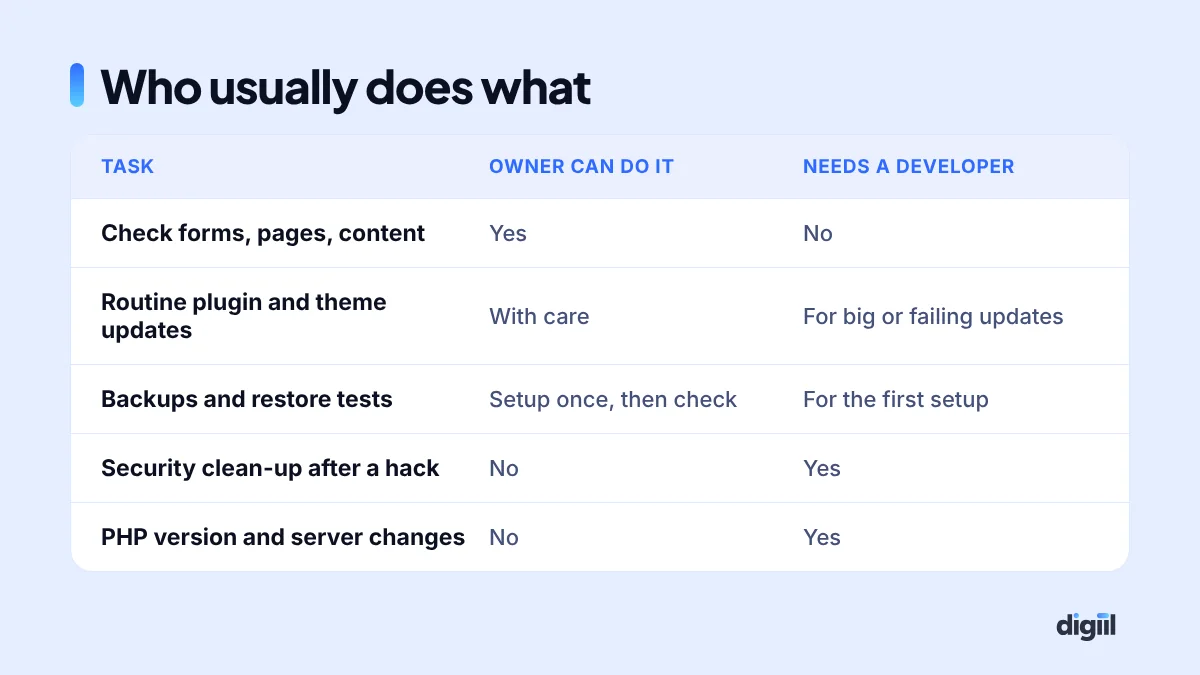
An owner or staff member can handle the weekly checks and most monthly content tasks with this checklist. Updates on simple sites are manageable with care. Anything involving server settings, a failed update, a hack or custom code belongs with a developer.
Whoever does it, record it. A simple log with the date, what was updated and anything unusual makes the next problem much faster to solve.
What maintenance costs
Doing it yourself costs time: about an hour a month for a simple site, more for a store. Hiring it out usually means a monthly maintenance plan from a developer or agency. Prices vary widely with what is included: number of updates, backups, uptime monitoring, security clean-up, small content changes and response time. Ask for the list of tasks and how quickly they respond if the site goes down.
Compare it with the cost of not doing it: lost enquiries from a broken form, a week of downtime after a hack, or a rebuild because the site became too outdated to update. For the cost of building a new site, see website development cost in Bangladesh.
Start with one hour
The clinic now has one person submit a test booking on the first working day of every month. It takes two minutes, and it would have saved eleven weeks of lost patients.
If your site has had no maintenance for a while, do these five things today: confirm you have a recent off-site backup, update everything after that backup, remove unused plugins and old admin users, test every form, and check your domain and SSL expiry dates. Then put the weekly check in your calendar.
To see what else needs attention, request a free SEO audit. If you would rather hand maintenance over completely, see our web development services or book a free 15-minute strategy call.

Amanat has 7+ years in digital marketing and has managed $8M+ in Google and Meta ad spend for 235+ brands in the UK, USA, Australia and Bangladesh. He holds 20+ certifications, including Digital Marketing Strategy from Harvard Business School Online. More about Amanat