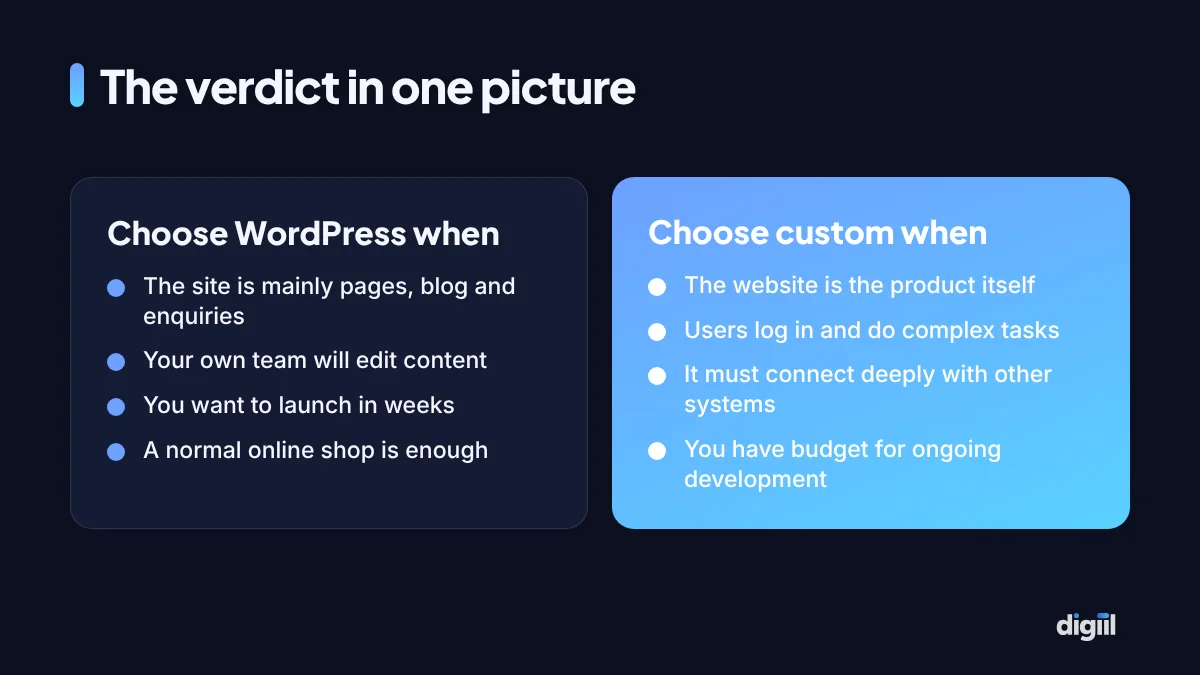
If your website’s job is to present your business, publish content and collect enquiries or orders, build it on WordPress. If the website is the business, meaning users log in and do things no plugin was designed for, build it custom. Most of the disagreement you hear comes from people answering this question for the wrong kind of project.
The WordPress vs custom website debate is usually presented as a matter of quality: WordPress as the cheap option, custom code as the professional one. That framing is wrong and it costs businesses money in both directions. Some pay for months of custom development to get a five-page brochure site. Others squeeze a complex platform into WordPress with forty plugins and wonder why it breaks.
What the two terms actually mean
WordPress is a free, open-source content management system (CMS). It gives you a ready admin panel for pages, posts, images, users and menus. Design comes from a theme. Extra features come from plugins. It runs a very large share of the world’s websites, which is why hosting companies, developers and tools all support it.
A custom website is written for you from code, typically with a framework such as Laravel, Django, Node.js or Next.js. Nothing exists until a developer builds it, including the admin panel your staff will use. That is its strength and its cost.
One point of confusion is worth clearing up. “Custom design” and “custom development” are different things. A WordPress site can have a completely original design. The question in this article is about what sits underneath.
Side by side
| Factor | WordPress | Custom website |
|---|---|---|
| Time to launch | Weeks | Months |
| Upfront cost | Lower | Higher, often several times |
| Editing content | Easy for non-technical staff | Only as easy as the admin panel you paid for |
| Adding a common feature | Often a plugin, same day | Developer time |
| Adding an unusual feature | Awkward or impossible without custom code | Natural |
| Speed | Good when built lean, poor when bloated | Highest ceiling |
| Security | Safe when updated; a common target if neglected | Depends entirely on the developer’s skill |
| Finding a developer | Very easy | Tied to the chosen framework, sometimes to one team |
| Maintenance | Regular updates of core, theme and plugins | Fewer routine updates, costlier changes |
The table gives the general picture. The sections below explain the rows that people most often misunderstand.
Cost: look at three years, not the quotation
Comparing two quotations tells you only the first payment. A fairer comparison is total cost of ownership over three years, which has four parts.
- Build. Design, development, content entry.
- Running costs. Hosting, domain, premium plugin or software licences.
- Maintenance. Updates, backups, security, small fixes.
- Change. Every new page type, feature or integration you ask for after launch.
WordPress is cheaper on the first and usually on the fourth, because so much already exists. It has steady costs on the third, because updates never stop. Custom is expensive on the first and fourth and can be cheaper on the third, since there are fewer moving parts from other vendors.
The fourth part decides most cases. A business website changes constantly in its first two years: new services, landing pages for campaigns, a blog, a careers page. On WordPress your marketing person does most of that alone. On a custom site each change is a ticket and an invoice, unless a flexible admin panel was part of the original build.
For actual price ranges in the local market, see website development cost in Bangladesh.
Speed: the platform matters less than the build
WordPress has a reputation for being slow. The reputation comes from how it is commonly assembled: a heavy multipurpose theme, a visual page builder, twenty plugins that each load their own scripts, cheap shared hosting and uncompressed photos. Any platform would be slow under that load.
Built with a lightweight theme, few plugins, caching and decent hosting, WordPress passes Google’s Core Web Vitals without drama. Custom code can be faster still, because the page contains only what it needs. Whether that last margin matters depends on your business. For a store with heavy traffic, it can. For a consultancy site with 2,000 visits a month, the money is better spent on content.
Whichever you choose, write a speed target into the agreement, measured on a phone. Our website speed optimisation guide explains what to ask for.
Security: popular target versus unknown quality
Because WordPress is everywhere, attackers build automated tools that scan for outdated plugins and weak passwords. Almost all hacked WordPress sites fall to one of those two things, or to pirated (“nulled”) themes that arrive with malware inside. Keep everything updated, use licensed software, add two-factor login and take off-site backups, and the risk is small.
A custom site is not scanned for known plugin flaws, which helps. But nobody else is reviewing its code either. Its safety rests on whether your developer handled logins, database queries, file uploads and permissions correctly, and you will rarely be able to judge that yourself. A mature framework such as Laravel or Django handles much of this well by default. A site hand-written without a framework is the riskiest option of all.
Agencies sometimes sell a site built on their own private CMS as “custom”. If you leave, nobody else can work on it and you may not even receive the code. Ask the ownership questions near the end of this article before signing.
SEO: no built-in winner
Google does not prefer one platform. It reads the HTML it is given. What matters is clean page structure, fast loading, mobile layout, correct titles and descriptions, structured data, a sitemap and sensible URLs.
On WordPress, a plugin such as Rank Math or Yoast gives you all of these on the first day, and editors can manage them per page. On a custom site each one is a feature somebody must remember to build: editable titles, redirects, sitemap generation, schema. Good custom teams do. Many forget, and the site launches with every page titled “Home”. Check against our on-page SEO checklist either way.
Who will run the site every day?
This question settles more decisions than any technical argument. If a marketing executive or the owner will add blog posts, change prices and build landing pages, they need an editor they can learn in an afternoon. WordPress is that editor, and there are thousands of tutorials in English and Bangla.
If the site is maintained by an in-house engineering team and content rarely changes, the convenience of a CMS matters much less.
Match the tool to the project
WordPress fits
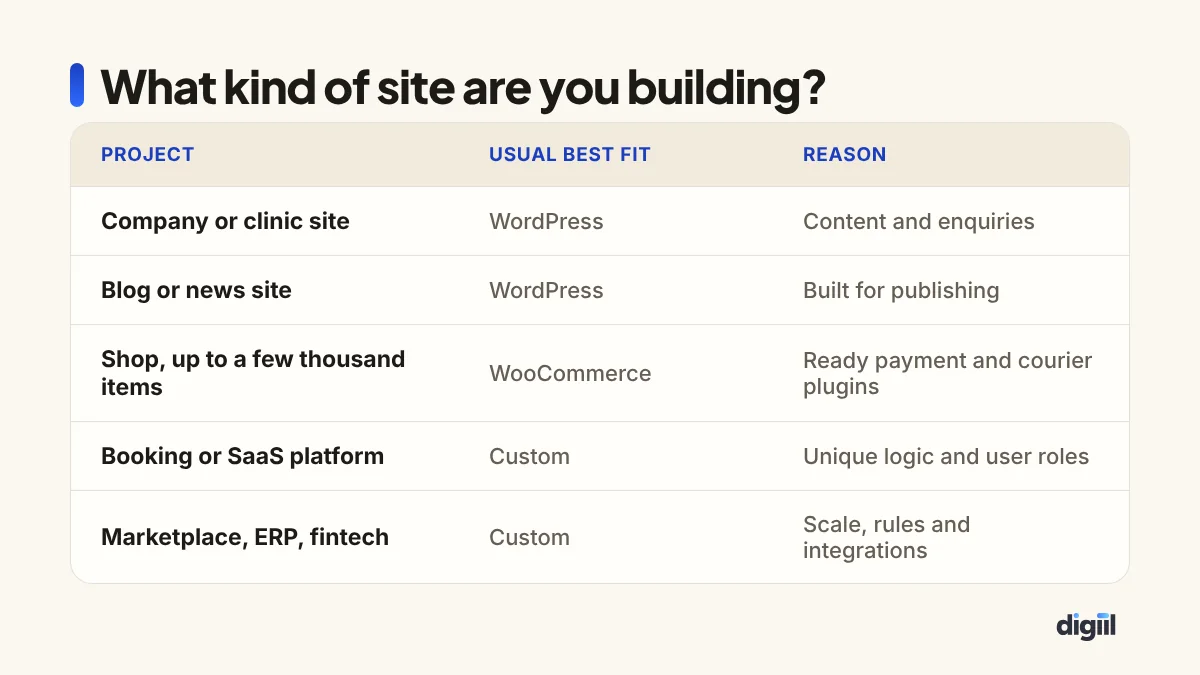
- Company, clinic, school, restaurant and agency websites.
- Blogs, magazines and content-led SEO projects.
- Online stores with standard needs. WooCommerce has ready integrations for local payment gateways and couriers. See WooCommerce vs Shopify in Bangladesh.
- Landing pages for advertising campaigns.
- A first version of almost any idea, to test demand cheaply.
Custom fits
- Software sold as a service, customer portals and dashboards.
- Marketplaces with several seller types, commissions and payouts.
- Booking systems with complicated rules, such as multi-branch clinics or logistics tracking.
- Platforms tied closely to an ERP, a bank API or internal systems.
- Products where interface speed and behaviour are the selling point.
A logistics startup needs two things: a marketing site that explains its service, and a system where merchants book parcels and track them. Building both as one custom application would delay the marketing site by months. Building both in WordPress would strain the tracking system. The sensible plan is a WordPress marketing site on the main domain and a custom web application on a subdomain such as app.example.com. Each tool does the job it was made for.
The middle paths
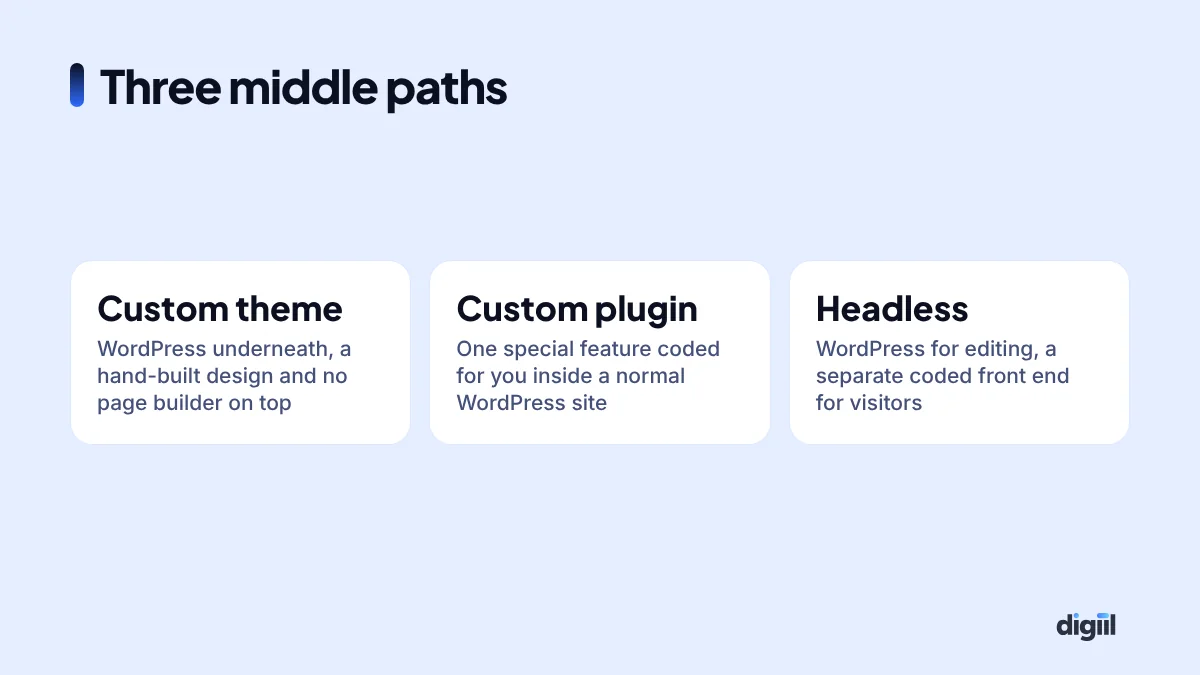
The choice is rarely all or nothing.
A custom theme gives you a hand-coded, lightweight design with the WordPress editor behind it. This is how most fast, good-looking WordPress business sites are built, and it removes the bloat that gives WordPress its bad name.
A custom plugin adds the one feature that is unique to you, such as a fee calculator or a dealer locator, without abandoning the platform.
Headless WordPress keeps the familiar editor for staff while a separately coded front end, often in Next.js, shows the content to visitors. It delivers very fast pages at the price of two systems to maintain. It suits larger content teams with developers on hand.
Moving from one to the other
Many owners worry that the first choice locks them in. It does not, if the move is planned.
WordPress to custom. Content can be exported from the WordPress database, and every old URL can be redirected to its new address so that rankings and backlinks carry over. The risks are forgotten redirects, lost page titles and descriptions, and a new admin panel that staff find harder to use. Keep the old site running in parallel until the new one has been checked page by page.
Custom to WordPress. This happens more often than agencies admit, usually when the original developer has disappeared and nobody can update the site. The content often has to be moved by hand, which is tedious but safe. It is also a good moment to remove pages nobody visits.
Page builder to lean WordPress. A third kind of move, and frequently the best value: keep WordPress and the content, replace a heavy builder theme with a lightweight custom one. The site becomes faster without the cost or risk of a full rebuild.
In every case, crawl the old site first and save a list of all URLs, titles and descriptions. That list is your insurance.
What maintenance really involves
| Task | WordPress | Custom |
|---|---|---|
| Software updates | Core, theme and plugins, most weeks | Framework and libraries, a few times a year |
| Backups | Plugin or host feature, easy to set | Must be set up by the developer |
| Security monitoring | Plugins and host tools available | Depends on server setup and logging |
| Small content changes | Your staff | Staff if the admin allows, otherwise developer |
| New feature | Plugin, or a few days of development | Development sprint |
| If the developer leaves | Any WordPress developer can step in | Needs someone who knows that framework and codebase |
Neither is maintenance-free. A WordPress site left without updates for a year is a security risk. A custom site left alone for three years can become impossible to upgrade because the framework has moved on. Budget for upkeep from the first day.
Five questions that decide it
- Does a plugin or theme already do 80% of what you need? If yes, WordPress. Paying to rebuild what exists is waste.
- Will visitors log in and carry out tasks specific to your business? If yes, lean custom.
- Who edits the site weekly? Non-technical staff point to WordPress.
- How soon must it be live? Under two months points to WordPress.
- Is there a budget for continuing development after launch? If no, avoid custom. An unmaintained custom site ages badly and nobody else can pick it up cheaply.
If your answers are mixed, start with WordPress or a hybrid. Moving from WordPress to custom later is a known, manageable project. Going the other way usually means the custom build was not needed in the first place.
Protect yourself whichever you choose
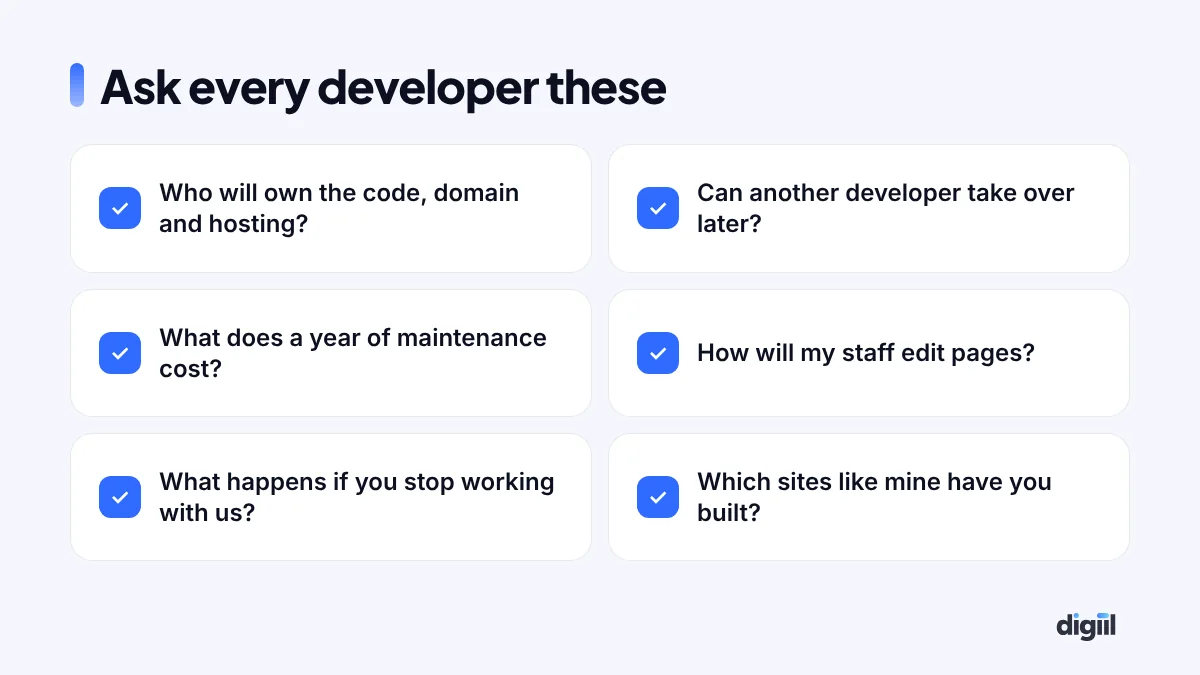
More projects go wrong over ownership than over technology. Put these in writing: the domain and hosting are registered in your name, you receive the full source code and admin access, the software licences are bought in your account, and there is a handover document. For a custom build, also ask for the code to be kept in a repository you control.
If you want an opinion on your own project, we build both: see our WordPress development and web application development services, or book a free 15-minute strategy call and we will tell you which one we would choose in your place.
Still deciding? Short answers
Is WordPress good enough for a serious business website?
Yes. Large publishers, universities and well-known brands run on WordPress. Quality depends on how the site is built and maintained, not on the platform name.
Is a custom website always faster than WordPress?
No. A carefully built WordPress site on good hosting can pass Core Web Vitals comfortably, and a poorly written custom site can be slow. Custom code has a higher ceiling for speed because it carries nothing it does not need.
Can I start on WordPress and move to custom later?
Yes, and many businesses do. Content, URLs and SEO value can be carried over if the migration is planned with redirects. It is usually cheaper than building custom before you know what the business needs.
Is Laravel better than WordPress?
They do different jobs. Laravel is a framework for building applications from code. WordPress is a finished content management system. For a content site WordPress is quicker. For a web application Laravel or a similar framework fits better.
Which is better for SEO?
Neither has a built-in ranking advantage. Search engines judge the pages they receive. WordPress makes SEO basics easy through plugins. A custom site can match that, but every feature has to be built.
What about Wix, Shopify or other builders?
Hosted builders are a third option: fastest to start, with monthly fees and less control. For stores, compare them in our WooCommerce vs Shopify guide.

Amanat has 7+ years in digital marketing and has managed $8M+ in Google and Meta ad spend for 235+ brands in the UK, USA, Australia and Bangladesh. He holds 20+ certifications, including Digital Marketing Strategy from Harvard Business School Online. More about Amanat