Search engines must be able to find a page, read it, understand it and load it quickly before they can rank it. Technical SEO is the work that makes those steps easy. This technical SEO checklist covers 25 checks, in plain language, with a free way to test each one.
You do not need to fix everything at once. Work through the list in order. The early checks can stop a site from appearing in Google at all, so they matter most.
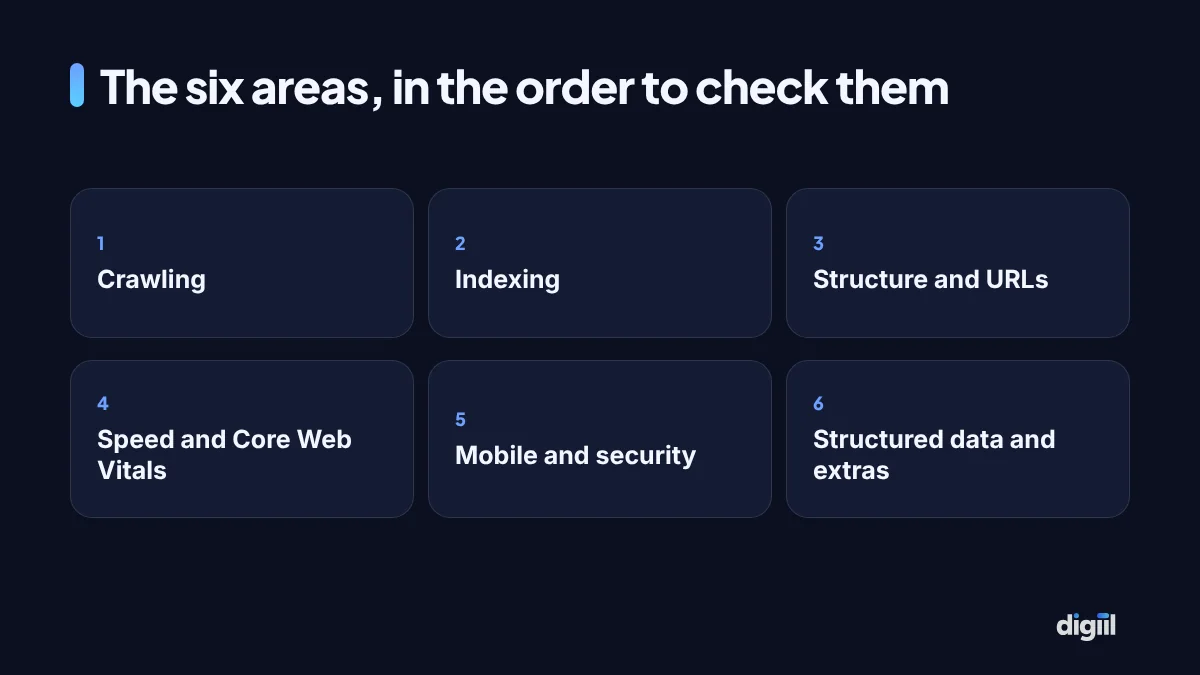
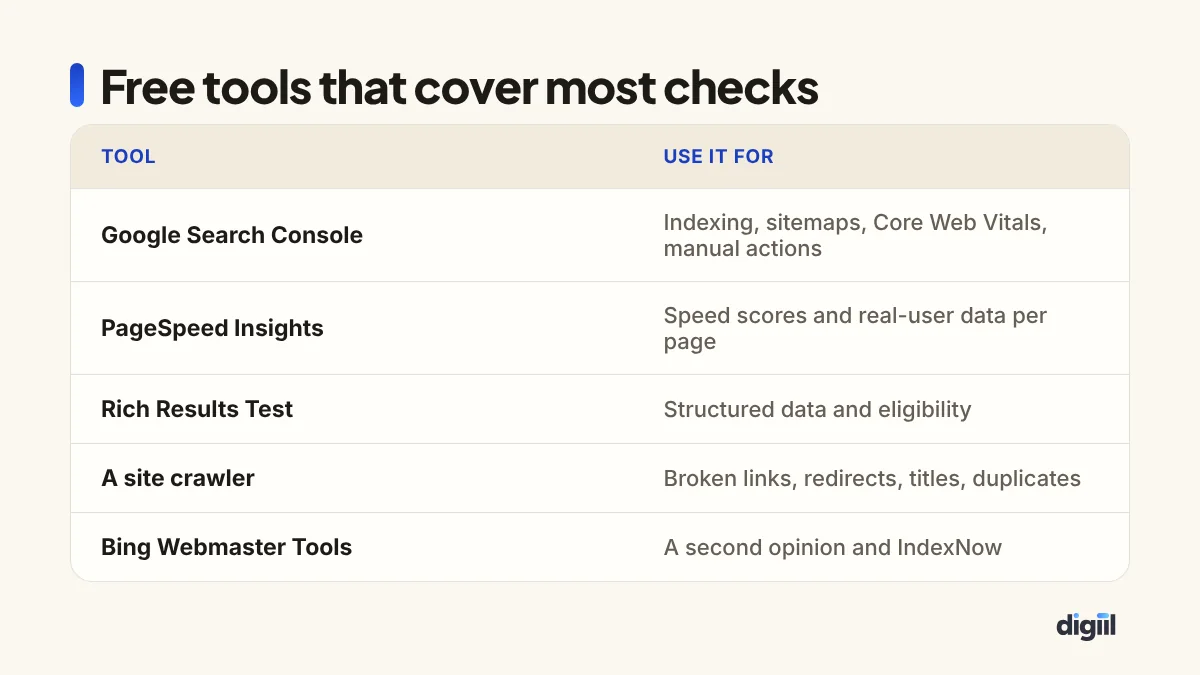
If the basics of SEO are new, read what SEO is first. For page content, such as titles and headings, our on-page SEO checklist is the companion to this one.
Crawling: can search engines reach your pages?
- robots.txt allows the pages that matter. Open yourdomain.com/robots.txt. Check that it does not contain
Disallow: /for all crawlers, and that it does not block folders holding CSS, JavaScript or important pages. A staging setting copied to the live site is a common cause of a sudden traffic drop. - An XML sitemap exists and is submitted. Most SEO plugins create one, often at /sitemap_index.xml. Submit it in Search Console under Sitemaps and in Bing Webmaster Tools. It should list only pages you want indexed, not redirects, error pages or noindexed pages.
- Important pages are linked from other pages. Pages with no internal links pointing to them, called orphan pages, may be found late or treated as unimportant. Every key page should be reachable within a few clicks of the home page.
- No important content depends on actions a crawler will not take. Content that only appears after a click, a scroll event or a login may not be seen. If you use a JavaScript-heavy framework, use the URL Inspection tool in Search Console to view the rendered page and confirm the main text is present.
- The server responds reliably. Frequent timeouts or 5xx errors slow down crawling. Search Console’s Crawl stats report, under Settings, shows response times and errors. If they are poor, review your hosting. See web hosting in Bangladesh.
Indexing: are the right pages in Google?
- Key pages are indexed. In Search Console, open Pages under Indexing. Look at “Why pages aren’t indexed” and check that none of your important pages appear there. For any single page, paste its URL into URL Inspection.
- No accidental noindex. A “noindex” tag tells Google to leave a page out. It is useful on thank-you pages and internal search results, and disastrous on service pages. In WordPress, also check Settings, Reading, that “Discourage search engines” is not ticked.
- Canonical tags point to the right version. When similar pages exist, a canonical tag says which one is the main version. Each normal page should have a self-referencing canonical. Product variants and filtered pages should point to the main product or category.
- Thin and duplicate pages are controlled. Tag archives, author archives with one author, empty categories, print versions and sorting parameters can create hundreds of near-identical URLs. Noindex them, block the parameters, or remove the pages.
- One version of the domain. http, https, www and non-www should all lead to a single version with one redirect. Type each variation into the browser and see where you land.
Structure and URLs
- URLs are short and readable. /services/seo/ beats /index.php?page_id=482. Use hyphens, lowercase and words that describe the page. Do not change existing URLs without redirects.
- No broken internal links. Run a crawler over the site and fix links that return 404. Update the link to the correct page rather than relying on redirects.
- Redirects are single hops. A chain of redirects slows loading and dilutes signals. Point each old URL straight to its final destination.
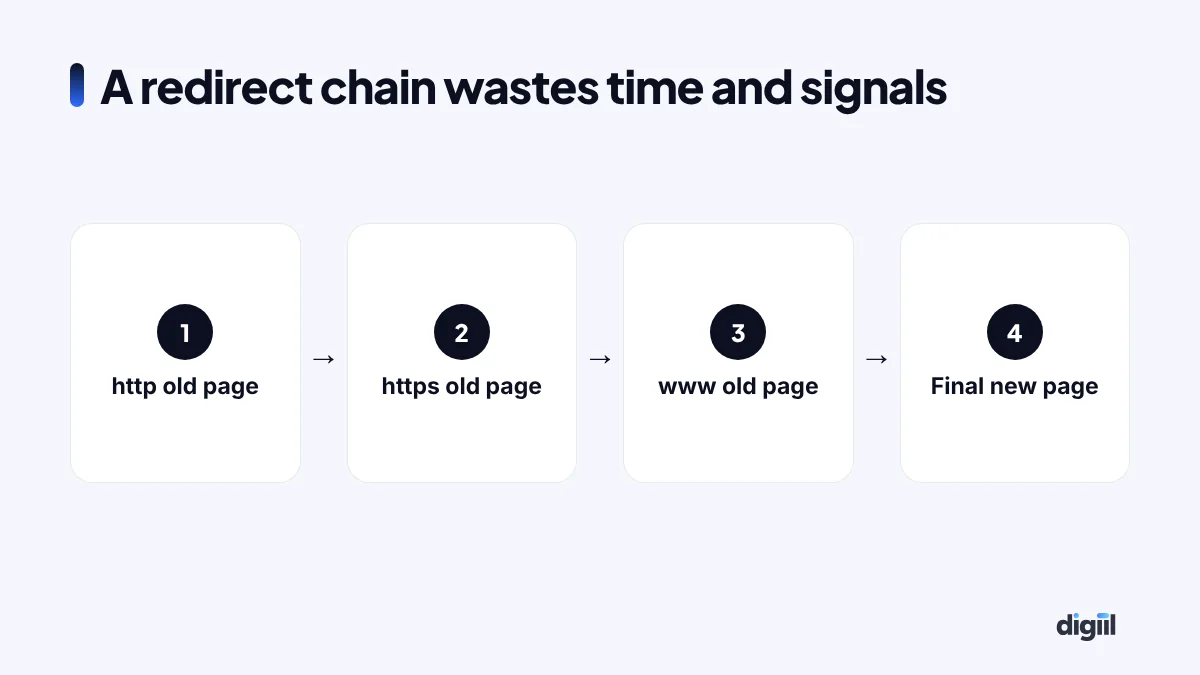
- Removed pages return the right status. A page that is gone for good and has no replacement should return 404 or 410. A page with a close replacement should be 301-redirected to it. Redirecting everything to the home page confuses users and search engines.
- Logical site hierarchy and breadcrumbs. Home, category, subcategory, page. Breadcrumbs help users and give search engines context, and they can appear in search results.
- A custom 404 page that helps lost visitors with search and links to main sections, while still returning a real 404 status code.
Speed and Core Web Vitals
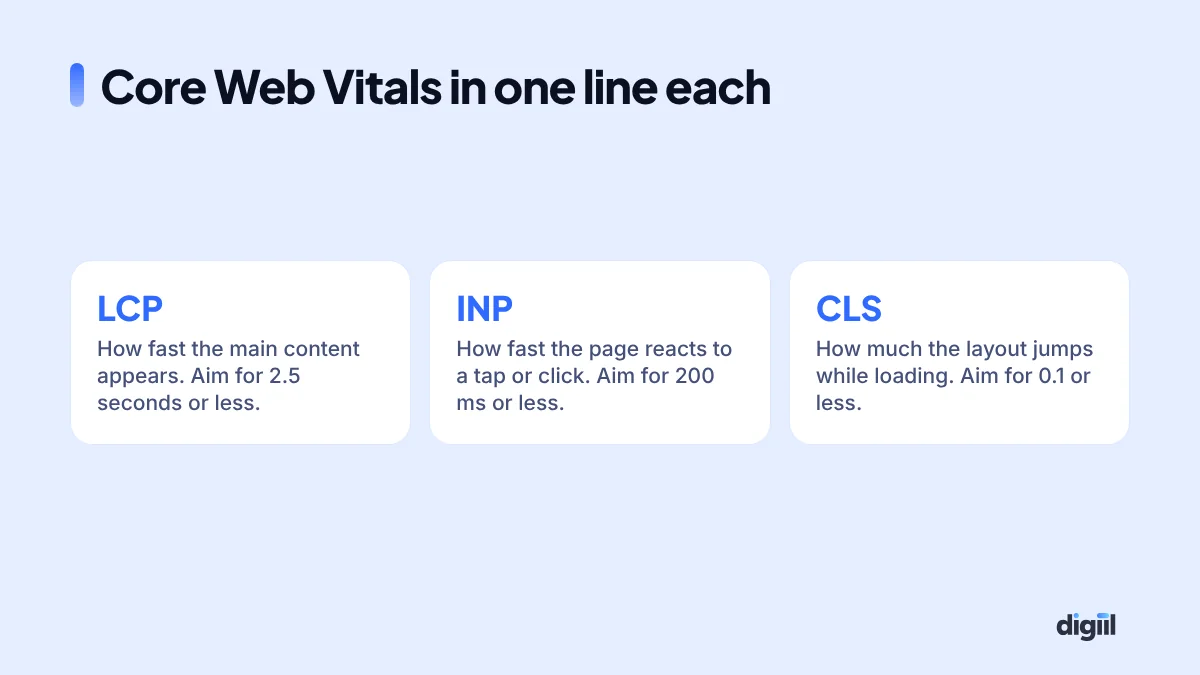
- Core Web Vitals pass for real users. Search Console’s Core Web Vitals report groups pages by status using real visitor data. PageSpeed Insights shows the same field data for single URLs, plus lab diagnostics. Focus on mobile, where most visitors in Bangladesh are.
- Images are compressed and sized correctly. Use WebP or AVIF, resize to the largest size actually displayed, and lazy-load images below the first screen. Do not lazy-load the main image at the top, since that delays LCP.
- Caching and a CDN are in place. Page caching and browser caching cut server work. A CDN such as Cloudflare serves files from locations closer to visitors.
- Scripts are under control. Remove unused plugins, chat widgets, sliders and tracking scripts. Delay non-essential scripts until after the page loads. Each third-party script adds weight and often hurts INP.
The full method is in our website speed optimisation guide.
Mobile and security
- The mobile version has the same content as desktop. Google mainly uses the mobile version for indexing and ranking. Content, headings, structured data and internal links hidden on mobile may be ignored.
- Tap targets and text are usable. Buttons large enough to tap, text readable without zooming, no horizontal scrolling, no pop-ups covering the content on arrival.
- HTTPS everywhere. A valid certificate, every page on https, and no “mixed content” where images or scripts still load over http. Your browser’s padlock and developer console show warnings.
Structured data and extras
- Structured data is valid and honest. Organization, LocalBusiness, Product, Article, BreadcrumbList and FAQ markup help search engines understand pages and can enable rich results. Test with the Rich Results Test and fix errors. Mark up only what is visible on the page.
- International targeting is correct, if you have it. Sites with versions in several languages or for several countries need hreflang tags linking the versions together. A site in English and Bangla, for example, should tell search engines which page is which.
Notes for WordPress sites
Most small business sites in Bangladesh run on WordPress, which handles much of technical SEO well once it is set up properly. The usual weak points:
- Attachment pages. WordPress can create a separate page for every uploaded image. Your SEO plugin should redirect these to the image or the parent post.
- Tag and date archives. Useful for some blogs, thin duplicates for most business sites. Noindex them unless they serve readers.
- Page builders and heavy themes. They often load large amounts of CSS and JavaScript on every page. This is the biggest single cause of poor mobile scores we see on WordPress.
- Plugin overlap. Two SEO plugins, or a theme and a plugin both printing meta tags and schema, produce duplicate or conflicting tags. Use one source for each job.
- Search and filter URLs from WooCommerce, such as ?orderby= and ?filter_color=, can multiply indexable pages. Make sure they are canonicalised or noindexed.
Notes for online stores
- Out-of-stock products: keep the page live with alternatives if the item will return. If it is gone for good, redirect to the closest product or category.
- Product variants: one indexable page per product with variant options, rather than a separate page for every colour, unless each variant gets its own searches.
- Product structured data: price, availability and reviews in valid markup, matching what the page shows.
- Category pages: give them a short, useful introduction, because they often rank for the broadest and most valuable searches.
- Pagination: make sure deeper pages of a category can still be crawled through normal links.
Checks to repeat after big changes
Most technical disasters happen during a redesign, a move to new hosting or a switch of platform. After any of these, check at least these five the same day: robots.txt, noindex settings, the sitemap, redirects from every old URL, and Core Web Vitals. Then watch Search Console’s Pages report daily for two weeks.
If you change domain or URL structure, prepare a full list of old URLs with their new destinations before launch. Missing redirects are the main reason sites lose traffic after a redesign. Keep the redirects in place permanently.
How to prioritise what you find
| Priority | Examples | When to fix |
|---|---|---|
| Critical | Site blocked in robots.txt, key pages noindexed, whole site down, hacked content | Today |
| High | Broken redirects after migration, duplicate domain versions, failing Core Web Vitals on main pages | This week |
| Medium | Redirect chains, broken internal links, thin archive pages, missing structured data | This month |
| Low | Minor URL tidying, small speed gains on rarely visited pages | When convenient |
Keep a log of each audit: date, what you found, what you fixed. It turns technical SEO into routine maintenance instead of emergency repair. It fits naturally into the website maintenance checklist.
Get a second pair of eyes
A checklist catches most problems. Some, such as JavaScript rendering issues, crawl budget on very large sites or subtle canonical conflicts, take experience to spot. If you want an expert review, request our free SEO audit, or see our technical SEO service for ongoing work.
Technical SEO questions
How often should I run a technical SEO audit?
A full audit once a quarter suits most business sites, plus a quick check after any redesign, migration, theme change or plugin overhaul. Large stores and news sites need closer monitoring.
Can I do technical SEO without a developer?
Many checks, such as sitemaps, robots.txt, titles, redirects and image compression, can be handled in WordPress with an SEO plugin. Server configuration, JavaScript rendering and complex speed fixes usually need a developer.
What is the most common technical SEO problem you see?
Pages that are accidentally blocked or set to noindex, usually after a redesign. Close behind are slow mobile pages caused by large images and heavy themes, and thin duplicate pages created by filters and tags.
Does technical SEO alone improve rankings?
It removes obstacles. A technically perfect site with weak content will still struggle. Technical SEO makes sure good content can be found, understood and loaded quickly.

Amanat has 7+ years in digital marketing and has managed $8M+ in Google and Meta ad spend for 235+ brands in the UK, USA, Australia and Bangladesh. He holds 20+ certifications, including Digital Marketing Strategy from Harvard Business School Online. More about Amanat