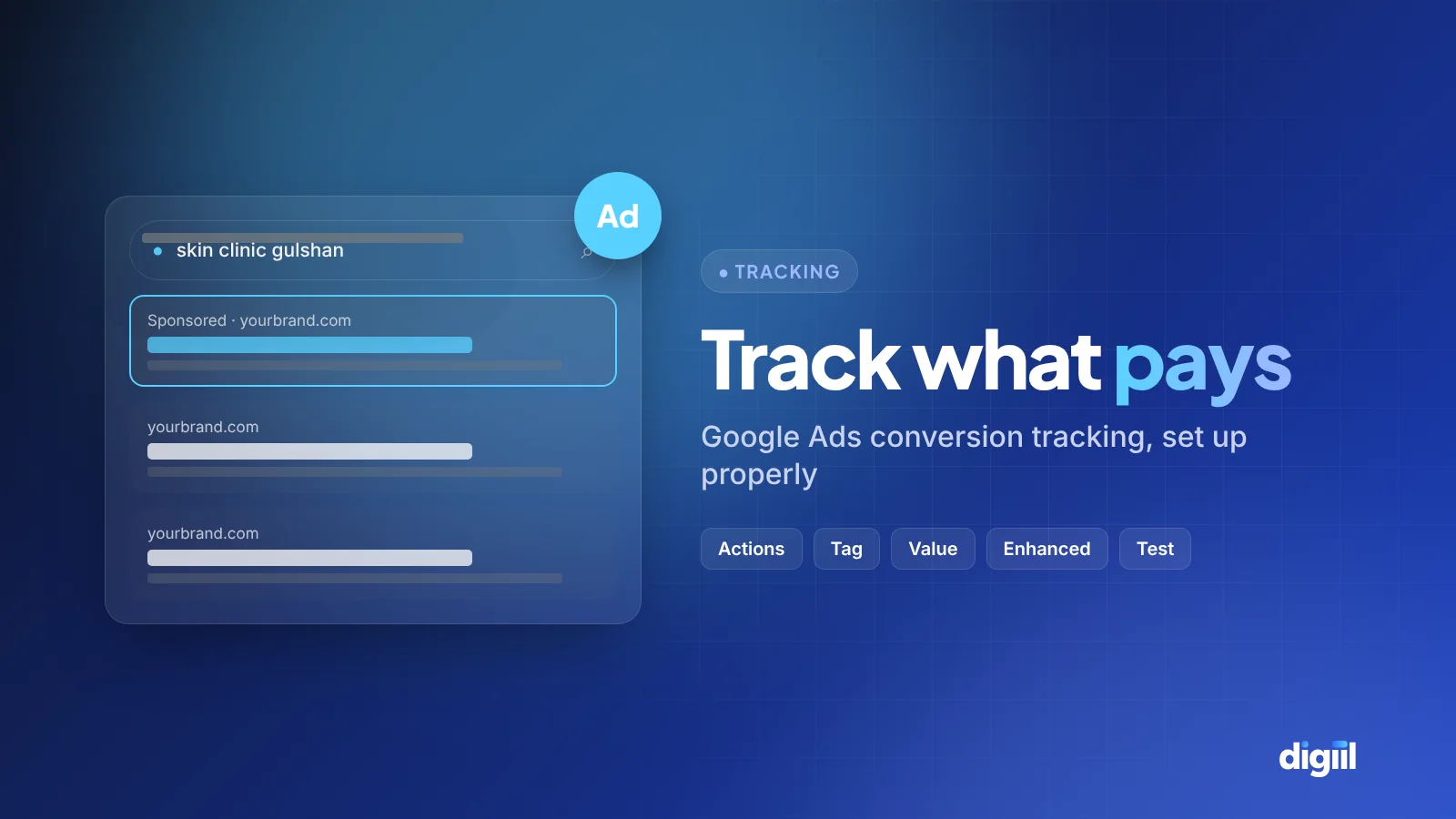
Google Ads bidding is powerful and literal. If you tell it that a page view is a conversion, it will find you page viewers. If your purchase tag fires twice, it will chase customers who do not exist. Google Ads conversion tracking is the instruction manual you give the system, and getting it right matters more than any bid strategy.
Step 1: Decide what counts
Before any code, write down the actions that are worth money to your business, and roughly how much.
- Online store: purchase, with the real order value.
- Service business: lead form, call, WhatsApp click, booking, and later a qualified lead or sale.
- Clinic or salon: booking, call from the ad, directions request.
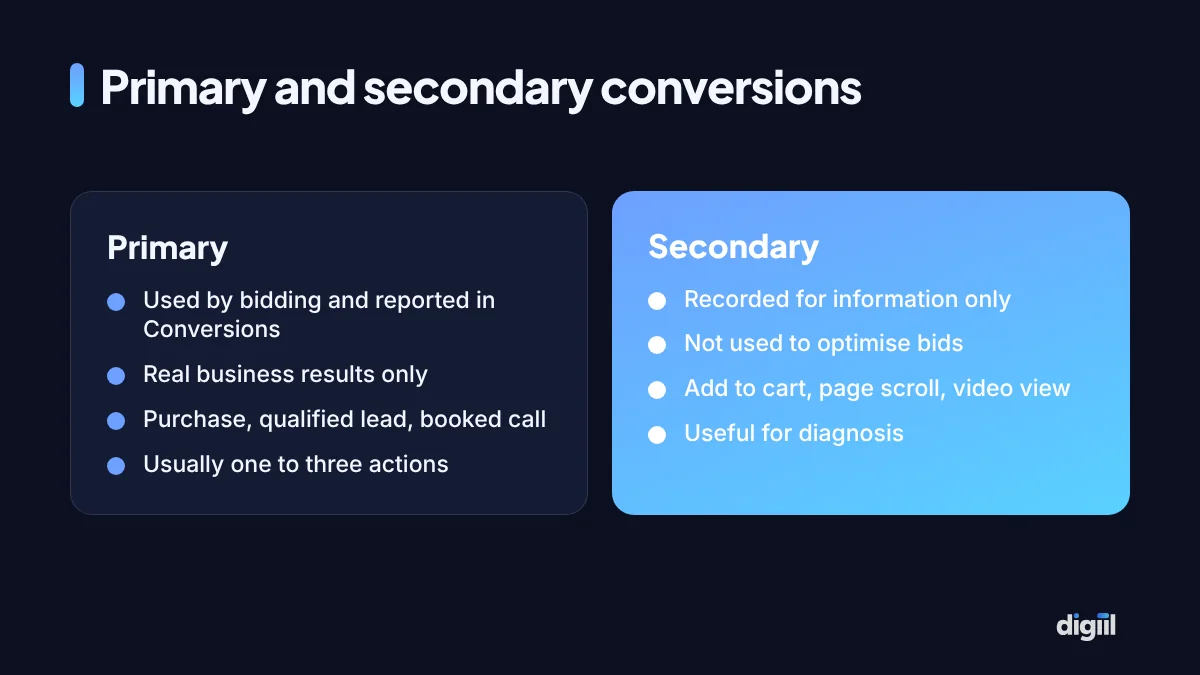
Only real business results should be primary. If “page scroll” or “time on site” is set as primary, the system will optimise for scrollers. Keep micro-actions as secondary so you can see them without steering bids.
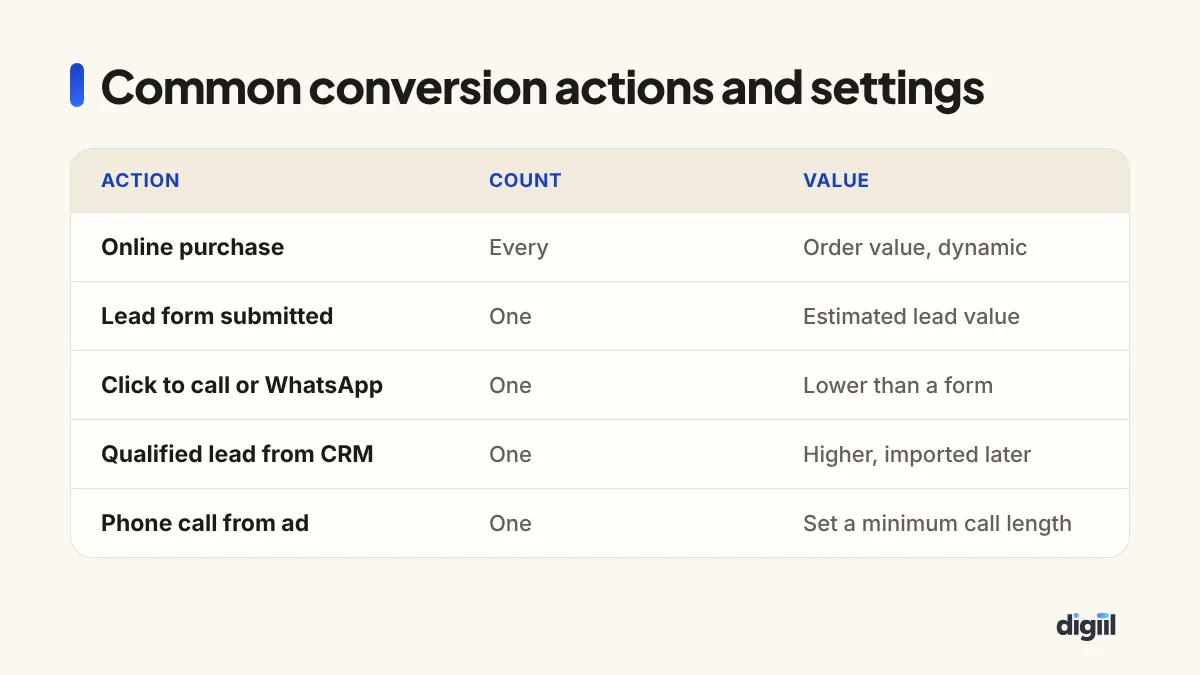
Counting: one or every?
“Every” counts each conversion, which suits purchases. “One” counts only one conversion per click, which suits leads, because one person submitting a form three times is still one lead.
Values
Give every conversion a value, even an estimate. If a lead is typically worth Tk 2,000 in profit and a call Tk 1,000, say so. Values let you use value-based bidding later and make reports meaningful.
Conversion window
The default click-through window is 30 days. For high-value services where people take longer to decide, a longer window may fit. For quick purchases, the default is fine.
The most common mistake we find in Google Ads accounts is a page view or a button click set as the main conversion. Smart Bidding then does exactly what it was told and finds people who view pages. When the primary conversion is switched to a real lead or sale, reported conversions fall, and what remains is the business the account was meant to bring.
Step 2: Choose how conversions reach Google
Option A: The Google Ads tag
Create a conversion action in Google Ads (Goals, Conversions, New conversion action, Website). Google gives you the Google tag for the whole site and an event snippet or settings for the specific action. The cleanest way to install both is through Google Tag Manager, following the same pattern as our Google Tag Manager setup guide: a Conversion Linker tag on all pages, and a Google Ads Conversion Tracking tag on the trigger, such as the thank-you page.
Option B: Import from GA4
If GA4 already records the key events you care about, link GA4 to Google Ads and import those events as conversions. It is simpler to maintain, with everything defined in one place. GA4 imports can record slightly fewer conversions and arrive later than the native tag.
Option C: Platform integrations
Shopify, WooCommerce and some CRMs have Google integrations that send purchases or leads automatically. Check what they send and whether values are included.
A common mistake is a native tag for purchases plus a GA4 import of purchases, both set as primary. Google counts both. Choose one as primary and set the other to secondary or remove it.
Step 3: Turn on enhanced conversions
Cookies are blocked or cleared more often than they used to be, so some conversions never connect back to the ad click. Enhanced conversions fix part of that by sending the customer’s email address or phone number, hashed before it leaves the page, with the conversion. Google matches it to signed-in accounts.
Enable it in the conversion settings, then configure it in Tag Manager or the Google tag so the form or checkout fields are captured. For Bangladeshi stores and lead forms, the phone number in international format is usually the most available field. Mention this data use in your privacy policy.
Step 4: Track calls and chats
- Calls from ads: call assets in search ads can be tracked as conversions, with a minimum call length so short accidental calls do not count. Google’s call reporting and forwarding numbers are available only in some countries, so check what your account supports.
- Taps on phone numbers on your site: track clicks on tel: links as conversions through Tag Manager.
- WhatsApp clicks: track clicks on wa.me links the same way, as a lower-value action.
Step 5: Import offline results
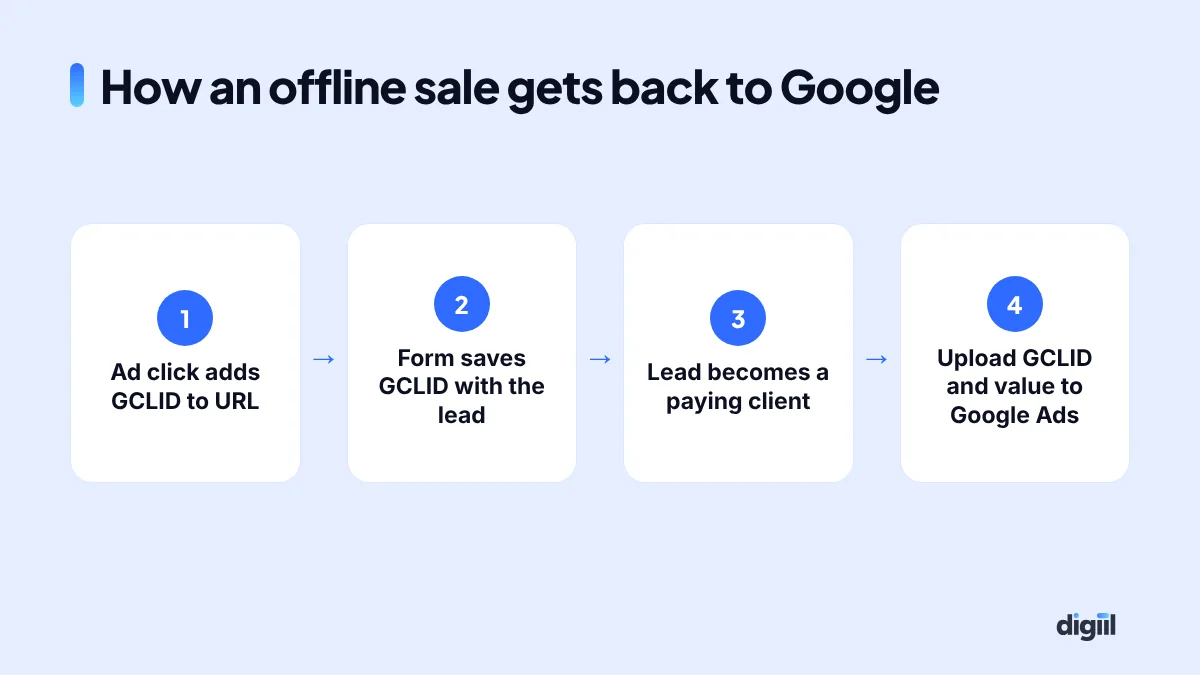
For service businesses, the website form is rarely the real result. The real result is a paying client weeks later. Offline conversion import closes that loop.
- Keep auto-tagging on, so each ad click adds a GCLID parameter to the landing page URL.
- Save the GCLID in a hidden form field along with the lead’s details, and store it in your CRM or sheet.
- Mark the lead’s outcome when it qualifies or pays, with the value.
- Upload regularly to Google Ads, manually or through a CRM integration, using the GCLID, conversion name, time and value.
Once Google sees which clicks became clients, it can bid towards clients rather than form fillers. This is one of the highest-value improvements for any lead generation account.
Step 6: Test before you trust
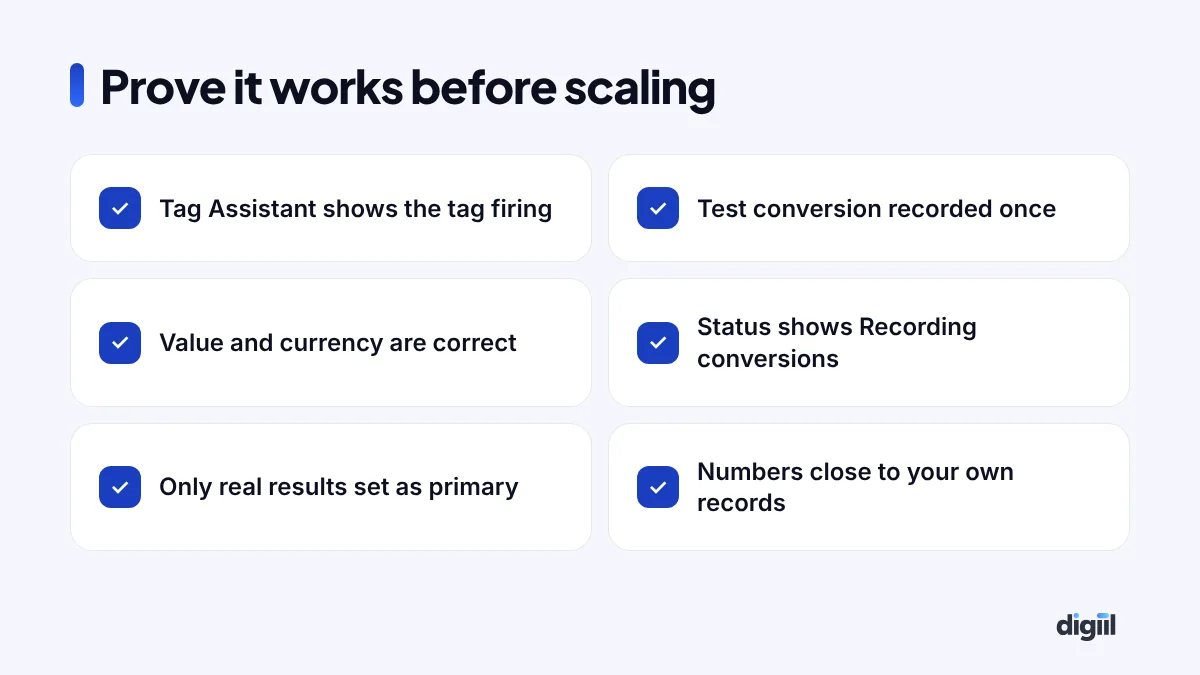
Use Tag Assistant to load your site, complete a test action, and confirm the conversion tag fires once with the right values. In Google Ads, the conversion action status should change to “Recording conversions” within a day. Then compare a week of Google Ads conversions with your own records. They will not match exactly, because of attribution windows and modelled conversions, but they should be close.
Choosing a bid strategy once tracking works
Tracking and bidding go together. A rough path for a new account:
- No conversions yet: Maximise clicks with a sensible maximum cost per click, or manual bidding, while you confirm tracking and learn which keywords convert.
- Steady conversions each month: Maximise conversions, then a target cost per acquisition once you know what a lead or sale normally costs.
- Purchases with values: Maximise conversion value, then a target return on ad spend.
- Qualified leads imported from your CRM: bid towards those rather than raw form fills.
Moving to automated bidding before tracking is reliable is the most expensive mistake on this list, because the system optimises confidently in the wrong direction.
A worked example: a clinic
A dental clinic runs search ads for implants and braces. It sets up four conversion actions: booking form submitted (primary, counted once, value Tk 3,000), tap on phone number (primary, counted once, value Tk 1,500), WhatsApp click (secondary), and paid treatment imported from the clinic’s patient sheet weekly using the GCLID (primary, actual treatment value). After two months, the clinic can see that one keyword group produced many form fills but few paid treatments, while another produced fewer leads that more often became patients. It moves budget accordingly, something it could never have seen from form submissions alone.
Consent and modelled conversions
If you have visitors from the EU or the UK, you need a consent banner, and Google’s consent mode adjusts tags based on each visitor’s choice. Google then models some conversions it cannot observe directly. For a mainly Bangladeshi audience the legal requirements are lighter today, but it is worth having a clear privacy policy that explains your tracking.
Common problems
| Problem | Likely cause |
|---|---|
| Status “No recent conversions” | Tag not firing on the thank-you step, or wrong trigger |
| Conversions doubled | Same action tracked twice as primary, or counting set to Every for leads |
| Purchase value is zero | Value not passed from the checkout, or wrong currency |
| Many leads, few real enquiries | Spam forms counted, or optimising for clicks not qualified leads |
| Smart bidding behaving strangely | A secondary-worthy action set as primary |
For tracking problems across Google, Meta and analytics together, see how to fix ad tracking. Performance Max and other automated campaigns depend on this setup most of all, as explained in Performance Max campaigns. For what clicks cost once tracking is right, see Google Ads cost in Bangladesh.
If you would like conversion tracking set up or audited, see our tracking services and Google Ads management, or book a free 15-minute strategy call.
Conversion tracking questions
Should I use Google Ads tags or import from GA4?
Both work. The Google Ads tag usually records more conversions and supports enhanced conversions directly. Importing GA4 key events is simpler if GA4 is already well set up. Do not set the same action as primary in both, or you will double count.
What are enhanced conversions?
Enhanced conversions send hashed customer details, such as email or phone, with a conversion so Google can match it to a signed-in user. It recovers conversions that cookies alone miss.
How long until conversions appear?
Test conversions can take a few hours to show. The conversion action status may take up to a day to change to Recording conversions.
Why does Google Ads show more conversions than my store?
Usual causes are counting set to Every for leads, the same action tracked twice, a tag firing on page reloads of the thank-you page, or view-through conversions included. Check each action's settings.
Can I track WhatsApp clicks as conversions?
Yes, as a click event from Google Tag Manager or the Google tag. Treat it as a lower-value or secondary action, because a click is not yet a sale.

Amanat has 7+ years in digital marketing and has managed $8M+ in Google and Meta ad spend for 235+ brands in the UK, USA, Australia and Bangladesh. He holds 20+ certifications, including Digital Marketing Strategy from Harvard Business School Online. More about Amanat