A store owner messaged us on a Sunday night. “Meta ads stopped working. Sales are the same, but Meta says we sold half as much.” He was about to cut his budget in half.
His ads were fine. His tracking was not. Meta could only see about half of his real orders, so its algorithm thought the ads were failing. If he had cut the budget, he would have lost sales for no reason.
This is one of the most common problems we see. Most ad accounts optimise on bad data, and nobody notices until the numbers stop making sense. Here is why it happens, and the three steps we use to fix it.
Why your ad data is wrong
Ad platforms like Meta, Google and TikTok learn from conversions. Every purchase or lead you send them teaches the algorithm who to show your ads to. When conversions go missing, the learning breaks.
Data goes missing for a few common reasons:
- Ad blockers stop tracking scripts from loading.
- Browser limits, like Safari’s tracking prevention, shorten how long cookies last.
- Consent choices mean some users say no to tracking.
- Broken tags fire twice, fire on the wrong page or do not fire at all.
- Slow pages close before the tag sends anything.
Step 1: Measure the gap
Before you fix anything, find out how big the problem is. It takes about 30 minutes.
Choose seven days with no big sale or site change.
Pull the number of paid orders from your store or CRM for that week.
Check purchases reported in Meta Events Manager, Google Ads and GA4 for the same days.
Platforms use different attribution rules, so numbers will never match perfectly. But if a platform sees far fewer orders than you really had, or more than you had, your tracking needs work.
Step 2: Fix the web layer
Most problems start in the browser setup. Clean it up first, using Google Tag Manager:
- Add a data layer. Your site should send order ID, value, currency and items to GTM in a standard format, instead of tags scraping the page.
- Use a transaction ID on every purchase, so duplicates can be removed.
- Stop double fires. Make sure purchase fires once, only on the confirmation step, and not again on page reload.
- Remove old tags from tools you no longer use.
- Connect consent. Set up a consent banner with Google Consent Mode v2, so tags respect user choices.
| Problem | What you see | Fix |
|---|---|---|
| Purchase fires twice | More purchases than orders | Transaction ID + fire once |
| Missing value | ROAS shows zero or blank | Send value and currency |
| Tag blocked | Far fewer purchases than orders | Server-side + CAPI |
| No consent setup | Legal risk, poor modelling | Consent Mode v2 |
Step 3: Add server-side tracking
Even a perfect browser setup misses some events. The next step is to send conversions from your server too.
- Meta Conversions API sends purchases and leads straight from your server to Meta. Meta’s own Conversions API guide recommends using it with the Pixel.
- Server-side GTM collects events on your own subdomain, then forwards them to GA4, Google Ads, Meta and TikTok.
- Deduplication keeps both signals without double counting. The browser and server events share the same event name and event ID.
For lead businesses, go one step further. Send qualified leads and closed deals from your CRM back to the ad platforms, so they learn what a real customer looks like.
What happens after the fix
For the store owner from the start of this post, the change was fast. After we rebuilt GTM and added CAPI through server-side GTM, Meta went from seeing about half of real orders to almost all of them. Within weeks, cost per purchase fell by about a quarter, with no change to the ads themselves. You can read the full tracking case on our services page.
Results vary by store, traffic and setup. But in our experience, clean data is one of the highest-return fixes in paid advertising, because every campaign benefits at once.
What the gap looks like in real numbers
Here is an example week from an online store, before any fix. The numbers are illustrative, but this shape is very common.

| Source | Purchases reported | Compared with real orders |
|---|---|---|
| Store (real paid orders) | 200 | 100% |
| GA4 | 148 | 74% |
| Meta Events Manager | 112 | 56% |
| Google Ads | 131 | 66% |
When a platform sees only about half of your sales, two things go wrong. Your reports say campaigns are weaker than they are. And smart bidding learns from a smaller, biased sample of buyers, so it finds fewer people like your real customers.
The Bangladesh problem: cash on delivery
In Bangladesh, a large share of online orders are cash on delivery. That creates a tracking trap most guides ignore.
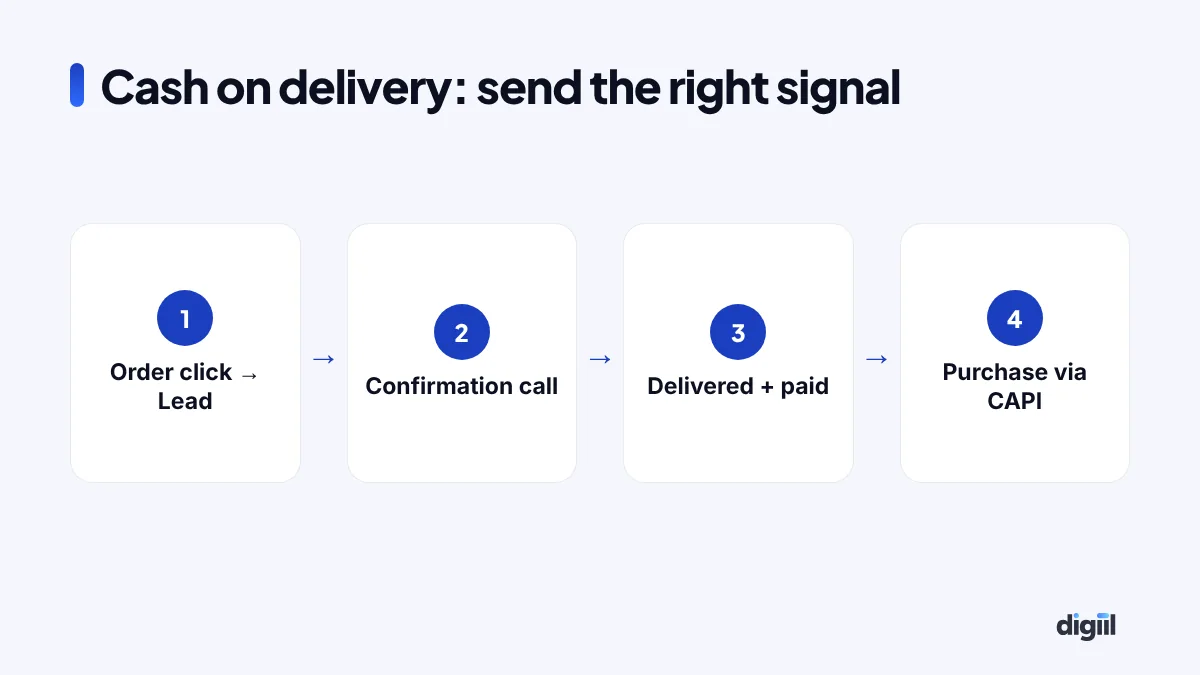
- The “purchase” event fires when the customer clicks “Confirm order”.
- Some of those orders are fake, cancelled on the confirmation call or refused at the door.
- Meta still counts every one of them as a sale, and learns to find more people who click but do not pay.
The fix is to send two different signals. Send the order click as a lead-style event, and send the real purchase only when the parcel is delivered and paid. You can do this from your order system with the Conversions API. Our guide on reducing fake COD orders explains the order side.
Event Match Quality: the score to watch
In Meta Events Manager, each server event gets an Event Match Quality score out of 10. It shows how well Meta can match your event to a real person on Facebook or Instagram.
| Data you send | Effect on matching |
|---|---|
| Hashed phone number | Very strong in Bangladesh, where most buyers order by phone |
| Hashed email | Strong, if you collect it |
| Click ID (fbc) and browser ID (fbp) | Strong; links the event to the ad click |
| IP address and user agent | Helpful support signals |
| City, district, postcode | Small extra help |
Always hash personal data with SHA-256 before it leaves your server. Format phone numbers with the country code (880) first.
A 14-day fix plan
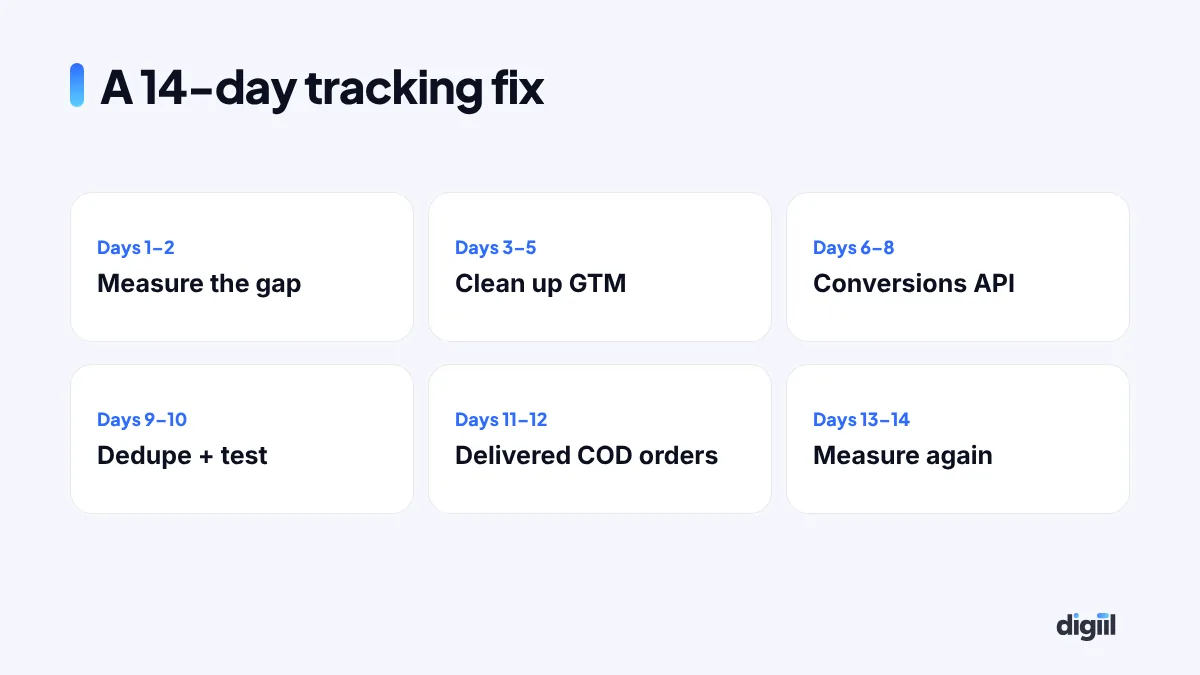
- Days 1–2: measure the gap with the method above. Write down the numbers.
- Days 3–5: clean up GTM. Add a data layer, a transaction ID and remove duplicate tags.
- Days 6–8: set up the Conversions API or a server-side GTM container on your own subdomain.
- Days 9–10: add deduplication with matching event IDs. Test in Events Manager and GA4 DebugView.
- Days 11–12: connect delivered COD orders as the real purchase event.
- Days 13–14: measure the gap again and compare.
Expect the platforms’ learning to settle over the following two to four weeks. Do not make big budget changes during that time.
Common mistakes during the fix
- Sending the purchase twice without event IDs, which doubles your reported sales.
- Forgetting test events left switched on, which pollutes real data.
- Using the wrong currency or value, for example sending Tk as USD.
- Changing campaigns at the same time, so you cannot tell what caused the change.
- Ignoring consent rules when selling to the UK, Europe or other regulated markets.
If you want an expert to do the audit, our Meta Pixel and CAPI service starts with a free gap check.
Orders that close in WhatsApp or Messenger: send them back to Meta
In Bangladesh, a big share of sales never touches a checkout page. Someone clicks the ad, sends a message, agrees on the size and pays cash on delivery. Your Pixel sees the click and the chat, then nothing. Meta thinks the ad brought a conversation, not a sale, so it keeps finding people who like to chat.
The fix is to send confirmed orders back to Meta yourself, through the Conversions API as offline or CRM events. You do not need a developer for the first version.
- Record each order with the buyer’s phone number in one sheet or order system: date, phone, order value, and whether it was delivered.
- Send only delivered orders. A refused COD parcel is not a sale, and teaching Meta that it is will bring you more refusers.
- Upload or connect them daily in Events Manager. Meta hashes the phone numbers and matches them to the people who saw or clicked your ads.
- Optimise on that event once you have 50 or more a week. Until then, keep optimising for messages, but judge campaigns by delivered orders.
The first thing most pages learn from this is uncomfortable: of all the ads that bring messages, only a few bring delivered orders. Once Meta can see that, you can turn off the rest and move the budget to the ads that sell.
| Where the sale happens | What to send | How |
|---|---|---|
| Website checkout | Purchase, with order value | Pixel + Conversions API with the same event ID |
| WhatsApp or Messenger chat | Delivered order, with phone and value | Offline or CRM events in Events Manager |
| Phone call | Qualified call or booked visit | Log in a sheet, upload daily |
| Shop visit after an ad | Purchase with phone at the counter | Offline events from your POS export |
A 10-minute tracking health check you can run every Monday
Tracking breaks quietly. A theme update, a new plugin or a checkout change can stop purchases from firing, and nobody notices until the cost per sale doubles. This short routine catches it early.
- Compare three numbers for last week: real orders in your store or sheet, purchases in Meta Events Manager, and purchases in GA4. A gap above 20 to 30% that suddenly widens means something broke.
- Open Events Manager → your Pixel → Overview. Check that both “Browser” and “Server” appear next to Purchase, and that the deduplication rate is high.
- Look at Event Match Quality for Purchase. If it dropped, a field such as phone or email has stopped being sent.
- Place one real test order once a month, with Test Events open, and watch it arrive.
- Check GA4 → Admin → DebugView after any site change, so you see events live before customers do.
Write the three weekly numbers in one row of a sheet. After a month you have a baseline, and any break shows up as a jump you cannot miss.
Your tracking checklist
- Platform purchases are close to real orders.
- Every purchase has a transaction ID, value and currency.
- Purchase fires once per order.
- Consent banner is connected to Consent Mode v2.
- Meta CAPI is live with deduplication.
- Event match quality for purchases is in the good range.
- Key leads and sales from the CRM are sent back to ad platforms.
- Ad platforms optimise only as well as the data they get.
- Measure the gap between real orders and platform numbers first.
- Clean up GTM with a data layer and transaction IDs.
- Add server-side tracking and CAPI, with deduplication.
- Check your setup every month, especially after site changes.
Frequently asked questions
How do I know if my ad tracking is broken?
Compare real orders or leads from your store or CRM with what Meta, Google Ads and GA4 report for the same week. A big gap, or more conversions than real orders, means something is wrong.
Does server-side tracking fix everything?
No, but it closes much of the gap caused by ad blockers and browser limits. It still needs a clean web setup and must respect user consent.
What is event deduplication?
When the browser and the server both send the same purchase, deduplication uses a shared event name and event ID so the platform counts it once.
How long does a tracking fix take?
Most setups take two to four weeks, including the audit, rebuild, testing and dashboard.

Amanat has managed $4M+ in Google and Meta ad spend for brands in the UK, USA, Australia and Bangladesh since 2020. He holds 20+ certifications, including Digital Marketing Strategy from Harvard Business School Online. More about Amanat