A cosmetics store in Dhaka had a strange problem. Their shop recorded 310 orders in a month. Meta Ads Manager showed 96 purchases. Their ads looked expensive, so they kept cutting budgets. The ads were not the problem. Meta simply could not see most of the sales.
Setting up the Meta Pixel on WooCommerce, together with the Conversions API, fixes this kind of gap. This guide explains what each piece does, how to set it up, how to test it and the mistakes that break it.
Pixel, CAPI and why you need both
The Meta Pixel is a small script in the customer’s browser. It tells Meta when someone views a product, adds to cart or buys. But ad blockers, privacy settings and slow pages can stop it.
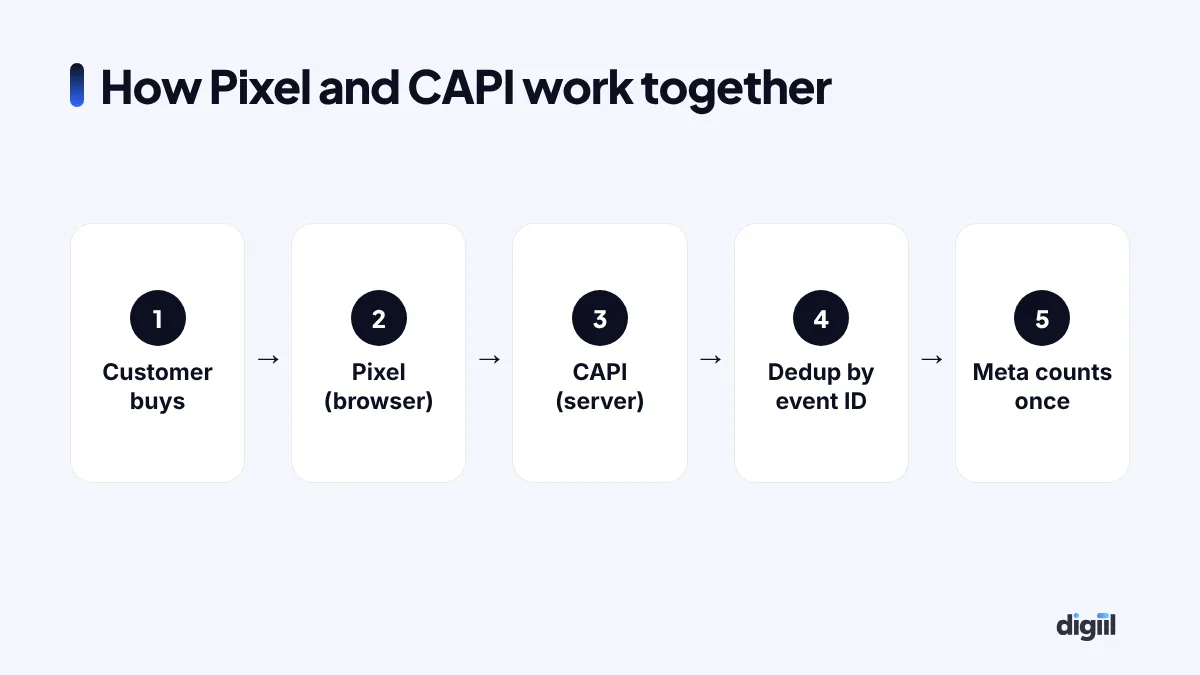
The Conversions API (CAPI) sends the same events from your server directly to Meta. It is not blocked by the browser. When both send the same event with a shared event ID, Meta keeps one and drops the duplicate. This is called deduplication.
The events that matter
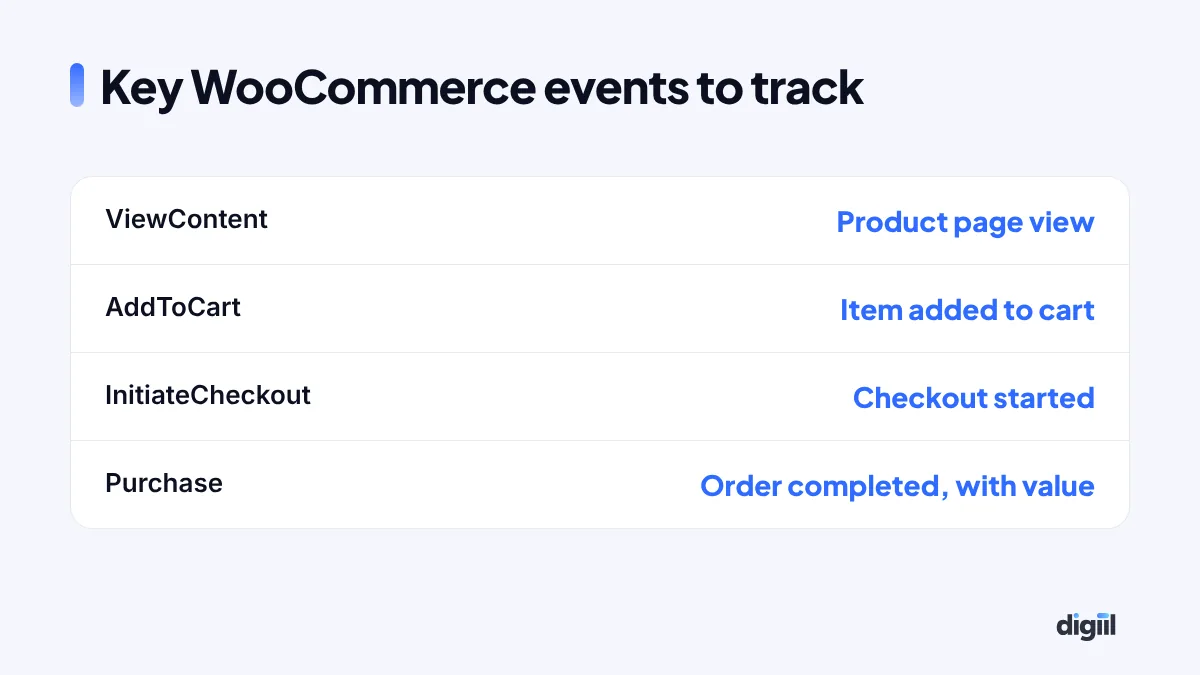
At minimum, track product views, add to cart, checkout started and purchase. The purchase event must include the order value and currency (BDT or your store’s currency), so Meta can optimise for revenue, not just order count.
Option 1: Meta’s official WooCommerce plugin
- Install the official Facebook for WooCommerce plugin.
- Connect it to your Meta Business account, page, ad account and Pixel.
- Enable the Conversions API in the plugin settings.
- Sync your product catalog if you want dynamic product ads.
- Test with Events Manager.
This is the simplest route for most small stores.
Option 2: Google Tag Manager with server-side tagging
For bigger stores, or stores that also need Google Ads and GA4 tracking, server-side GTM gives more control. It sends events from your own tagging server to Meta, Google and others. It needs more setup and a small hosting cost. Our server-side tracking service explains this approach.
Option 3: A trusted tracking plugin
Several WooCommerce tracking plugins support Pixel plus CAPI with deduplication. Pick one with good reviews and active updates. Do not combine several plugins that all send Purchase events, or you will double count.
Improve match quality
Meta matches events to people using hashed customer details. The more good data you send, the better the match. With customer consent and according to your privacy policy, send:
- Email and phone number (hashed automatically by good setups).
- First and last name, city and country.
- The fbp and fbc browser cookies.
- Client IP address and user agent.
Events Manager shows an “Event Match Quality” score. Aim to improve it over time.
How to test your setup
- Open Events Manager, choose your Pixel and go to Test Events.
- Open your store using the test link or test code.
- View a product, add to cart, start checkout and place a test order (use cash on delivery and cancel it later).
- Check each event appears once, marked as received from both browser and server, and deduplicated.
- Check the Purchase value and currency are correct.
Common errors and fixes
| Problem | Likely cause | Fix |
|---|---|---|
| Purchases counted twice | Two plugins or no shared event ID | Use one method, enable deduplication |
| Purchase value is 0 | Value not passed | Check plugin settings and thank-you page |
| Purchase missing for some orders | Payment gateway skips thank-you page | Fire from server on order status |
| Wrong currency | Store and Pixel settings differ | Match store currency |
| Low match quality | Few customer details sent | Send email, phone and cookies with consent |
Privacy and consent
Tell visitors in your privacy policy that you use tracking for ads and analytics. If you sell to the UK or EU, use a proper consent banner. Respect people who say no. Good tracking and good privacy can work together.
What improves after tracking is fixed
When Meta sees more of your real sales, three things usually happen. Reports become closer to reality, so you stop cutting good ads. Smart bidding gets better data, so it finds more buyers. And retargeting audiences grow, because more visitors are recognised.
Step-by-step: checking your setup in the browser
Besides Events Manager, a few simple checks help you spot problems quickly:
- Install the Meta Pixel Helper browser extension.
- Open a product page. The helper should show PageView and ViewContent once each.
- Add the product to cart. AddToCart should fire once, with the product ID and value.
- Go to checkout. InitiateCheckout should fire once.
- Place a test order. On the thank-you page, Purchase should fire once with the order value.
If you see two Purchase events, or a Purchase on every page refresh, something is wrong. Many stores double count because the thank-you page fires Purchase again when customers reload it.
Cash on delivery and cancelled orders
Most Bangladeshi stores sell with cash on delivery. That creates a tracking question: when is a sale really a sale?
- Option 1: Purchase on order placed. Simple and fast. Meta learns quickly. But cancelled and returned orders still count.
- Option 2: Purchase on order confirmed. Fire the server event only after your team confirms the order by phone. Data is cleaner, but slightly delayed.
- Option 3: Both, as different events. Send “Purchase” on placement and a custom event like “ConfirmedOrder” after confirmation, then optimise for the one that works best.
Advanced setups also send offline conversions or adjust values for returns. Start with option 1 or 2, then improve.
Catalog and dynamic ads
When your Pixel events include product IDs that match your catalog, you can run dynamic product ads. These automatically show people the exact products they viewed or added to cart. For stores with many products, they are often the best performing retargeting ads.
To make them work:
- Sync your WooCommerce products to a Meta catalog.
- Make sure the product IDs in your events match the catalog IDs.
- Keep prices and stock updated.
- Use good product images, ideally square, with clean backgrounds.
What good data looks like
| Check | Healthy sign |
|---|---|
| Purchases in Meta vs real orders | Reasonably close, without big gaps or double counts |
| Event deduplication | Browser and server events shown as deduplicated |
| Event Match Quality | Improving over time |
| Purchase value | Matches order totals in your currency |
| Diagnostics tab | No major warnings |
Check these once a month. Plugins update, themes change and payment gateways add new steps, so tracking can break quietly.
Speed and tracking can work together
Store owners sometimes worry that tracking slows the site. Too many scripts can. The fix is not to remove tracking, but to clean it up: one Pixel, one GA4 tag, no duplicate plugins, and server-side delivery where possible. Read our guide on server-side tracking to learn how moving events to a server can make tracking more reliable and your site lighter.
Troubleshooting checklist for store owners
If Meta’s numbers suddenly look wrong, go through this list before changing your ads:
- Did someone install a new plugin, theme or checkout page recently?
- Did the payment gateway change how customers return to your site?
- Are there two Pixels, or the same Pixel added twice?
- Does Events Manager show warnings in the Diagnostics tab?
- Is the Conversions API still connected, or did an access token expire?
- Are events deduplicated, with matching event IDs?
- Do purchase values still match your order totals?
Most tracking problems come from a recent change. Finding that change is usually faster than rebuilding everything.
Who should own your tracking
Your Pixel, Conversions API access, Business portfolio and analytics accounts belong to your business. Agencies and freelancers should get partner access, not ownership. If someone else created your Pixel in their own account, ask them to share or transfer it now. Changing Pixels later means losing your history and audiences.
Event parameters: what each purchase should carry
An event without the right details is half useful. Meta needs these parameters on every purchase to optimise well and report value correctly.
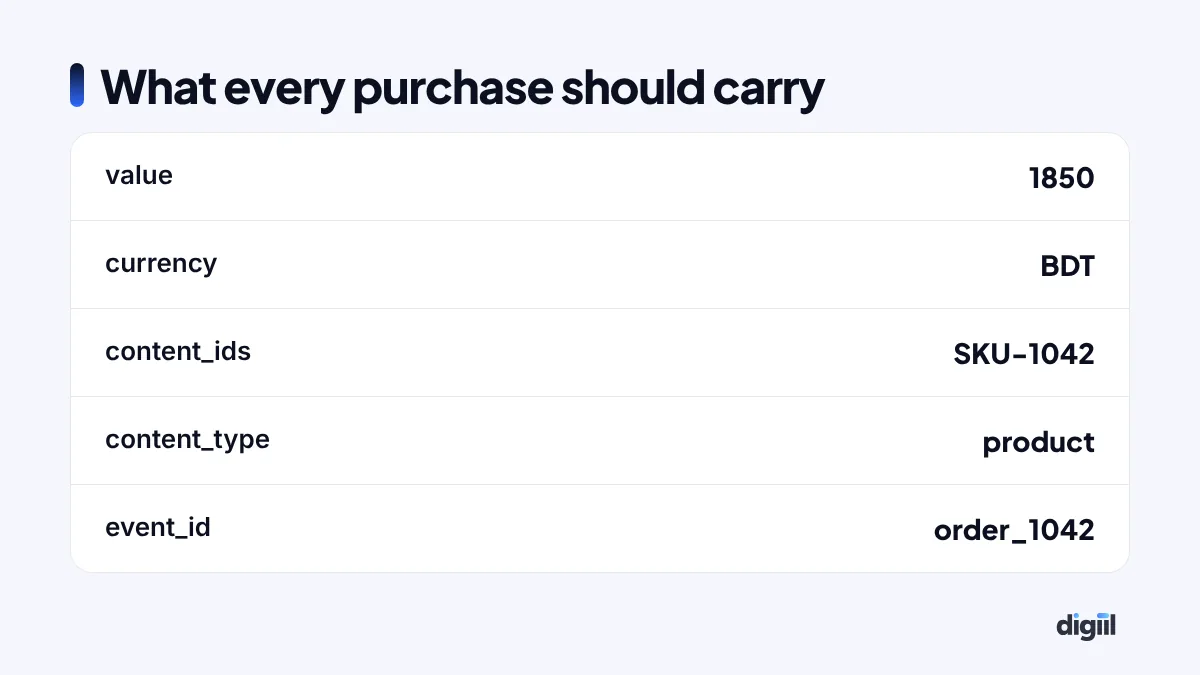
| Parameter | Example | Why it matters |
|---|---|---|
| value | 1850 | Lets Meta optimise for revenue, not just order count |
| currency | BDT | Wrong currency makes reported revenue wrong by a huge factor |
| content_ids | [“SKU-1042”] | Links sales to products in your catalogue for dynamic ads |
| content_type | product | Required for catalogue matching |
| num_items | 2 | Helps understand basket size |
| event_id | order_1042 | Removes duplicates between Pixel and CAPI |
Use the same product IDs in your Pixel events and your Meta catalogue. If the catalogue uses SKUs and the Pixel sends WooCommerce post IDs, dynamic ads will not match.
Plugin options compared
There are three common ways to connect WooCommerce to Meta. Each works; the right one depends on your team.
| Option | Setup effort | Control | Best for |
|---|---|---|---|
| Meta’s official plugin (Facebook for WooCommerce) | Low | Medium | Small stores that want catalogue sync and basic CAPI |
| A dedicated tracking plugin | Low to medium | Medium to high | Stores that also send events to GA4, TikTok and Google Ads |
| GTM + server-side container | High | Full | Growing stores with high ad spend and COD complexity |
Avoid running two of these at once. Two plugins sending the same purchase is the most common cause of doubled sales in Ads Manager.
Catalogue and product IDs: getting dynamic ads right
Dynamic product ads show each visitor the exact products they viewed. They are often the cheapest sales in an account. They only work when your Pixel events and your catalogue speak the same language.
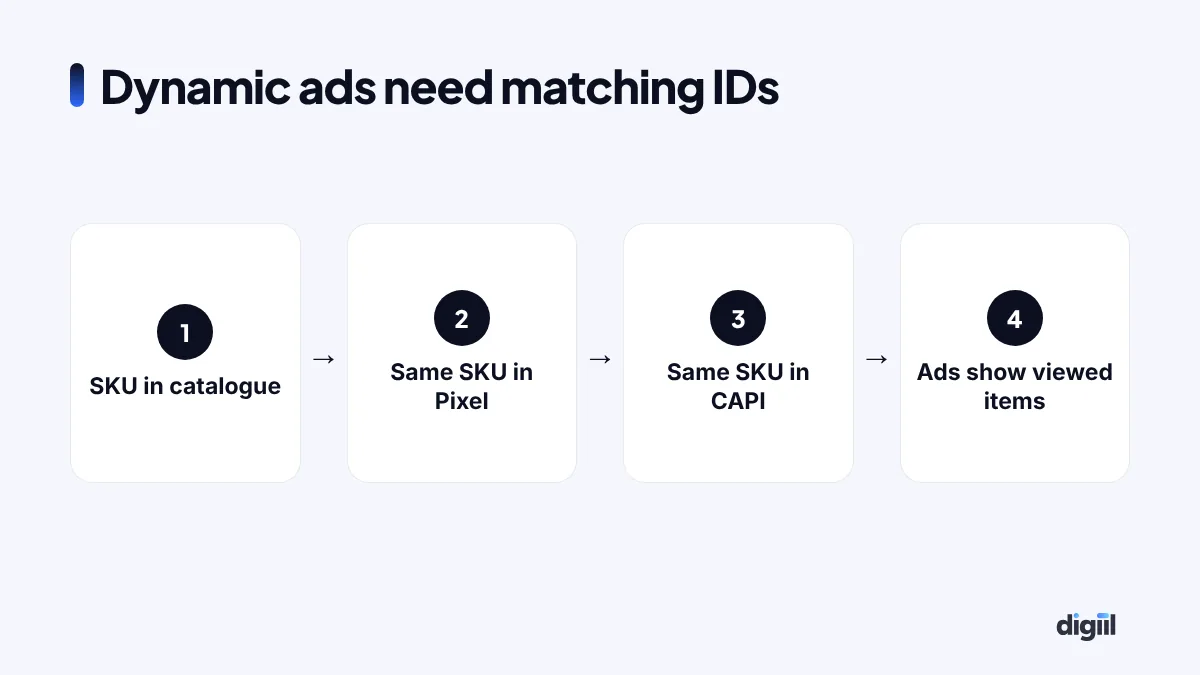
- Pick one ID for every product: usually the SKU. Use it in the catalogue and in content_ids.
- Keep the catalogue in sync. Price, stock and images must update automatically from WooCommerce.
- Handle variations. Decide whether ads show the parent product or each size and colour. Match the events to that choice.
- Check the match rate in Commerce Manager. If many events do not match catalogue items, the IDs differ.
- Exclude out-of-stock items so you never pay to advertise products you cannot deliver.
In Bangladesh, the hashed phone number is often the single strongest match signal, because most buyers give a phone but not an email. Make sure your checkout collects it in a consistent format, with 880 as the country code. Need help? Our Meta Pixel and CAPI service includes catalogue checks.
The cosmetics store, after the fix
We removed two old plugins that were fighting each other, set up Pixel plus CAPI with deduplication, and passed order value correctly. Meta’s reported purchases moved much closer to real orders. The owner stopped cutting budgets on ads that were actually working, and cost per purchase in Ads Manager dropped as the algorithm learned from better data.
The Meta Pixel on WooCommerce is not a one-time checkbox. It is the foundation of every Facebook ad you run. If you want it set up and tested properly, see our Meta Pixel and CAPI service, or read our deeper guide on fixing ad tracking.
- Use both Pixel and Conversions API, with deduplication.
- Track ViewContent, AddToCart, InitiateCheckout and Purchase with value.
- Use one tracking method, not several plugins at once.
- Test with Events Manager before trusting the numbers.
- Better data helps Meta find more buyers.
Quick answers
Do I need both the Pixel and the Conversions API?
Yes, ideally. The Pixel tracks from the browser, CAPI sends events from your server. Together, with deduplication, they give Meta more complete data.
What is event deduplication?
When the same purchase is sent by both Pixel and CAPI, Meta uses the event name and a shared event ID to count it only once.
Which plugin should I use for WooCommerce?
Meta's official Facebook for WooCommerce plugin, or trusted tracking plugins and server-side Google Tag Manager setups. Choose one method, not several at once.
How do I know tracking works?
Use Test Events in Meta Events Manager, place a test order, and check that each event arrives once from both browser and server with the right value and currency.

Amanat has managed $4M+ in Google and Meta ad spend for brands in the UK, USA, Australia and Bangladesh since 2020. He holds 20+ certifications, including Digital Marketing Strategy from Harvard Business School Online. More about Amanat