Ask a small business owner in Bangladesh where their sales come from, and you often hear: “Mostly Facebook, I think.” Ask for proof and there is none. Money goes into ads, SEO and influencers, but nobody knows which one really works.
This GA4 setup guide fixes that. Google Analytics 4 is free, and you only need a few things set up correctly to see which channels bring visitors, leads and sales. No jargon, just the steps that matter.
What GA4 can tell you
- How many people visit your website, and from where.
- Which channels bring them: Google search, Facebook, ads, email, WhatsApp links.
- Which pages they view and where they leave.
- Which visits turn into leads, calls or sales.
That last point is the most important. Traffic is nice. Results pay the bills.
Step-by-step setup

1. Create a GA4 property
Go to Google Analytics with a business Google account you control. Create an account, then a property. Set the time zone to Asia/Dhaka (or your main market) and your currency.
2. Add a web data stream
Add your website URL. Keep “Enhanced measurement” on. It tracks page views, scrolls, outbound clicks, site search and file downloads automatically.
3. Install the tag
Choose one way:
- WordPress: Google’s Site Kit plugin, or your SEO plugin’s integration.
- Shopify: the Google and YouTube app.
- Google Tag Manager: add a Google tag with your Measurement ID. Best if you also run Meta and Google Ads tags.
Use only one method. Two installs cause double counting.
4. Mark your key events
Decide which actions matter. For most Bangladeshi businesses:
- purchase for online stores, with value.
- generate_lead for form submissions.
- WhatsApp and phone clicks tracked as events.
- Booked meetings for service businesses.
Create these events (often through Tag Manager), then mark them as key events in GA4 Admin.
5. Link Google Ads and Search Console
Linking Google Ads lets you import key events for bidding and see ad performance in GA4. Linking Search Console shows which Google searches bring visitors.
6. Tag your links with UTMs
Links from Facebook posts, WhatsApp messages, emails and influencers often show up as “direct” or “referral”. UTM tags fix that. Example:
yourbrand.com/offer?utm_source=facebook&utm_medium=social&utm_campaign=eid_sale
Use the same naming every time: lowercase, no spaces. Keep a simple sheet of the UTMs you use.
Settings people forget
- Data retention: change from 2 months to 14 months in Admin, so you can compare longer periods.
- Internal traffic: filter your own office or team visits if they are large.
- Unwanted referrals: add payment gateways (for example, the gateway’s checkout domain) so sales are not credited to them.
- Google signals and consent: follow privacy rules for your markets and mention analytics in your privacy policy.
The three reports to check every week

You do not need to learn every GA4 screen. Look at these weekly:
- Reports → Acquisition → Traffic acquisition: sessions and key events by channel.
- Reports → Engagement → Key events: how many leads or sales, and from where.
- Reports → Engagement → Pages and screens: your most visited pages and how people engage.
Ask simple questions: Which channel brings the most leads? Which landing page converts best? Did last week’s campaign bring results, or just clicks?
Why GA4 numbers do not match other tools
| Tool | Counts | Why it differs |
|---|---|---|
| Your shop or CRM | Real orders | The source of truth for sales |
| GA4 | Tracked sessions and events | Ad blockers, consent, attribution model |
| Meta Ads | Purchases Meta can link to ads | Includes view-through, own attribution |
| Google Ads | Conversions linked to clicks | Own attribution and conversion windows |
Do not try to make them all equal. Use your shop for exact sales, GA4 for comparing channels and spotting trends, and ad platforms for optimising campaigns. Our article on fixing ad tracking explains how to close big gaps.
Common GA4 mistakes
- Installing the tag twice.
- No key events, so GA4 shows traffic but not results.
- Payment gateways stealing credit for sales.
- No UTMs on social, email and WhatsApp links.
- Leaving data retention at two months.
- Letting a freelancer own the GA4 account. Always keep admin access yourself.
Track WhatsApp and phone clicks the easy way
In Bangladesh, many website visitors never fill a form. They tap a WhatsApp or call button instead. If you do not track those taps, GA4 will make your website look useless when it is actually bringing customers.
- Open Google Tag Manager and create a trigger for “Just Links” clicks.
- Set it to fire when the Click URL contains
wa.meorapi.whatsapp.com. - Create a GA4 event tag named
whatsapp_clickusing that trigger. - Repeat with Click URL starting with
tel:for aphone_clickevent. - Publish, test with Preview mode, then mark both events as key events in GA4.
Now you can see which pages and channels bring WhatsApp chats and calls, not just visits.
Explorations: when you want deeper answers
The standard reports cover most needs. When you have specific questions, the Explore section lets you build custom tables. Useful examples:
- Landing page by source: which first pages convert best for Facebook vs Google visitors.
- Device by key event: whether mobile users convert less, which may point to a mobile design problem.
- Path exploration: what people do before they buy or leave.
- Funnel exploration: where people drop off between product page, cart and checkout.
Start with one question at a time. Explorations are powerful but easy to get lost in.
Connect GA4 to Looker Studio for a simple dashboard
If you check the same numbers every week, build a one-page dashboard in Looker Studio (free). Add sessions by channel, key events by channel, top landing pages and revenue if you sell online. Share the link with your team or agency. Everyone sees the same numbers, and meetings become shorter and more useful.
GA4 and privacy
GA4 collects data about how people use your site. Be open about it:
- Mention analytics and cookies in your privacy policy.
- If you have visitors from the UK or EU, use a consent banner and Google’s consent mode.
- Do not send personal data like names, phone numbers or emails into GA4 events.
Good privacy habits protect your visitors and your business, and they are increasingly expected by customers abroad.
A weekly 15-minute GA4 routine
| Minute | What to check | Question to ask |
|---|---|---|
| 0–5 | Traffic acquisition | Which channels grew or dropped? |
| 5–10 | Key events by channel | Where did leads and sales come from? |
| 10–15 | Landing pages | Which pages convert, which need work? |
Write down one action each week: improve a page, move budget, fix a broken link. Small, regular actions based on real data beat big guesses.
Setting up GA4 for an online store
If you sell online, GA4 can show revenue by channel, product and campaign. You need e-commerce events:
- view_item when someone opens a product page.
- add_to_cart when they add an item.
- begin_checkout when they start checkout.
- purchase with transaction ID, value, currency and items.
WooCommerce and Shopify have plugins and apps that send these automatically. Always test with a real order. The transaction ID is important: it stops GA4 from counting the same order twice when a customer reloads the thank-you page.
Once it works, the Monetisation reports show which products sell, which channels bring revenue and how much a typical order is worth. That is the information you need to decide where to spend your next taka.
What to do when numbers suddenly drop
- Check if the tag is still on every page, especially after a website update.
- Look at the Realtime report while you browse your own site.
- Check if a consent banner changed and now blocks analytics by default.
- Compare with Search Console and ad platforms. If they also dropped, the change may be real.
- Check for big changes: a new theme, a new checkout, a domain change.
Most sudden drops are tracking problems, not business problems. Find the cause before panicking.
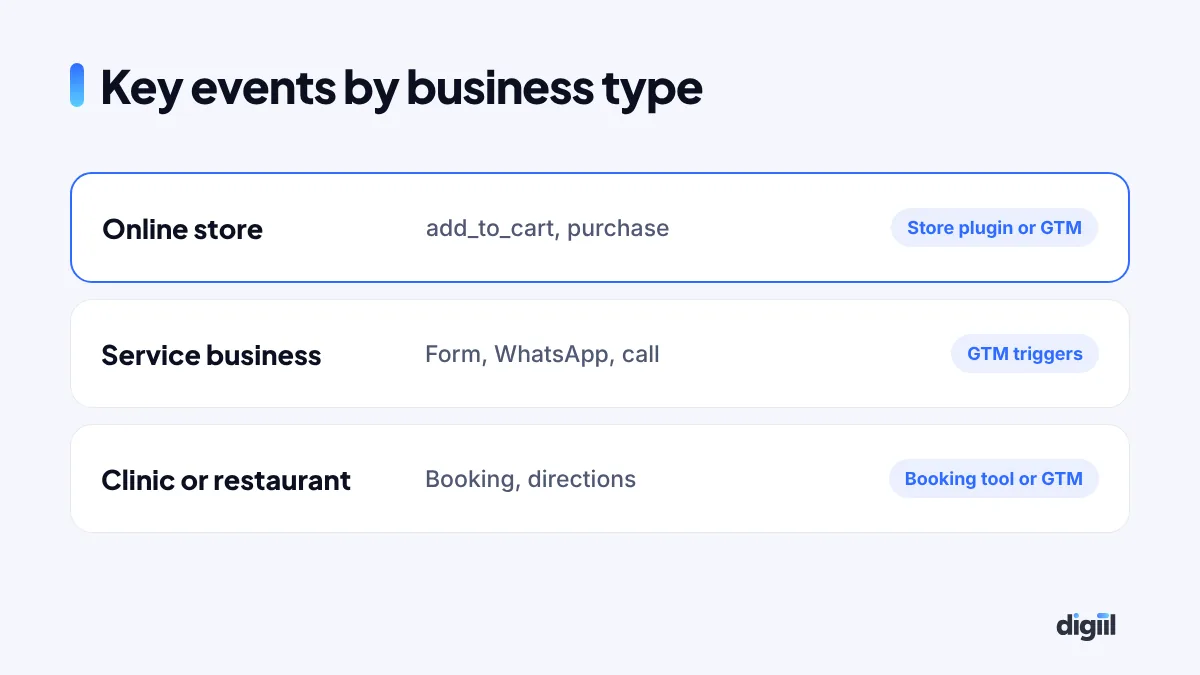
The events every small business should track
GA4 collects some events automatically. The ones that matter most for your business usually need a little setup. Mark the important ones as “key events” so they show in your reports.
| Business type | Key events to track | How |
|---|---|---|
| Online store | view_item, add_to_cart, begin_checkout, purchase | WooCommerce or Shopify integration, or GTM |
| Service business | generate_lead (form), click_whatsapp, click_call | GTM click triggers and form events |
| Clinic or restaurant | book_appointment, click_directions, click_call | Booking tool events or GTM |
| B2B company | generate_lead, file_download, schedule_meeting | GTM and calendar tool events |
Start with three or four key events. Too many make reports confusing.
A real example
A furniture shop in Chattogram believed Facebook brought most of its website orders. After setting up GA4 key events and UTMs, they found that Google search, mostly people searching for their brand name and “sofa price in Chattogram”, brought almost as many orders as Facebook, at a fraction of the cost. They invested in SEO and their Google Business Profile, and their ad budget became far more efficient.
GA4 does not have to be complicated. Set it up once, track the actions that matter, and check three reports a week. If you want it done for you, together with Meta and Google Ads tracking, see our Google Tag Manager and analytics service.
- GA4 is free and shows which channels bring real results.
- Install the tag once and mark your key events.
- Use UTMs on every social, email and WhatsApp link.
- Set data retention to 14 months and fix payment gateway referrals.
- Check traffic acquisition, key events and pages every week.
FAQs
Is Google Analytics 4 free?
Yes. The standard version of GA4 is free and enough for almost every small and medium business.
What are key events in GA4?
Key events are the actions that matter most to your business, such as purchases, form submissions or WhatsApp clicks. GA4 used to call them conversions.
Do I need Google Tag Manager for GA4?
Not for a basic setup. But Tag Manager makes it easier to track buttons, forms and other events without changing website code each time.
Why do GA4 numbers differ from Facebook or my shop?
Each tool counts differently. Ad blockers, consent choices and attribution rules all play a part. Use GA4 for trends and channel comparison, and your shop or CRM for exact sales.

Amanat has managed $4M+ in Google and Meta ad spend for brands in the UK, USA, Australia and Bangladesh since 2020. He holds 20+ certifications, including Digital Marketing Strategy from Harvard Business School Online. More about Amanat