Imagine a shop where a security guard counts every customer at the door. Now imagine half the customers wearing invisibility cloaks. The guard’s count is wrong, and the owner makes decisions based on that wrong count. That is what happens with browser-only tracking today.
Server-side tracking is like adding a second counter inside the shop who sees every sale at the till. This guide explains, in plain English, what it is, why it matters for your ads and when your business needs it.
The problem with browser tracking
Traditional tracking uses scripts (pixels and tags) that run in the visitor’s browser. They send events like “added to cart” or “purchased” directly to Meta, Google and others. But:
- Ad blockers block many tracking scripts.
- Browsers like Safari limit cookies and tracking.
- Slow pages close before scripts fire.
- Too many scripts slow your site.
Result: platforms see fewer conversions than really happen, and their algorithms optimise on incomplete data. Read our story on why ad accounts optimise on bad data.
What server-side tracking does
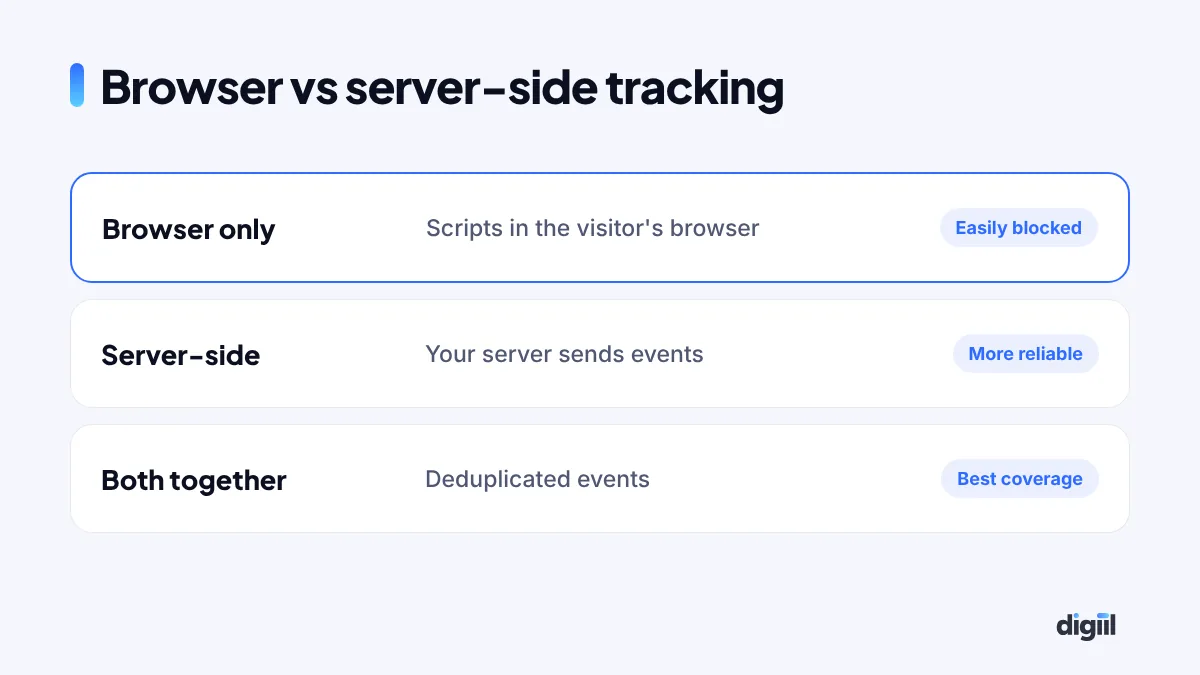
With server-side tracking, events go to a server you control, usually on your own subdomain like data.yourbrand.com. That server then sends cleaned, consistent data to each platform. Because the data comes from your server and first-party domain, it is more reliable.
How server-side GTM works
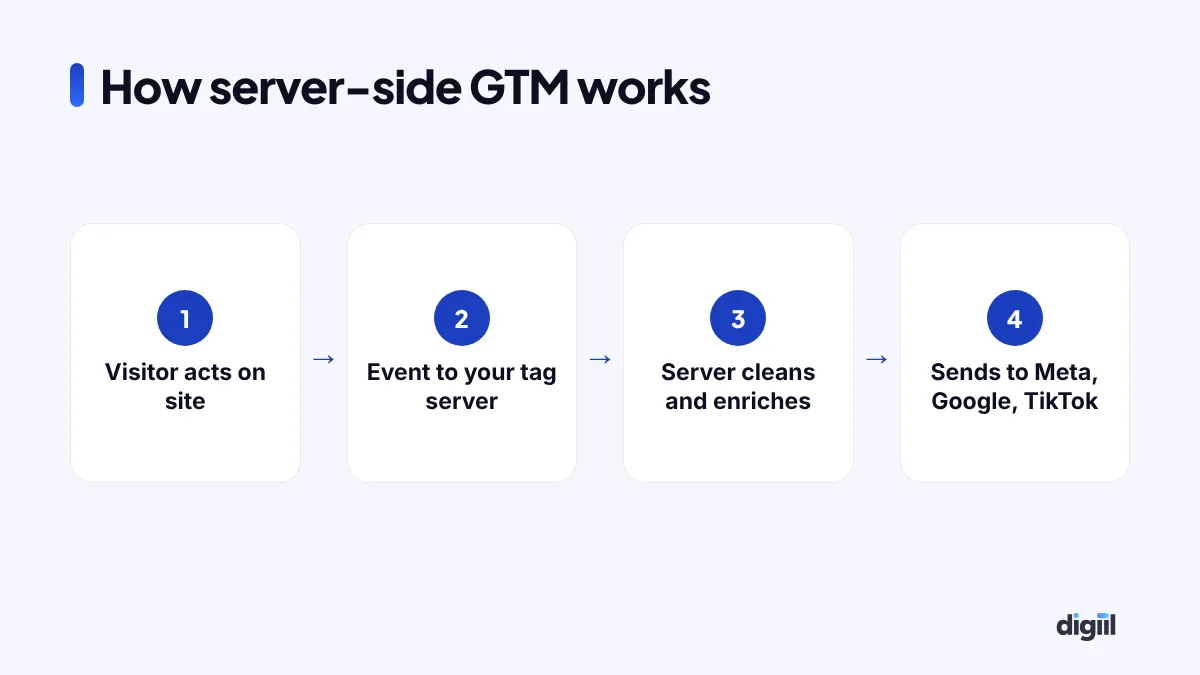
Google Tag Manager has a server-side version. You run a “server container” on a cloud server or a managed hosting service. Your website sends events to it, and it forwards them to GA4, Google Ads, Meta CAPI, TikTok Events API and others.
Benefits
- More complete conversion data for smarter bidding.
- Better match rates when you send consented customer details securely.
- Faster websites, because fewer third-party scripts run in the browser.
- More control over what data goes to which platform.
- Consistent data across Meta, Google and analytics.
What it does not do
- It does not make tracking 100% perfect.
- It does not remove the need for consent and privacy compliance.
- It does not fix a broken website setup; the browser side still needs to be clean.
Options for setting it up
| Option | Best for |
|---|---|
| Platform plugins (Meta CAPI for WooCommerce, Shopify integrations) | Small stores starting out |
| Managed server-side tagging services | Growing businesses without developers |
| Self-hosted sGTM on Google Cloud or similar | Larger advertisers with technical help |
For a WooCommerce store, our Meta Pixel and CAPI guide is a good first step.
When your business needs it
- You spend regularly on Meta, Google or TikTok ads.
- Platform numbers are far below your real orders.
- You sell to markets with many iPhone and Safari users, like the UK, US and Europe.
- You want to reduce scripts and speed up your site.
- You need cleaner data for reporting and decisions.
Costs in simple terms
You pay for setup (time and expertise) and running costs (server hosting or a managed service). For many small and medium businesses, monthly running costs are modest compared to ad spend. The gain from better optimisation often outweighs the cost.
Common mistakes
- Sending events twice without deduplication.
- Ignoring consent settings.
- Setting up the server but leaving the messy browser tags in place.
- No testing after setup.
- Not monitoring server uptime and costs.
Questions to ask before setting it up
- Which platforms do we advertise on, and how much do we spend?
- How big is the gap between platform numbers and real orders?
- Do we have consent tools in place for our markets?
- Who will maintain the server and monitor errors?
- Which events matter most: purchase, lead, booking, call?
A typical setup timeline
| Step | What happens |
|---|---|
| Audit | Review current tags, events and data gaps |
| Plan | Choose events, platforms, consent approach |
| Build | Set up server container, custom domain, tags |
| Test | Check every event, deduplication and values |
| Monitor | Watch data quality and costs for weeks after launch |
Server-side tracking and cash on delivery
For Bangladeshi stores with COD, the server can also send events when an order is confirmed or delivered, not just placed. This gives ad platforms a cleaner picture of real sales and helps them find buyers who actually accept parcels.
What you lose without it: a simple picture
Browser tracking does not fail all at once. It leaks. A few events here, a few there. Over a month, the gap becomes large enough to change your decisions.
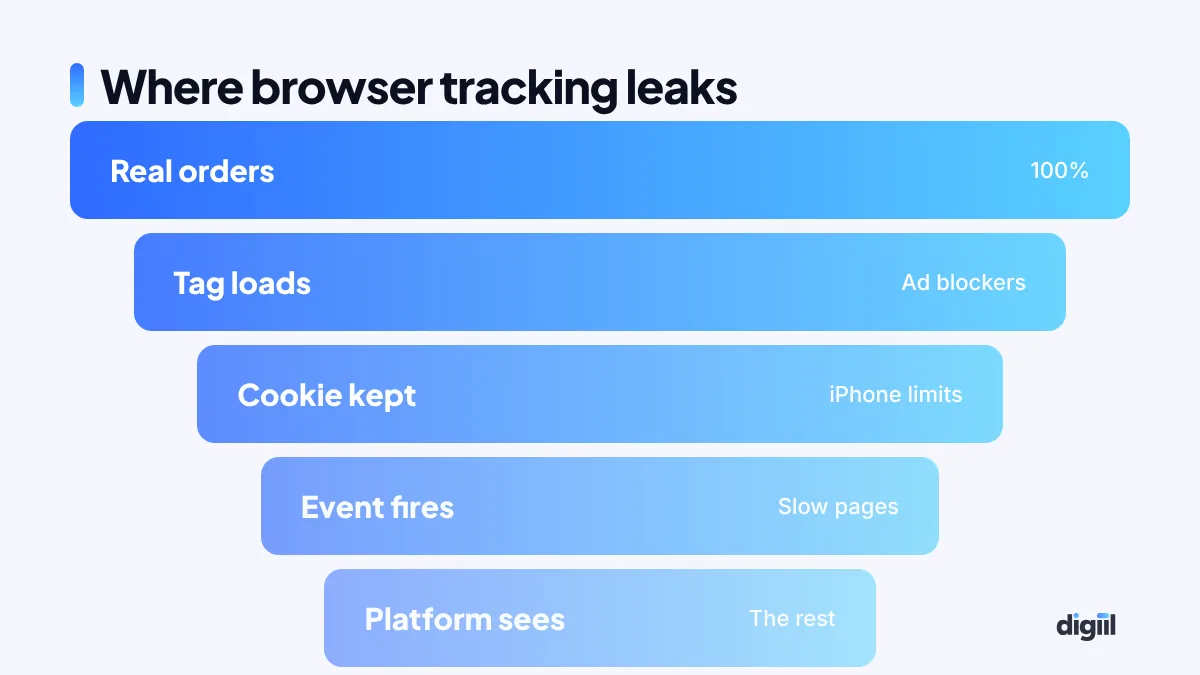
The leak comes from many small things:
- Ad blockers stop the Pixel and GA4 scripts from loading.
- iPhone privacy features limit cookies and strip some click IDs.
- Slow mobile connections close the page before the tag fires.
- In-app browsers on Facebook and Instagram behave differently from Chrome.
- Cash on delivery means the real sale happens days later, far from any browser.
The exact gap is different for every site. That is why the first step is always to measure it. Compare real orders in your store with purchases reported in Meta and GA4 for the same week. Our tracking fix guide shows how.
Browser vs server-side: side by side
| Question | Browser only | Browser + server-side |
|---|---|---|
| Blocked by ad blockers? | Often | Much less, if set up on your own domain |
| Who controls the data? | Each vendor’s script | You decide what each platform receives |
| Page speed impact | Many scripts in the browser | Fewer scripts, lighter pages |
| Can send confirmed COD sales? | No | Yes, from your order system |
| Setup effort | Low | Medium; needs a server and testing |
| Monthly cost | Free | Small server cost |
How a server-side setup looks, step by step

1. A tagging server on your own subdomain
You create a server container in Google Tag Manager. It runs on a cloud server or a managed host. You point a subdomain like data.yourbrand.com to it. Because the subdomain is yours, browsers treat it as first-party.
2. The website sends one stream of data
Instead of loading five different scripts, your site sends events to your tagging server. That keeps pages lighter.
3. The server forwards clean events
The server sends events to Meta Conversions API, GA4, Google Ads and TikTok. You choose which fields go where. You can remove data a platform does not need.
4. Your order system adds the truth
When an order is delivered, your store or courier status can trigger a server event. Now the ad platforms learn from real, paid orders, not just clicks on the “Order” button.
5. Deduplication keeps numbers honest
Each event carries an event ID. If the browser and the server both send the same purchase, the platform counts it once. Skipping this step is the most common mistake we see.
Signs your setup is working
- The gap between store orders and platform purchases gets smaller.
- Meta’s Event Match Quality score goes up in Events Manager.
- Campaigns exit the learning phase faster.
- Cost per real, delivered order goes down over the following weeks.
If you want an expert to check your setup, our server-side tracking service starts with a free gap check.
Back to the shop
With a second counter at the till, the owner finally sees the real number of sales. For your ads, that means platforms learn from more of your real customers, reports make more sense and budget decisions get better. That is the whole point of server-side tracking.
If you want server-side tracking set up properly, with consent and deduplication, see our server-side tracking service.
- Browser tracking misses conversions because of blockers and browser limits.
- Server-side tracking sends events from a server you control.
- It improves data quality, match rates and site speed.
- It does not replace consent or a clean website setup.
- Worth it for regular advertisers with noticeable tracking gaps.
Frequently asked questions
What is server-side tracking?
Instead of sending tracking data straight from the visitor's browser to platforms like Meta and Google, events go to a server you control, which then forwards them.
Does server-side tracking bypass consent?
No, and it should not. You must still respect user consent and privacy laws. Server-side tracking improves reliability, not permission.
How much does server-side tracking cost?
You pay for a cloud server or a managed tagging service, plus setup. For many small and medium businesses, monthly hosting costs are modest.
Do small businesses need server-side tracking?
If you spend meaningfully on ads and rely on conversion data, it is often worth it. Very small advertisers can start with platform tools like Meta CAPI plugins.

Amanat has managed $4M+ in Google and Meta ad spend for brands in the UK, USA, Australia and Bangladesh since 2020. He holds 20+ certifications, including Digital Marketing Strategy from Harvard Business School Online. More about Amanat