Two kacchi restaurants sit on the same road in Dhanmondi. One is always full on Friday nights. The other has better food, according to most people who try it. The difference? When someone hungry types “kacchi near me” into Google, the first restaurant shows up in the top three on the map, with 1,200 reviews and photos that make you hungry. The second one does not show up at all.
That is the power of a well-managed Google Business Profile in Bangladesh. For clinics, restaurants, shops, salons, schools and service businesses, it is often the cheapest source of new customers. This guide shows you how to set it up properly and how to climb into the Google Maps top three.
What is Google Business Profile?
Google Business Profile (it used to be called Google My Business) is your free business listing on Google Search and Google Maps. It shows your name, location, hours, phone, website, photos, reviews and more. When people search for a business like yours nearby, Google decides which profiles to show, usually in a box of three called the local pack.

Most people click one of those three. Being fourth often means being invisible.
How Google decides who ranks
Google explains that local results are based mainly on three things. You can read it in Google’s own help page.
- Relevance: how well your profile matches what the person searched.
- Distance: how far your business is from the searcher or the area they mentioned.
- Prominence: how well known and trusted you are, including reviews, links and mentions across the web.
You cannot move your shop. But you can improve relevance and prominence a lot.
Step 1: Create or claim your profile
- Go to Google Business Profile and sign in with a Google account you control. Use a business email, not a staff member’s personal one.
- Search for your business. If it already exists, claim it. If not, create it.
- Enter your exact business name, as it appears on your signboard. Do not stuff keywords into the name. Google can suspend profiles for that.
- Place the map pin exactly on your location. In Bangladesh, the automatic pin is often wrong, so drag it to the right spot.
Step 2: Get verified
Google needs to confirm your business is real before your profile shows fully. Verification options depend on your business and can include a video recording, phone, email or postcard. Video verification is common now: you record your signboard, the inside of your business and proof that you manage it, such as a trade licence or equipment.
Step 3: Choose the right categories
Your primary category is one of the strongest ranking signals. Choose the most specific one that fits. “Dental clinic” is better than “Medical clinic” if that is what you are. Then add secondary categories for other services, for example “Cosmetic dentist” or “Orthodontist”.
Look at the top-ranking competitors in your area. Which categories do they use? This gives you useful clues.
Step 4: Fill every part of the profile
- Hours: correct, including Friday and holiday hours. Wrong hours lead to angry reviews.
- Phone and WhatsApp: a number that is answered.
- Website: link to the most relevant page, not just the homepage.
- Services or products: list them with short descriptions and prices where possible.
- Description: a clear, helpful description of what you do and where. Write naturally.
- Attributes: wheelchair access, women-led, parking, Wi-Fi and so on.
Step 5: Photos that sell
Profiles with good photos get more attention. Add:
- The outside of your business, so people recognise it.
- The inside, clean and well lit.
- Your team at work.
- Your products, dishes or results.
- A logo and a cover photo.
Add new photos every week or two. Real, recent photos beat stock images.
Step 6: Reviews, the engine of local SEO
Reviews influence both your ranking and the customer’s choice. Build a simple system:
- Create your short review link from the profile dashboard.
- Send it by WhatsApp or SMS after each visit or delivery, with a friendly thank-you.
- Print a QR code for your counter or reception.
- Reply to every review within a day or two. Thank happy customers. Respond calmly and helpfully to complaints.
Step 7: Keep the profile active
An active profile signals a real, open business. Make this a weekly habit.
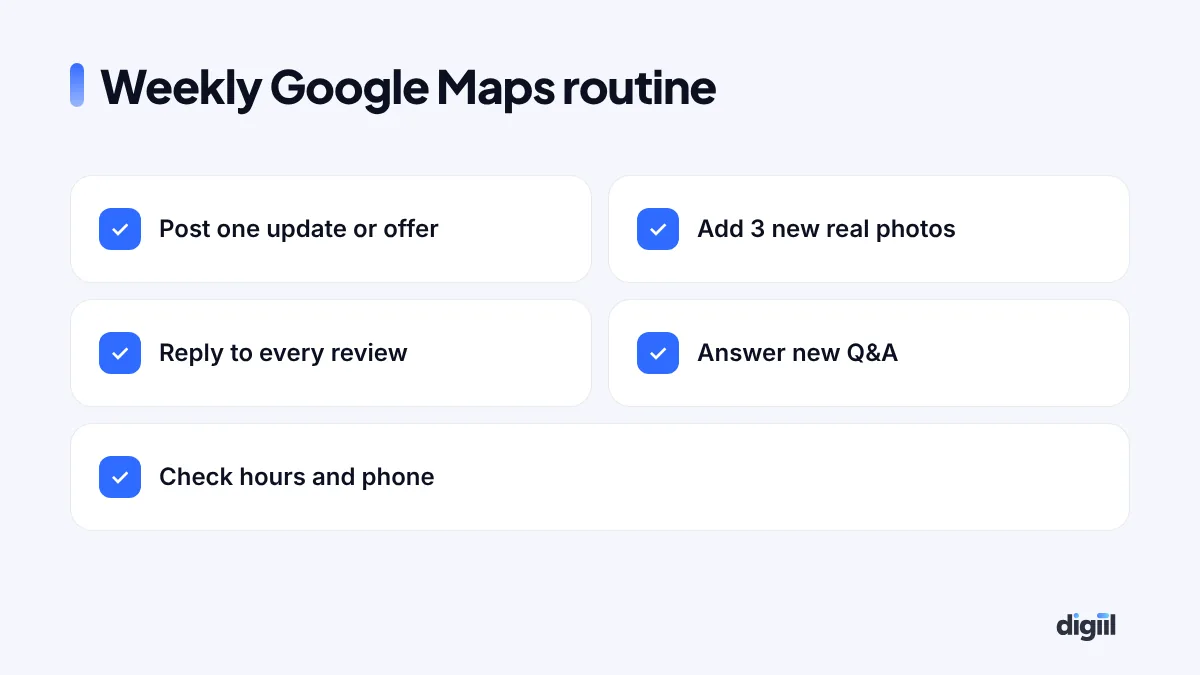
- Publish a post: an offer, new product, event or useful tip.
- Add new photos.
- Answer questions in the Q&A section. You can also add common questions yourself.
- Check that hours and phone are still correct.
Step 8: Make your website support your profile
Your website and your profile work together. Google looks at both.
- Show the same business name, address and phone (often called NAP) on your website as on your profile.
- Create a page for each main service, and for each area you serve if you serve several.
- Add local details: landmarks, directions, parking, nearby areas.
- Embed a Google map on your contact page.
- Add LocalBusiness schema so search engines understand your details.
Step 9: Fix your details across the web
Your business is probably listed on Facebook, directories, maps and review sites. If your name, address or phone differs between them, Google gets unsure. Search for your business name and phone, list every place you appear, and make them consistent. In Bangladesh, area names are often spelled in different ways, such as “Mirpur 10” and “Mirpur-10”. Pick one format and use it everywhere.
Special tips for Bangladesh
- Search in both languages. People search in English, Bangla and Banglish. Your profile description and website should cover common versions naturally.
- Get the pin right. Many Bangladeshi addresses are hard for maps. A correct pin matters more than a perfect address line.
- Friday and Ramadan hours. Update special hours, or customers will arrive to closed doors.
- Use WhatsApp. Many customers prefer messaging. Make sure the number on your profile is on WhatsApp.
Industry tips: clinics, restaurants, shops and services
Clinics and hospitals
List every service and specialist, add doctor schedules in your posts, and show the exact entrance and parking in photos. Patients worry about finding the right building. Make it easy. Reply to reviews without sharing any private medical details.
Restaurants and cafés
Upload your menu, popular dishes and price range. Food photos drive clicks more than anything else. Ask diners for reviews while they are still at the table, with a QR code on the bill folder.
Retail shops
Add products with prices and keep stock-related posts fresh. “New Eid collection arrived” posts work well. Make sure your hours match the market’s real opening times.
Home services and repair
If you visit customers rather than having them visit you, set up a service-area business and hide your home address. List the areas you cover. Before-and-after photos of real jobs build trust fast.
How to handle a negative review
Every business gets one eventually. How you reply matters more than the review itself, because future customers read both.
- Reply within a day, calmly and politely.
- Thank them for the feedback, even if you disagree.
- Apologise for the experience, without arguing about details in public.
- Offer to fix it and give a direct contact, such as a WhatsApp number.
- Follow up privately, and if the problem is solved, kindly ask if they would update their review.
If a review is fake or breaks Google’s policies, you can report it from your profile. But never respond with anger. It always looks worse than the review.
Google Maps and Google Ads together
If you need calls this week, you can also run Google local and call ads that appear on Maps and search. They work well alongside your profile while your organic ranking grows. Our Google Ads service sets these up with call tracking, so you know which calls came from ads.
Common mistakes that hurt local rankings
- Keyword-stuffed business names like “Best Dentist Dhaka Smile Clinic”.
- Wrong category or too many unrelated categories.
- Duplicate profiles for the same location.
- Ignoring negative reviews.
- Using a virtual address or a location where you do not serve customers.
- No activity for months.
How to measure results
The profile dashboard shows how people find you and what they do: calls, direction requests, website clicks and messages. Track these monthly. For a clearer picture, add UTM tags to your website link so you can see profile visits in Google Analytics, and use a separate phone number or ask callers how they found you.
Category picks for common Bangladeshi businesses
Choosing categories is where many profiles go wrong. Here are sensible starting points. Always check what the top three competitors near you use, and pick the most specific primary category that is true for your business.
| Business | Primary category | Useful secondary categories |
|---|---|---|
| Dental clinic | Dental clinic | Cosmetic dentist, Orthodontist, Dental implants provider |
| Diagnostic centre | Medical diagnostic imaging centre | Medical laboratory, Blood testing service |
| Biryani or kacchi restaurant | Biryani restaurant | Bangladeshi restaurant, Caterer, Takeout restaurant |
| Café | Coffee shop | Café, Dessert shop |
| Clothing boutique | Women’s clothing store | Boutique, Bridal shop, Tailor |
| AC repair service | Air conditioning repair service | HVAC contractor, Appliance repair service |
| Coaching centre | Coaching center | Tutoring service, Language school |
| Real estate developer | Real estate developer | Real estate agency, Property management company |
Category names in Google change from time to time, and some are only offered in certain countries. Type the start of the name in your profile settings and choose the closest match Google shows you.
A monthly profile report you can read in five minutes
Numbers in the profile dashboard can feel random. Put them in a simple monthly table, and the trend becomes clear.
| Metric | Where to find it | What a healthy trend looks like |
|---|---|---|
| Searches showing your profile | Performance → Searches | Rising, especially for category searches (“dentist near me”) |
| Calls | Performance → Calls | Steady or rising; compare with calls you actually received |
| Direction requests | Performance → Directions | Rising for shops, clinics and restaurants |
| Website clicks | Performance → Website clicks and GA4 (with UTM tags) | Rising, with visitors staying on the page |
| New reviews and average rating | Reviews tab | Several new reviews every month, rating stable or rising |
Look at three months together, not one. Seasons like Ramadan, Eid and winter can change local searches a lot. If you want a second opinion on your local visibility, our local SEO team can run a map ranking check.
See your ranking across the whole city, not just from your desk
Google Maps results change with the searcher’s location. If you search “dentist” from inside your clinic, you will probably see yourself near the top. A patient two kilometres away may not see you at all. That is why checking your rank from one place gives a false sense of safety.
Local rank-grid tools solve this. They check your position for one keyword from many points on a map, for example a 7×7 grid across Dhanmondi and nearby areas, and colour each point by your rank. You will usually see a green circle around your address that fades to red further out.
- Run a grid for your 3 main keywords every month, at the same size and centre, so the maps are comparable.
- Grow the green area, not just the centre. More reviews mentioning the area, area pages on your website and local links help you rank further from your address.
- Compare with one competitor. The grid shows exactly which neighbourhoods they own and you do not.
Several paid tools offer this, and some SEO suites include it. If you work with an agency, ask them for a grid report before and after their work. It is the clearest proof of local SEO progress you can get.
Back to the two restaurants
The second restaurant called us after a slow Ramadan. We fixed its category and pin, added 80 real photos, wrote a proper description, listed the menu and started a review request card on every table. The owner replied to every review personally. Four months later it was in the top three for “kacchi near me” across most of Dhanmondi, and Friday nights started to look very different.
Google Business Profile is free, but it is not “set and forget”. Treat it like a shop window you clean every week. If you want a team to manage it for you, see our local SEO service.
- Google ranks local businesses on relevance, distance and prominence.
- Choose the most specific primary category and fill every part of your profile.
- Real reviews and fast replies are the engine of local SEO.
- Post, add photos and answer questions every week.
- Keep your name, address and phone consistent everywhere online.
FAQs
Is Google Business Profile free in Bangladesh?
Yes. Creating and managing a Google Business Profile is free. You only pay if you choose to run Google Ads.
How do I verify my business on Google in Bangladesh?
Google offers verification methods such as video recording, phone, email or postcard, depending on your business. Follow the options shown in your profile dashboard. Video verification is common now.
How long does it take to rank on Google Maps?
Fixing your profile can show results in a few weeks. Strong, stable top-three rankings across your area usually take three to six months of steady reviews, photos and updates.
Do reviews really help ranking?
Yes. The number, quality and freshness of reviews, and your replies to them, help both ranking and the customer decision.
Can I rank in areas where I do not have an office?
It is hard to appear in the map pack far from your address. But local pages on your website can help you rank in normal results for nearby areas you serve.

Amanat has managed $4M+ in Google and Meta ad spend for brands in the UK, USA, Australia and Bangladesh since 2020. He holds 20+ certifications, including Digital Marketing Strategy from Harvard Business School Online. More about Amanat