Nabila sells hand-painted mugs from her flat in Mohammadpur. Her first photos were taken at night under a yellow bulb, on a cluttered table. The mugs looked dull, and people kept asking “Is this the real colour?” Then she moved her table to the balcony door, taped a sheet of white paper behind it, and shot in the morning. Same phone, same mugs. Her messages doubled.
Product photography on a budget is mostly about light, background and patience, not expensive cameras. This guide shows how to take photos that sell using just a phone.
Why photos matter so much online
Online buyers cannot touch your product. Photos are the product. Clear, honest photos reduce questions, build trust and cut returns caused by “it looked different in the picture”.
Build a home studio for almost nothing
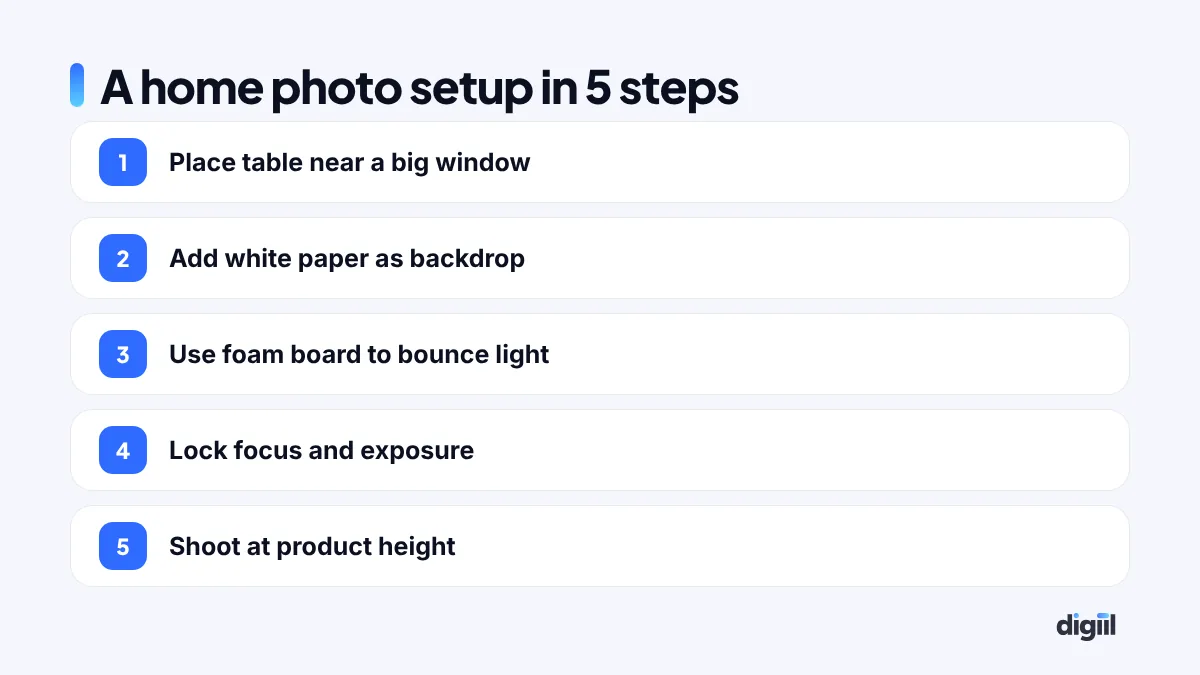
You need:
- A table near a large window.
- White chart paper or a white sheet as a backdrop, curved from wall to table so there is no line.
- A white foam board or even a white box lid to bounce light into shadows.
- A cheap phone tripod or a stack of books.
Get the light right
- Use soft daylight. Morning or late afternoon light from a big window is ideal.
- Avoid harsh direct sun. If the sun hits directly, hang a thin white curtain to soften it.
- Turn off room lights to avoid mixed colours.
- Bounce light with white board on the opposite side to soften shadows.
Phone camera settings
- Clean the lens. It sounds silly, but fingerprints blur many photos.
- Tap to focus on the product, then lock focus and exposure.
- Lower exposure slightly if white areas look washed out.
- Avoid digital zoom. Move closer, or use the phone’s 2x lens if it has one.
- Turn off beauty filters and heavy effects.
The shots every product needs
- Front view on a clean background.
- Side and back views.
- Close-up details: stitching, texture, buttons, labels.
- Scale shot: in a hand or next to a common object.
- Lifestyle shot: the product in real use.
- What is in the box or packaging.
Lifestyle photos for social media
On Facebook and Instagram, products shown in real life usually stop scrolls better than plain white shots. A saree being worn, a mug with steaming tea on a rainy windowsill, a bag on a rickshaw ride. Keep it real and local. Our social media guide explains how to plan this content.
Short videos: the new product photo
A 10-second video often sells better than five photos. Show the product being opened, used, worn or tested. Keep the phone steady, use daylight, and add captions. These clips work well as Reels and TikTok ads.
Editing: keep it honest
- Straighten and crop.
- Adjust brightness and white balance so colours look true.
- Remove dust spots.
- Use background removal for marketplace-style white backgrounds.
Do not change the product’s colour or shape. Misleading photos lead to returns and bad reviews, and they go against fair trade practice.
Sizes and file weight
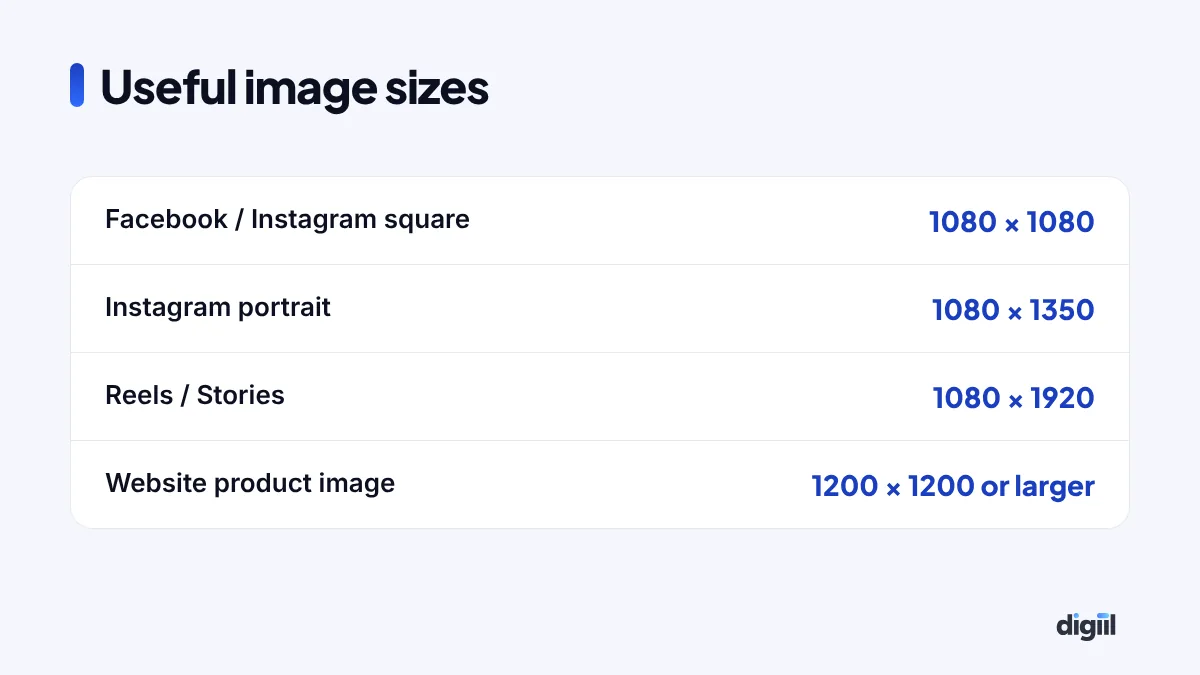
For websites, export images as WebP or compressed JPG, ideally under 200 KB each. Large files slow your site. See our website speed guide.
Common mistakes
- Yellow indoor light that changes colours.
- Busy backgrounds that hide the product.
- Blurry photos from shaky hands.
- Only one photo per product.
- Over-edited photos that do not match reality.
- Using supplier or other sellers’ photos without permission.
Budget kit for better results
| Item | Why |
|---|---|
| Phone tripod | Sharp, consistent photos |
| White foam boards | Bounce light, clean backgrounds |
| Daylight LED light | Shoot any time |
| Small light tent | Great for jewellery and small items |
| Props from home | Simple lifestyle scenes |
Photo ideas by product type
| Product | Must-have shots |
|---|---|
| Clothing | Flat lay, worn by a model, fabric close-up, size label, back view |
| Jewellery | On a hand or neck for scale, macro detail, packaging |
| Food | Plated dish, texture close-up, packaging, serving size |
| Gadgets | Front and back, ports and buttons, in use, box contents |
| Home décor | Styled in a room, size reference, material detail |
| Skincare | Bottle front and back label, texture swatch, in a routine |
Batch shooting saves time
Instead of photographing each product when it arrives, set one shooting day every week or two:
- Prepare all products, cleaned and ironed.
- Set up light and background once.
- Shoot every product with the same angles for a consistent look.
- Film short clips while the setup is ready.
- Edit everything in one sitting with the same settings.
Consistent photos make your page and website look professional, like a real brand.
Using AI tools carefully
AI tools can remove backgrounds, fix lighting and create simple lifestyle scenes. Use them to improve real photos, not to invent products that look different from what customers receive. Misleading images cause returns and damage trust. Read our AI tools guide for safe ways to use them.
When to hire a photographer
Phone photos are enough for many small shops. Consider a professional when you launch a new brand, shoot a big seasonal collection, need model shoots, or want hero images for your website and ads. Even then, keep shooting your own everyday content; it keeps your page fresh and real.
What a basic photo kit costs in Bangladesh
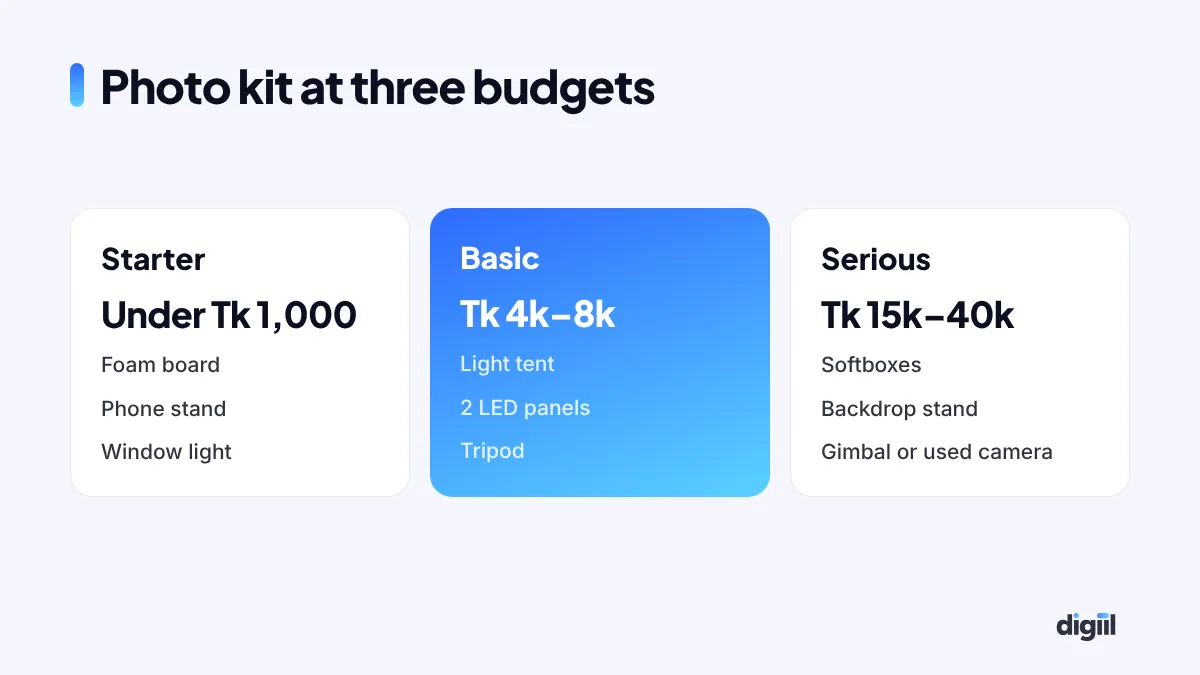
You can start with almost nothing. Here is what each level looks like. Prices change, so treat these as rough local ranges and check current prices in your area.
| Level | What you buy | Rough cost | Good for |
|---|---|---|---|
| Starter | White foam board, a phone stand, a window | Under Tk 1,000 | Small products, first listings |
| Basic | Light tent, two LED panels, tripod | Tk 4,000–8,000 | Daily shooting, any weather |
| Serious | Softbox lights, backdrop stand, phone gimbal or used camera | Tk 15,000–40,000 | Fashion, food, Reels, ads |
The starter kit with good daylight will beat an expensive camera used badly. Upgrade only when the light, not the camera, becomes your limit.
Lighting setups, simply
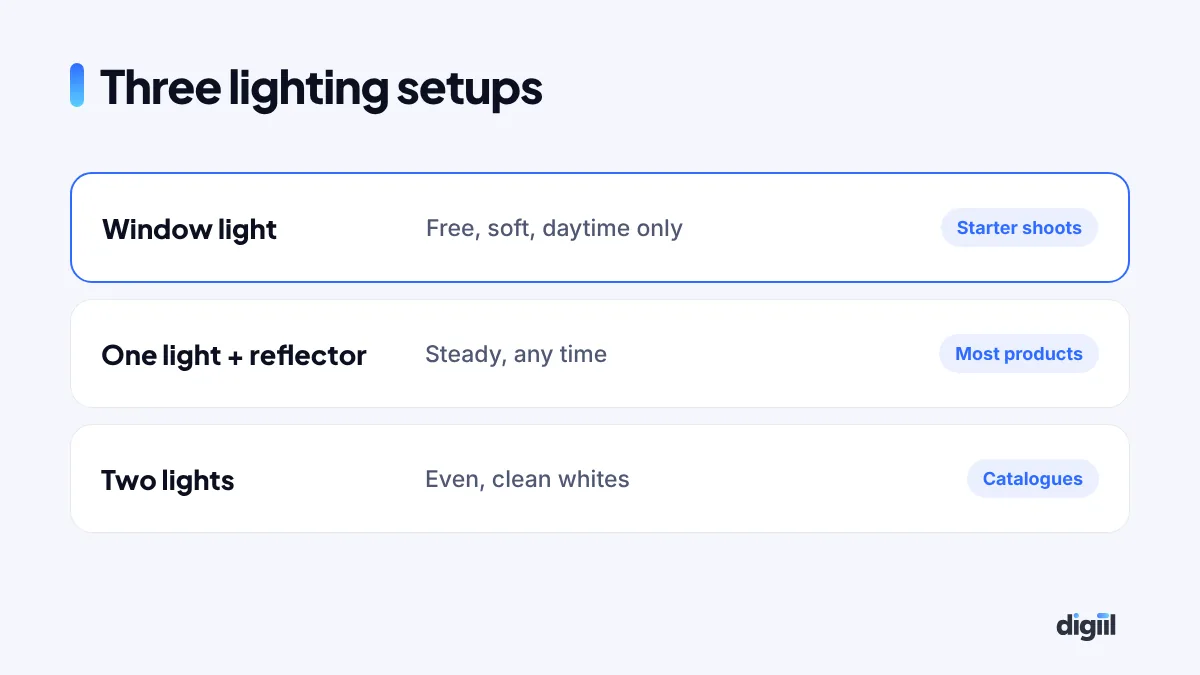
Window light (free)
Put the product near a big window with indirect light. Use a white board on the other side to bounce light into the shadows. Best between mid-morning and afternoon.
One light + reflector
Place one LED light at 45 degrees to the product, slightly above. Use a white board opposite to soften the shadows. Good for most products.
Two lights
One main light at 45 degrees, one weaker light on the other side. Gives clean, even light for catalogues and white backgrounds.
Photos and returns: the hidden cost
In Bangladesh, many returns and refused COD parcels come from one complaint: “It looked different in the picture.” Honest photos are not just good ethics. They protect your margin.
- Show real colour in daylight, not only in a styled studio shot.
- Show size with a model or a measurement in the photo.
- Show the fabric up close so buyers know if it is thin or thick.
- Use real customer photos, with permission, next to your own.
Our guide on reducing failed COD orders covers the other causes too.
Nabila’s routine today
Every Saturday morning, Nabila shoots all new mugs at her balcony door: front, side, a close-up of the painting, one in her hand and one on her breakfast table. She edits in ten minutes, and films one short video of the painting process. Her return rate is low, because buyers know exactly what they will get.
Product photography on a budget is a skill anyone can learn. Light, background, angles and honesty will do more than any expensive camera. If you want professional photos, videos and ad creatives, see our design services.
- Soft daylight and a clean white background beat expensive cameras.
- Take front, side, detail, scale and lifestyle shots.
- Short product videos often sell even better than photos.
- Edit for accuracy, not to change the product.
- Compress images for fast websites.
FAQs
Can I take professional product photos with a phone?
Yes. Modern phones take excellent photos. Good light, a clean background and steady shots matter far more than the camera.
What is the best light for product photos?
Soft daylight from a large window is the cheapest and often the best. Avoid direct harsh sun and mixed coloured lights.
Should I use a white background?
White backgrounds are great for product pages and marketplaces. For social media, lifestyle photos showing the product in use often perform better.
Which apps help edit product photos?
Free tools like Snapseed, Lightroom Mobile, Canva and background removal apps cover most needs.

Amanat has managed $4M+ in Google and Meta ad spend for brands in the UK, USA, Australia and Bangladesh since 2020. He holds 20+ certifications, including Digital Marketing Strategy from Harvard Business School Online. More about Amanat