The Meta Pixel runs in the visitor’s browser. For years that was enough. Today, browser privacy features, ad blockers, iPhone tracking prompts and slow connections all stop a share of pixel events from reaching Meta. When Meta sees fewer purchases than you actually made, two things go wrong: your reports understate results, and the ad system optimises on incomplete information.
The Conversions API (CAPI) fixes most of this by sending the same events directly from your server. This guide explains how it works, how to choose a Conversions API setup method, and how to check it is working rather than assuming.
How the pixel and the API work together
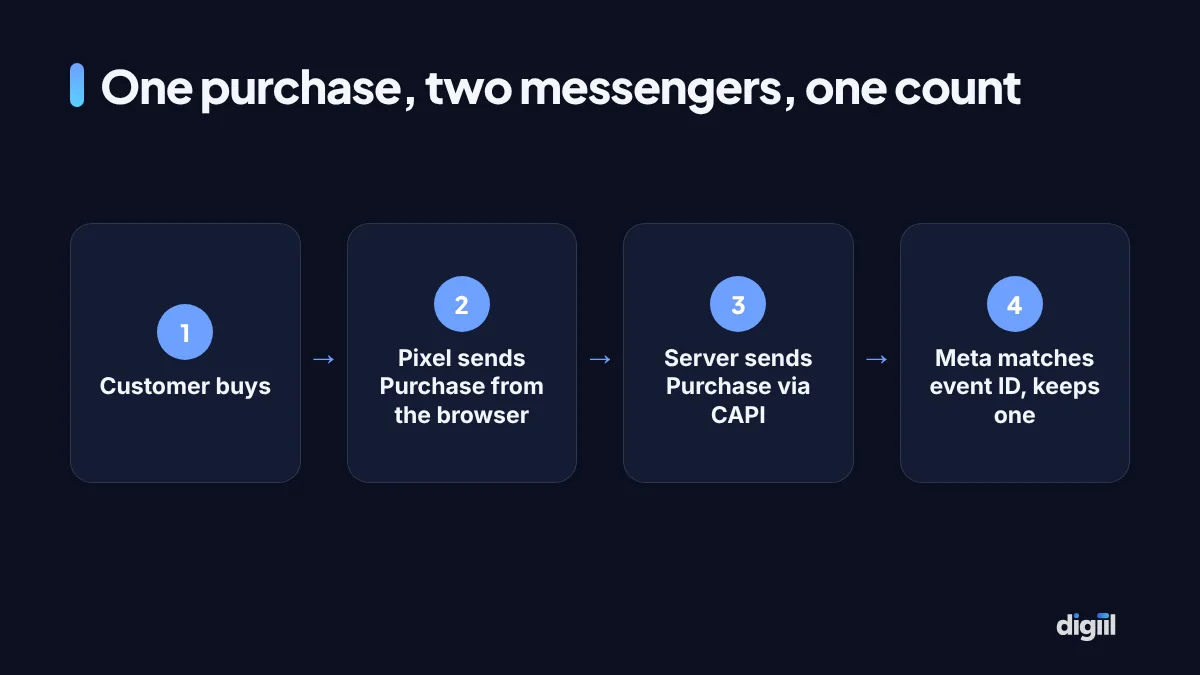
Think of two messengers carrying the same news. The pixel tells Meta from the browser. Your server tells Meta through the API. If both arrive, Meta keeps one. If the browser messenger is blocked, the server one still gets through.
That is why Meta recommends a redundant setup: pixel and Conversions API sending the same events, with deduplication. Running the API alone loses useful browser signals. Running the pixel alone loses events.
What a server event contains
Each event is a small package of data. You do not need to write it yourself if you use an integration, but knowing the parts makes troubleshooting much easier.
- event_name
- Purchase, Lead, AddToCart, InitiateCheckout, ViewContent, or a custom name.
- event_time
- When it happened, as a Unix timestamp.
- event_id
- A unique ID for this event, also sent by the pixel. This is what makes deduplication work.
- action_source
- Where it happened, usually “website”.
- event_source_url
- The page where it happened.
- user_data
- Customer details used to match the event to a Meta account: hashed email and phone, plus cookies, IP address and browser details.
- custom_data
- Value, currency, product IDs, order number.
Choosing a setup method
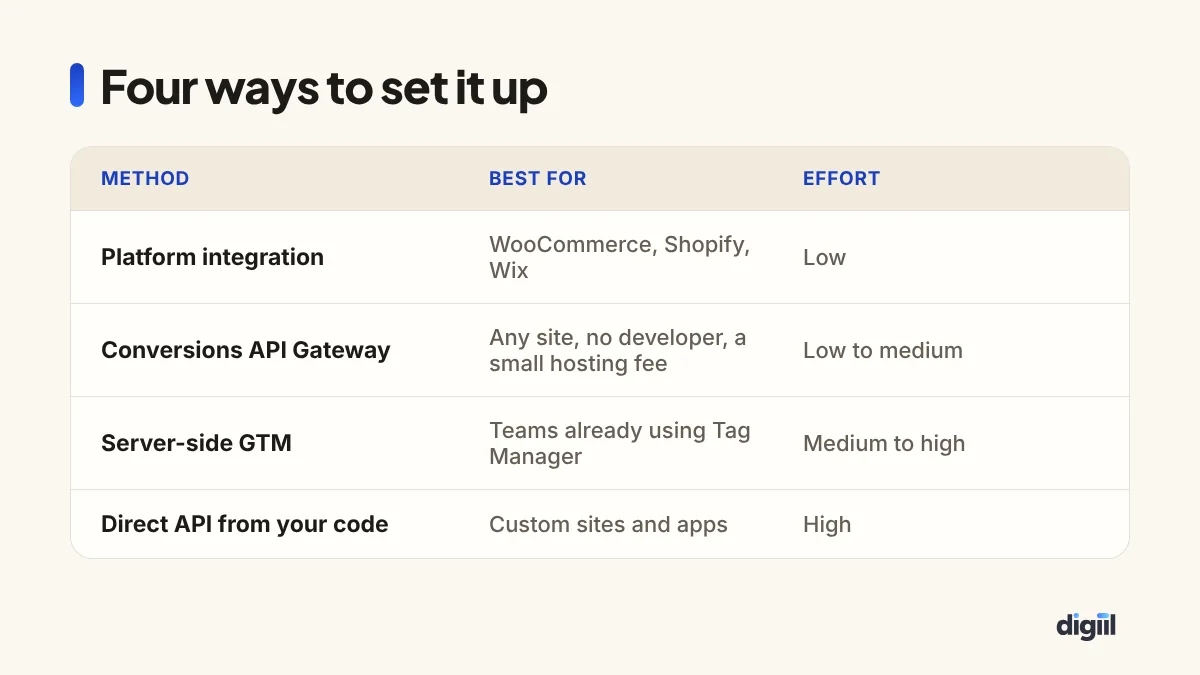
1. A platform integration
If your store runs on WooCommerce, Shopify, Wix or another major platform, start here. Meta’s official integrations handle both pixel and server events, including deduplication. On WooCommerce, the official Facebook for WooCommerce extension is the common choice. Our Meta Pixel for WooCommerce guide walks through it.
The limit: you get the events the integration supports, in the way it sends them. That covers most stores. It struggles with unusual setups, such as orders confirmed by phone or WhatsApp.
2. The Conversions API Gateway
Meta’s Gateway is a ready-made server you launch in your own cloud account, often through a hosting partner, with a setup flow inside Events Manager. It listens to your pixel events and forwards them from the server. No coding, but a monthly hosting fee, and it only sends what the pixel sees, so it will not add events the pixel never fires.
3. Server-side Google Tag Manager
If you already manage tracking through Tag Manager, a server container can send events to Meta, Google and others from one place. It is flexible and handles several platforms at once. It needs hosting and someone comfortable with Tag Manager. See server-side tracking explained for how it fits together.
4. The API directly from your code
Custom websites and apps can call the API from their own backend whenever an order is saved. This gives the most control: you can send events at exactly the right moment, including ones that never happen in a browser. It needs a developer and an access token generated in Events Manager, kept secret on the server.
A WooCommerce clothing store: the official integration. A lead-generation site on custom code with no developer on staff: the Gateway. An agency running tracking for several platforms: server-side Tag Manager. A food delivery app: direct API from the backend.
Deduplication: the part most setups get wrong
When both the pixel and the server send “Purchase” for the same order, Meta needs to know they are one event, not two. It matches on two fields: the event name and the event ID. If they match and arrive within Meta’s deduplication window, Meta keeps one copy.
So the pixel and the server must use the same event ID for the same action. For a purchase, the order number is a natural choice. The common failure looks like this: the pixel sends no event ID, or a different one, and Ads Manager suddenly reports twice as many purchases as you had. If your numbers doubled the week you added CAPI, start here.
Updating or switching a tracking plugin is the most common way deduplication breaks. After any change, place a test order and confirm in Events Manager that the purchase is counted once.
Purchases reported at close to double the real order count. Almost every time, the browser and the server both send the purchase, but with different event IDs, or one of them sends no ID at all, so Meta cannot tell they are the same order. Before trusting any ROAS figure, compare a week of purchases in Events Manager with your order sheet.
Event Match Quality
Meta can only use an event if it can connect it to a person on Facebook or Instagram. Event Match Quality (EMQ) is a score out of 10 shown in Events Manager for each server event, telling you how well your events match.
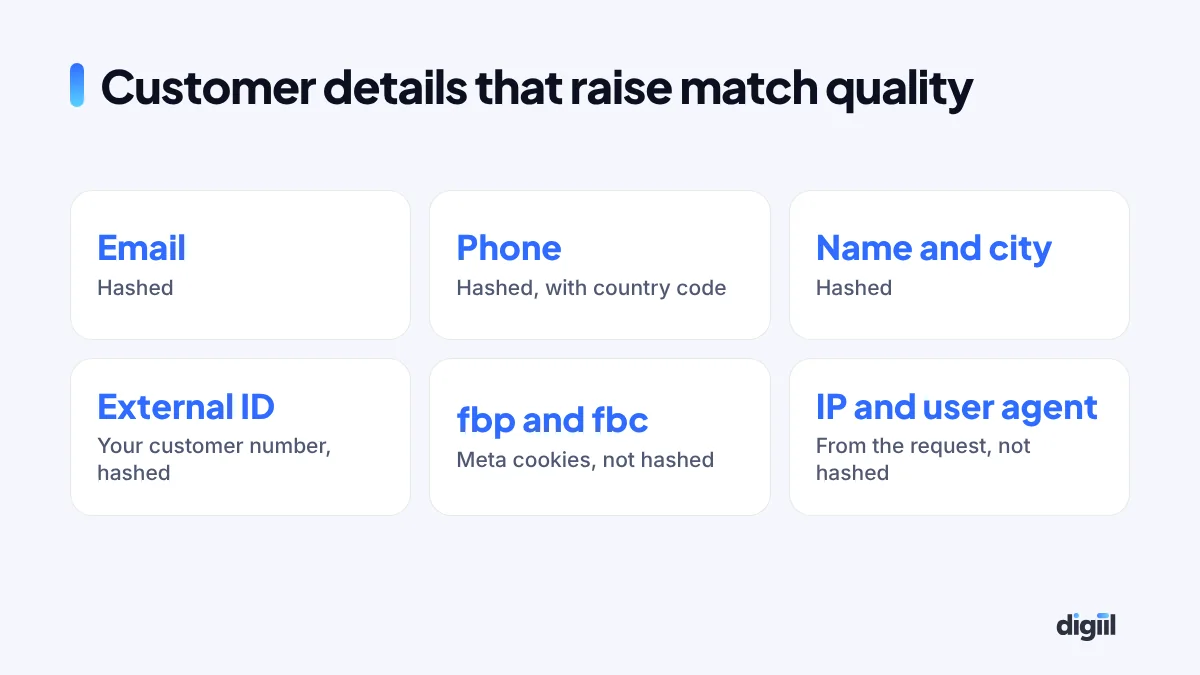
The single biggest improvement for most Bangladeshi stores is the phone number. Almost every order, especially cash on delivery, has one. Send it in international format (8801XXXXXXXXX) and hashed with SHA-256, after removing spaces, dashes and the plus sign. Integrations do the hashing for you. If you build it yourself, hash before sending and never send raw personal data.
Also pass the fbp and fbc cookies from the browser to your server event when available. They link the server event to the original ad click and are a large part of a good match score.
Which events to send
Start with the events that matter most for optimisation, then add the rest.
| Business | Priority events | Add later |
|---|---|---|
| Online store | Purchase, InitiateCheckout, AddToCart | ViewContent, Search |
| Lead generation | Lead (on successful form submit) | A custom “QualifiedLead” from your CRM |
| Services booked by call or chat | Contact, Schedule | Purchase when the job is paid |
Cash on delivery and confirmed orders
Many orders in Bangladesh are placed, then confirmed by phone, then delivered or refused. If Meta only ever hears “Purchase” at checkout, it learns to find people who place orders, including ones who refuse the parcel. With a direct API setup or a CRM integration, you can also send a later event, such as a custom “OrderConfirmed” or “Delivered”, when the order really completes. That gives you a cleaner measure of real sales and, once it has enough volume, a better event to optimise towards. Our guide to reducing fake COD orders covers the confirmation process itself.
Testing before you trust it
- Open Events Manager, select your dataset (pixel), and go to Test Events.
- For server events, copy the test event code and add it to your integration’s test setting, or to your API calls while testing.
- Place a real test order on the site using a low-priced item or a coupon.
- Watch the Purchase appear twice in Test Events, once marked Browser and once marked Server, and then shown as deduplicated.
- Click into the server event and check value, currency and the customer parameters received.
- Remove the test code once you finish, so live events are not marked as tests.
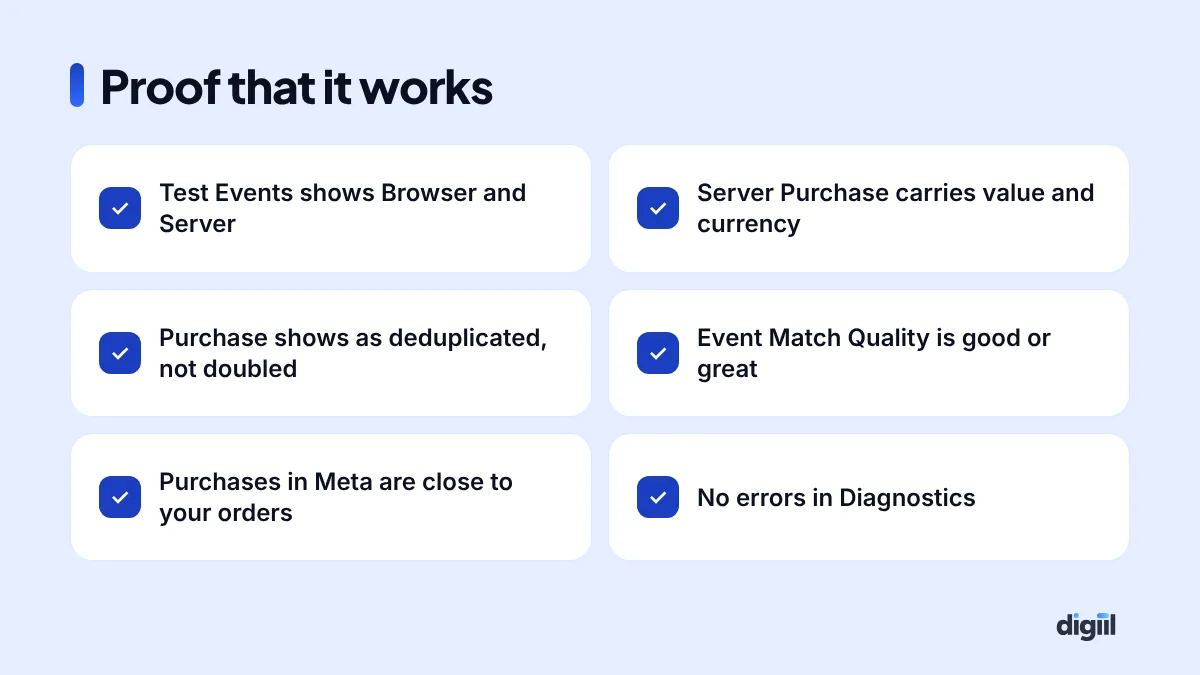
A few days after launch, look at the Overview and Diagnostics tabs. Diagnostics lists problems Meta has spotted, such as missing parameters, deduplication issues or events arriving late. Then compare purchases reported in Meta with orders in your store for the same week. They will never match perfectly, because of attribution windows and people who buy without seeing an ad. They should be in the same range. If they are far apart, work through how to fix ad tracking.
Common problems and fixes
| Problem | Likely cause | Fix |
|---|---|---|
| Purchases doubled | Event ID missing or different between pixel and server | Use the order number as event ID in both |
| Server events show, browser ones do not | Pixel removed or blocked by a theme change | Reinstall the base pixel, check with Pixel Helper |
| Low match quality | Only IP and user agent sent | Add hashed email and phone, pass fbp and fbc |
| Value is zero or wrong | Value field not mapped, or sent in the wrong currency | Send order total as a number with currency BDT |
| Events arrive hours late | Sent in batches by a scheduled job | Send in real time when the order is saved |
| Access token stopped working | Token revoked or the system user lost access | Generate a new token in Events Manager |
Privacy and consent
CAPI sends customer data to Meta, so treat it with care. State in your privacy policy that you share data with advertising partners. Hash personal data before it leaves your server. If you receive visitors from the EU or UK, respect their consent choices for server events as well as browser ones. Sending server events for people who refused tracking defeats the purpose of asking.
When to get help
A platform integration on a standard store is a job you can do yourself in an afternoon with this guide. Custom checkouts, COD confirmation events, several ad platforms at once, or a mismatch you cannot explain are where specialist help saves weeks of wasted ad spend. If that is you, see our Meta Pixel and Conversions API service or book a free 15-minute strategy call.
Conversions API questions
Do I still need the Meta Pixel if I use the Conversions API?
Yes, in almost every case. Meta recommends running both. The pixel captures browser signals such as cookies and on-page behaviour, the server catches events the browser misses, and deduplication keeps one copy.
Is the Conversions API free?
Meta does not charge for it. Platform integrations are free. The Conversions API Gateway and server-side Tag Manager need cloud hosting, which has a monthly cost.
What is a good Event Match Quality score?
Meta rates it out of 10 and labels it poor, okay, good or great. For purchase events, aim for good or better by sending email and phone with each order.
Will CAPI make my ads cheaper?
Not directly. It gives Meta more complete conversion data, which helps delivery optimise and makes reporting more accurate. Many advertisers see better cost per result after fixing tracking, but it is a side effect of better data, not a discount.
Does CAPI get around privacy rules or ad blockers?
It recovers events that browsers block from reaching Meta, but it does not remove your legal duties. You still need a privacy policy, and consent where the law requires it, such as for visitors from the EU or UK.

Amanat has 7+ years in digital marketing and has managed $8M+ in Google and Meta ad spend for 235+ brands in the UK, USA, Australia and Bangladesh. He holds 20+ certifications, including Digital Marketing Strategy from Harvard Business School Online. More about Amanat